Participant
August 17, 2022
Answered

Scrollen un Zoomen mit Mausrad

  • August 17, 2022
  • 2 replies
  • 3570 views

Hallo,

bis vor Kurzem konnte ich in Illustrator mit dem Mausrad und der ALT-Taste zoomen und mit Mausrad und STRG-Taste horizontal scrollen. Nun haben sich die Tasten geändert. Wie kann ich die alten Tastenkombinationen wieder einstellen? in allen anderen Programmen läuft es wie gewohnt, nur in Ai nicht.


Ein Hinweis wäre super toll!

Vielen Dank im Voraus,

der Dirk
This topic has been closed for replies.
Correct answer Anubhav M

Hello @Dirk25685083a3kw,


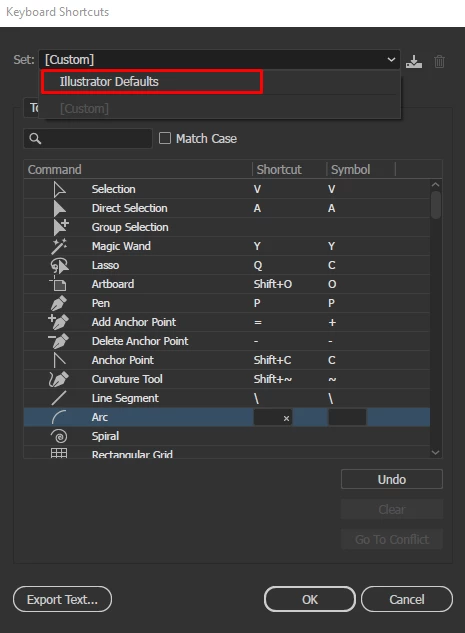
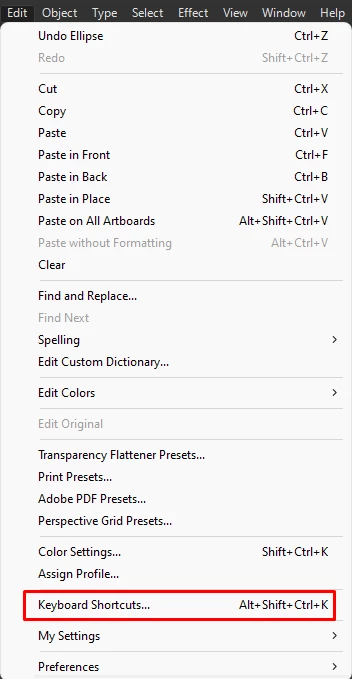
Sorry to hear about this experience. I would request you check if Illustrator is behaving this way with other files as well. If yes, kindly navigate to the menu for Keyboard Shortcuts and choose Illustrator Defaults from the dropdown menu to check if it helps resolve the problem.


Also, try resetting Illustrator's preferences by following the steps shared in this article (https://helpx.adobe.com/illustrator/kb/troubleshoot-preference-issues.html) and sharing your observations.
Disclaimer: Please note that resetting preferences will remove all custom settings, and Illustrator will launch with the defaults. You may take a backup of these settings from the location mentioned in the article.

Looking forward to hearing from you.


Thanks,
Anubhav

2 replies

Anubhav M
Community Manager
Anubhav MCommunity ManagerCorrect answer
Community Manager
August 17, 2022

Hello @Dirk25685083a3kw,


Sorry to hear about this experience. I would request you check if Illustrator is behaving this way with other files as well. If yes, kindly navigate to the menu for Keyboard Shortcuts and choose Illustrator Defaults from the dropdown menu to check if it helps resolve the problem.


Also, try resetting Illustrator's preferences by following the steps shared in this article (https://helpx.adobe.com/illustrator/kb/troubleshoot-preference-issues.html) and sharing your observations.
Disclaimer: Please note that resetting preferences will remove all custom settings, and Illustrator will launch with the defaults. You may take a backup of these settings from the location mentioned in the article.

Looking forward to hearing from you.


Thanks,
Anubhav

Participant
August 18, 2022

OK, great thanks!! That seems to have worked!! 😄

What I#m wondering about: Why do I have TWO Folders with "Illustrator Settings" in my Adobe Folder? one is an older one (25) and one is the newer version (26).


As I deleted the 26-folder (only the 25-folder was existing..) and opened Illustrator, the 26-folder appeared again..?!?

But now it's working as it should: scroll sideways with STRG- (CNTRL)-key and zoom with ALT-key!!


So, thank you very much!!!

Anubhav M
Community Manager
Community Manager
August 18, 2022

Hello @Dirk25685083a3kw,


Glad to hear that the problem was solved. The older folder is for Illustrator CC 2021 (v25) preferences. You can remove the folder if you don't need them.


Feel free to reach out if you need further assistance in the future. We'd be happy to help.


Regards.

Ged_Traynor
Community Expert
Community Expert
August 17, 2022

Moving thread to the Illustrator forum from Using the Community