

Participating Frequently
October 1, 2022
해결됨

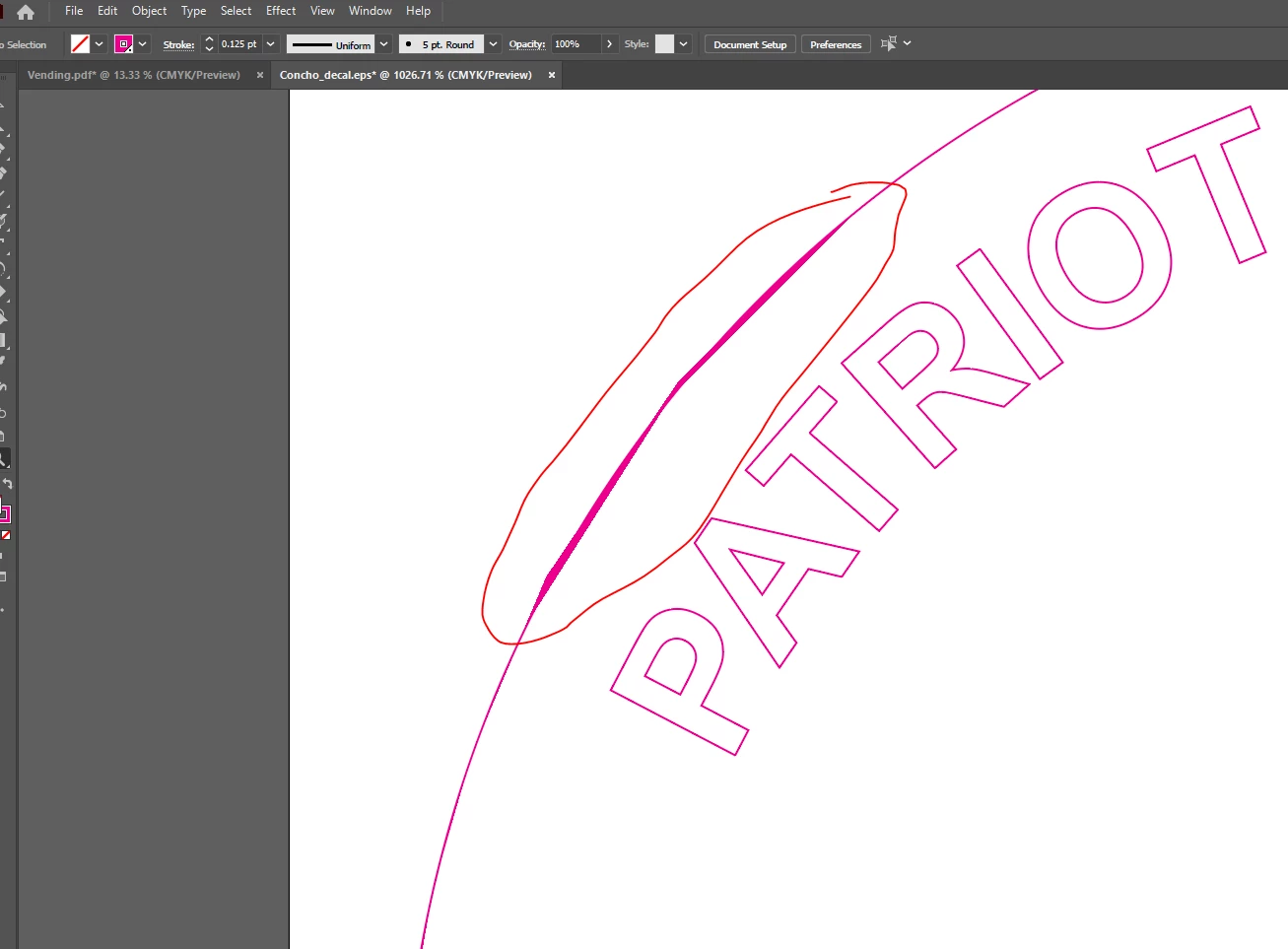
Stroke weight preview looks strange when i set the weight under 0.125pt (for CutContour lines)

  • October 1, 2022
  • 1 답변
  • 433 조회

Please let me know if this is a bug... 
 

이 주제는 답변이 닫혔습니다.
최고의 답변: Brad @ Roaring Mouse

"Is this my graphics card being outdated?"

Not exactly. It's that your GPU is doing screen redraws as fast as it can to speed things up. One of the ways they do this is to output at higher flatness settings, which takes less processing time, but ALL curves, no matter what, are made by drawing tiny straight lines, and some GPUs aren't very good at finding the right balance between speed and accuracy, hence it will make some curves out of longer straight segments. Rest assured though, the ACTUAL document is created using the CPU so your file itself is not screwed up; it's just a screen draw issue.

If you are on a PC, make sure you have the latest driver available for your card that is designed for Graphics (some GPUs used for gaming will have Gaming-specific drivers designed to optimize that use in addition to a regular Graphics driver)

1 답변

Larry G. Schneider
Community Expert
Community Expert
October 1, 2022

Does it look different if you use View on CPU?

pennys4432362작성자
Participating Frequently
October 1, 2022

Yes, looks normal in that preview. Is this my graphics card being outdated?


pennys4432362작성자
Participating Frequently
October 1, 2022

"Is this my graphics card being outdated?"

Not exactly. It's that your GPU is doing screen redraws as fast as it can to speed things up. One of the ways they do this is to output at higher flatness settings, which takes less processing time, but ALL curves, no matter what, are made by drawing tiny straight lines, and some GPUs aren't very good at finding the right balance between speed and accuracy, hence it will make some curves out of longer straight segments. Rest assured though, the ACTUAL document is created using the CPU so your file itself is not screwed up; it's just a screen draw issue.

If you are on a PC, make sure you have the latest driver available for your card that is designed for Graphics (some GPUs used for gaming will have Gaming-specific drivers designed to optimize that use in addition to a regular Graphics driver)


Thanks for your help!
