Known Participant
November 19, 2015
Beantwortet

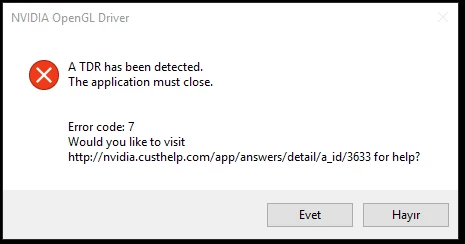
"TDR detected" illustrator fails

  • November 19, 2015
  • 33 Antworten
  • 31472 Ansichten

Its just starting today as brand new headache. it says "TDR detected" than closing.

My graphic card driver is updated and its Nvidia GTX 760,

I have 4K Philips monitor and using 3840 x 2160 res. Is it a problem for illustrator???

how can i solve this issue? any help

Dieses Thema wurde für Antworten geschlossen.
Beste Antwort von Mark_Kilgard

shaned94196317,

I'm quite interested in whether the 361.91 drivers resolve your issue.

- Mark Kilgard, NVIDIA driver guys


Here is a link to the 361.91 drivers for Windows 10 64-bit:

  https://www.nvidia.com/download/driverResults.aspx/98556/en-us

Here is a direct link to the 361.91 drivers for Windows 10 32-bit:

  https://www.nvidia.com/download/driverResults.aspx/98555/en-us

These drivers should resolve NVIDIA bug 1726408 with Illustrator CC 2015 on updated Windows 10 PCs.

While the specific issues were predominantly with GeForce 6xx and 7xx GPUs, all Windows 10 systems with NVIDIA GPUs are recommended to upgraded to these drivers.

Details and discussion of these drivers can be found at:

  https://forums.geforce.com/default/topic/916860/geforce-drivers/official-361-91-game-ready-whql-display-driver-feedback-…

- Mark Kilgard, NVIDIA driver engineer

33 Antworten

January 28, 2016

This is caused by corrupted OpenCL.dll.  If you have 27KB instead of 190KB OpenCL.dll filesize on sysWOW64, its corrupted. I fixed mine weeks ago; no crashes since then.

Here's the link where I found the fix:

Nvidia is Corrupting Windows 10 for clean installs - Page 4

This is what did.

  1. Run sfc /scannow
    • Search the log file for opencl.dll
    • If you see that it's corrupt, you have this problem
  2. Uninstall all nvidia software/drivers from control panel
  3. Run DDU (display driver uninstaller) to remove all graphics drivers
    • This will also disable automatic driver updates.
  4. Repair the corrupt file with: "DISM /Online /Cleanup-Image /RestoreHealth /source:WIM:E:\sources\install.wim:1 /LimitAccess"
    • change E:\sources\install.wim to the location of your Windows 10 1511 (November update) source location
  5. Run sfc /scannow again (this will now fix the corrupt opencl.dll)
  6. Install the latest nvidia driver
    • I did a custom install to install only the graphics driver and physx, but this may not be necessary
  7. If you want to verify it's fixed, run "sfc /scannow" again. You should now see there are no errors.
Participant
January 28, 2016

Same TDR Error Code 7 for me. This error should not occur in a professional production environment.

Win 10 Pro x64
1 x 2560x1440 & 2 x 1920x1080

2 x GTX 650Ti (not SLI)

24GB DDR3
i7 3930K @ 3.2GHz
Wacom Intuos Pro Medium
GeForce Driver 361.75 as of this morning

Known Participant
January 27, 2016

Disable Enhance Thin Lines is not a solution for me. Still TDR error.

ben_io
Participating Frequently
January 27, 2016

Then you can try to disable GPU performance.

Participant
January 27, 2016

When I try to open a file with illustrator it gives this warning. I do not know what to do. please help.

ben_io
Participating Frequently
January 27, 2016

As a temporary workaround until a fix is released, you can click on the rocket icon (last icon of the top menu) to open GPU performances options and disable GPU performance. You can also try to keep the GPU Perfomance enabled and just uncheck Enhance Thin Lines. I did not get this error since I unchecked the Lines option.

Zeroghost
Known Participant
January 27, 2016

First wave of entropy in complex software working relationships? Still getting the TDR error on my WIN 10 PC muscle box. But stopped on my weaker system. Error not yet isolated to Win 10, NVIDIA or Photoshop. Thinking it might be a relationship and conflicting instructions. Hal comes to mind.

Making it Real
Participating Frequently
January 25, 2016

same here... hotfix 361.60 and latest AI 2015.2.1. crashes like a b*tch...

Participating Frequently
January 25, 2016

rolled back to 358.50, no crash so far also with enhanced lines.. . pathetic...

John T Smith
Community Expert
Community Expert
January 25, 2016

How is it Adobe's fault when a hardware company like NVidia issues a new driver and that driver causes problems for an Adobe program?

Known Participant
January 19, 2016

I just went all the way back to 353.30 as per a recommendation on here and everything seems to be working again. (This also fixed the most recent driver causing After Effects to BSOD the whole machine) I used this driver cleaner Display Driver Uninstaller (DDU) V15.7.3.0 Released. - Wagnardmobile Forum

Good luck people. I feel your pain. Just clean and try drivers until something sticks!

Szalam
Community Expert
Community Expert
January 19, 2016

TomNapperDesign wrote:

I just went all the way back to 353.30 as per a recommendation on here and everything seems to be working again. (This also fixed the most recent driver causing After Effects to BSOD the whole machine)

This is off topic a bit, but what was the error message that you saw when AE would cause the BSOD? There are a few threads in the AE forum about BSOD happening which is very unusual. If this solution fixes the same issue, I'd like to know so I can share it with them.

Known Participant
January 19, 2016

"KERNEL_SECURTY_ERROR_CHECK" when opening AE, it would think about itself for 5-10 seconds, not begin any of it's loading messages and just blue screen. It's what led me to update my drivers that then caused the TDR! I rlled back the driver and it BSOD again so it's 100% the driver in my case.

Note -the 361.60 hotifx recommended by some didn't work for me either.

Windows 10 64bit, GTX680M

Known Participant
January 19, 2016

I am still using 355.60. There is no problem with that driver. But performance is slower then latest. After i install latest driver, illustrator works perfect but only 5mins. sometimes even on opening being crash.

my suggestion, use 355.60 untill Nvidia or Adobe solves problem

Participating Frequently
January 19, 2016

353.30 does seem to be working for me too. Thanks for the suggestion! I can finish working again

Participating Frequently
January 18, 2016

Yeah, fairly basic vector files (most of which worked fine a week ago). I can work for about 5 minutes then TDR error. I can't imagine that a 2G NVIDIA graphics card is not powerful enough for Illustrator.

I can understand its difficult to pinpoint where the issue is. Windows 10 did update recently, as did NIVIDIA, do remember updating Illustrator recently.

I too can confirm that Photoshop is fine, no issues.

-----------------------------

Win 10 = v1511 build 10586.63 (64bit)

RAM = 16G
CPU = i7

Graphics card = NVIDIA GeForce GT 640M

Driver = 361.60

Graphics RAM = 2G

------------------------------

Participating Frequently
January 17, 2016

I am still getting the TDR error even after the 361.60 driver update.

Where are you guys finding the older drivers? I want to roll back.

Thanks

Mark_Kilgard
Participating Frequently
January 17, 2016

I am looking into this.  How many gigabytes of video memory does your GeForce GT 640M have?  It could be 1 or 2.  You attached image is too blurry for me to make it out.

Can you try rebooting once you have 361.60 installed?

I'm interested in if other users have better results with 361.60 drivers.

>Where are you guys finding the older drivers? I want to roll back

From Drivers | GeForce if you do a manual search, you can get a range of older drivers.

- Mark

Participant
January 17, 2016

I have downloaded the 361.60 and restarted my pc, but the same error appears.

My video card:

Nvidia GeForce GTX 780

On windows 10