Known Participant
November 19, 2015
Beantwortet

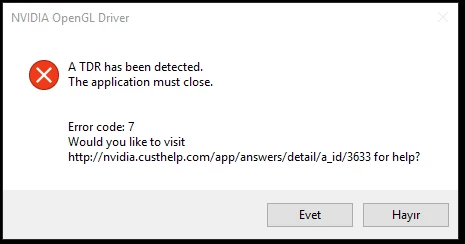
"TDR detected" illustrator fails

  • November 19, 2015
  • 33 Antworten
  • 31472 Ansichten

Its just starting today as brand new headache. it says "TDR detected" than closing.

My graphic card driver is updated and its Nvidia GTX 760,

I have 4K Philips monitor and using 3840 x 2160 res. Is it a problem for illustrator???

how can i solve this issue? any help

Dieses Thema wurde für Antworten geschlossen.
Beste Antwort von Mark_Kilgard

shaned94196317,

I'm quite interested in whether the 361.91 drivers resolve your issue.

- Mark Kilgard, NVIDIA driver guys


Here is a link to the 361.91 drivers for Windows 10 64-bit:

  https://www.nvidia.com/download/driverResults.aspx/98556/en-us

Here is a direct link to the 361.91 drivers for Windows 10 32-bit:

  https://www.nvidia.com/download/driverResults.aspx/98555/en-us

These drivers should resolve NVIDIA bug 1726408 with Illustrator CC 2015 on updated Windows 10 PCs.

While the specific issues were predominantly with GeForce 6xx and 7xx GPUs, all Windows 10 systems with NVIDIA GPUs are recommended to upgraded to these drivers.

Details and discussion of these drivers can be found at:

  https://forums.geforce.com/default/topic/916860/geforce-drivers/official-361-91-game-ready-whql-display-driver-feedback-…

- Mark Kilgard, NVIDIA driver engineer

33 Antworten

Participant
January 16, 2016

this seems to happen only when on battery, not on A/C. And of course only when "gpu performance" is enabled...

Participant
January 14, 2016

Same thing here..

Well I'm working on a file that has a lot of lines (it's a whole map of Manhattan with every single buildings with lines), maybe that's why.

But I hope nvidia fixes this problem...

I'm working on a windows 10 bootcamp with macbook retina 15 inch 2012 model.

Graphic card is nvidia geforce GT 650M. Also using the official most updated Creative Cloud Apps!

Mark_Kilgard
Participating Frequently
December 11, 2015

NVIDIA driver engineer here... Thanks for this bug report.

We have confirmed the bug.  We believe the bug is isolated to Windows 10.  The problem occurs when video memory is used at near capacity.  To minimize exposure to the bug, reduce the video memory consumption overall.  As noticed here, disabling "Enhance Thin Lines" can reduce the video memory consumption.  Reducing the rendering window resolution of Illustrator will also help.  If you are working in the CMYK color mode but use of the RGB color mode is acceptable, converting to RGB (File->Document Color Model->RGB Color) can almost halve Illustrator's video memory consumption compared to CMYK documents.   Competing video memory usage by other applications will also help.  Graphics cards with less video memory will run into near-capacity issues sooner.

NVIDIA is working to resolve the issue (NVIDIA bug # 1711214) and fix it in a future driver update.

jaksajani
Participating Frequently
December 11, 2015

Thanks Mark! Wow so nice to see such comments

Participating Frequently
December 11, 2015

Update: I've downgraded to 358.91 drivers and everything is working fine. No TDR errors. So the problem started from upgrading 358.91 to 359. Hope that this will help to someone.

ben_io
Participating Frequently
December 8, 2015

Same problem with Windows 10 and a 780GTX driver 359.06.

It was crashing as soon as I was using the paint brush tool, even on a basic document with a couple of shapes. As a temporary workaround, I left the GPU Performance option enabled but disabled the Enhance Thin Lines option. I did not crash so far.

Participant
December 8, 2015

Thank you!

Same here! Enhanced Thin Line off WORKS so far.

Participating Frequently
December 3, 2015

I have same problems. It all started with 359.00 Nvidia update. 359.06 didn't solve the problem. It is really annoying. I've tried to repair all Redistributable Packages... no luck. Now I've temporarily switched to Intel graphics for Illustrator. Photoshop is working fine with Nvidia.

Windows 10

GTX 770M

Latest version of Illustrator through Creative Cloud subscription

Hope we'll get a solution soon.

Known Participant
December 3, 2015

Nvidia 353.30 works normal. No crash.

Participating Frequently
December 3, 2015

Thanks for information.

I'll try with 358.91 tomorrow and report back. This is the last version without TDR errors. I hope it'll fix the problem temporary before someone (Adobe, Nvidia or Microsoft) fix the problem.

jaksajani
Participating Frequently
December 1, 2015

There is a new driver, came out earlier today. Version: 359.06.

Participant
December 1, 2015

Illustrator crashes like always in the same document.

Participant
November 30, 2015

the same video card, the same error. I disabled GPU inside illustrator and it doesn't crash no more (surely that's not a long term solution)

fobmasta
Participant
November 28, 2015

Disabling hardware acceleration in chrome solved it for me. You could try using illustrator with your chrome closed and see if it works.

The solution was posted here:
Nvidia 740m TDR detected : nvidia

Known Participant
November 30, 2015

Chrome solution doesnt work for me.

I uninstalled latest driver and tried many old drivers. Now using 353.30. It works much better. I used for three days with heavy files, still not seem any error.

jaksajani
Participating Frequently
November 27, 2015

By the way earlier today the original error message came back, even after i tried to reinstall illustrator from scratch. Anyway after a 3dguru vga driver uninstaller, i downloaded and installed the 358,91 nvidia driver, now the tedious TDR error message seems to have gone (again, but who knows for how long).