Known Participant
November 19, 2015
Answered

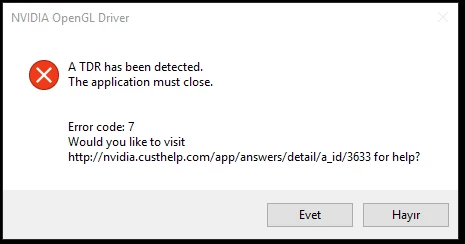
"TDR detected" illustrator fails

  • November 19, 2015
  • 33 replies
  • 31580 views

Its just starting today as brand new headache. it says "TDR detected" than closing.

My graphic card driver is updated and its Nvidia GTX 760,

I have 4K Philips monitor and using 3840 x 2160 res. Is it a problem for illustrator???

how can i solve this issue? any help

This topic has been closed for replies.
Correct answer Mark_Kilgard

shaned94196317,

I'm quite interested in whether the 361.91 drivers resolve your issue.

- Mark Kilgard, NVIDIA driver guys


Here is a link to the 361.91 drivers for Windows 10 64-bit:

  https://www.nvidia.com/download/driverResults.aspx/98556/en-us

Here is a direct link to the 361.91 drivers for Windows 10 32-bit:

  https://www.nvidia.com/download/driverResults.aspx/98555/en-us

These drivers should resolve NVIDIA bug 1726408 with Illustrator CC 2015 on updated Windows 10 PCs.

While the specific issues were predominantly with GeForce 6xx and 7xx GPUs, all Windows 10 systems with NVIDIA GPUs are recommended to upgraded to these drivers.

Details and discussion of these drivers can be found at:

  https://forums.geforce.com/default/topic/916860/geforce-drivers/official-361-91-game-ready-whql-display-driver-feedback-…

- Mark Kilgard, NVIDIA driver engineer

33 replies

Known Participant
November 23, 2015

I reinstalled all windows today. It was look ok at first time.

then i saw bellowed message. What's going wrong with illustrator....

jaksajani
Participating Frequently
November 23, 2015

Just like you i only got these error messages since i updated to this new Nvidia driver... something's not right between the new driver and illustrator i'd say...

Try to install the previous one , just for a day or at least for a few hours to see if that works for you. In case it does i suggest wait for the next driver and skip the current one (359.00), the previous one should be 358.91 according to the nvidia download site:

GeForce Game Ready Driver WHQL359.00November 19, 2015
GeForce Game Ready Driver WHQL358.91November 9, 2015
Known Participant
November 23, 2015

My driver version is 355.98

now downloading 358.91

let me try with it, then i will reply again.

jaksajani
Participating Frequently
November 22, 2015

Got the same a few times before. Same gpu (760gtx), havin this since the last driver update / illu reinstall. Using windows 10 btw... turning off gpu acceleration will not solve the problem. I'll try that link that Jacob posted next monday.

EDIT:

1. Repair Microsoft Visual C++ Redistributable Package

and / or

3. Repair the Microsoft Windows Installer (Windows)

seems to have solved this problem thanks Jacob Bugge!

Jacob Bugge
Community Expert
Community Expert
November 22, 2015

You are welcome, jaksajani.

Jacob Bugge
Community Expert
Community Expert
November 19, 2015

ozcanosx,

This Adobe help page should help you through:

http://helpx.adobe.com/creative-suite/kb/errors-exit-code-6-exit.html

Boqueron.1969
Participating Frequently
January 15, 2016

Tried repairing Microsoft C++ redistributable packages and that did not work as when I right click on each one I only get the "Uninstall" option (not the "Repair/Change" option as indicated in the instructions on Errors "Exit Code 6" and "Exit Code 7" installing Adobe Creative Cloud, CS6, and CS5.5). Scratch that one.