Inspiring
April 13, 2020
Answered

Text Frame - Area Type Options - Basline options and BaseLine offset

  • April 13, 2020
  • 6 replies
  • 3275 views

Hi,


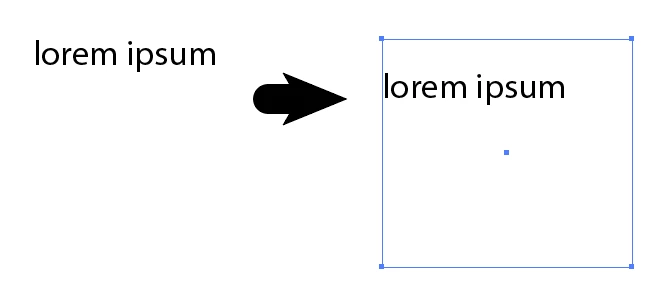
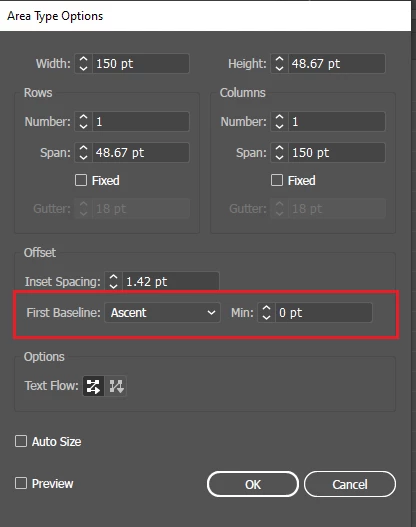
I have a tex frame (In Path Text) and I want to set Baseline option and baseline offset as shown with Area Type options.


I searched Illustrator SDK a lot but could not find API to set baseline option and baseline offset.


Can any expert help me ?


Please see the below screenshot for reference -
 

This topic has been closed for replies.
Correct answer CarlosCanto

Hi rahul, select your Area text frame and try the below sample script

// set Area text baseline options
// carlos canto
// https://community.adobe.com/t5/illustrator/text-frame-area-type-options-basline-options-and-baseline-offset/td-p/11045221?page=1

selection[0].firstBaseline = FirstBaselineType.BASELINECAPHEIGHT;
selection[0].firstBaselineMin = 20;

6 replies

CarlosCanto
Community Expert
Community Expert
April 27, 2020

sorry I'm not familiar with the SDK, can't you run javascript from C++ somehow? or is there an API call like sendScriptMessage, we use it call plugin functions from javascript.

CarlosCanto
Community Expert
CarlosCantoCommunity ExpertCorrect answer
Community Expert
April 26, 2020

Hi rahul, select your Area text frame and try the below sample script

// set Area text baseline options
// carlos canto
// https://community.adobe.com/t5/illustrator/text-frame-area-type-options-basline-options-and-baseline-offset/td-p/11045221?page=1

selection[0].firstBaseline = FirstBaselineType.BASELINECAPHEIGHT;
selection[0].firstBaselineMin = 20;
Inspiring
April 27, 2020

Hi,


Thanks, the javascript snippet worked and it was able to set the baseline options with Area Text Options.


But, I again searched the Illustrator SDK and was still unable to find anything API to set baseline options for Area Text.

Peter Villevoye
Community Expert
Community Expert
April 25, 2020

I found some mentions of the "baseline shift" in these two PDFs (page 17 and 18):

https://www.adobe.com/content/dam/acom/en/devnet/illustrator/pdf/Illustrator_JavaScript_Scripting_Reference_2017.pdf

https://www.adobe.com/content/dam/acom/en/devnet/illustrator/pdf/Illustrator_Scriptin_Reference_JavaScript_cc.pdf

Probably the position is calculated through this/these values, combined with the characteristics/metrics of the font itself.

Another mention of it in an online resource can be found here:

https://illustrator-scripting-guide.readthedocs.io/jsobjref/CharacterAttributes/#characterattributes-baselineposition

Inspiring
April 26, 2020

All these BaseLine options are available for Character Styles and not for Text Frame (Area Type options).

Peter Villevoye
Community Expert
Community Expert
April 26, 2020

True, but the Text Frame value might be translated to an overall (extra) value for the Character setting of Baseline Shift. Just like text frames can have an overall Kerning value, which in essence is also a Character setting. But then we're back to square one: what's the name of this value ?

It's indeed a strange, mysteriously missing variable...


Like I said, maybe it's derived from OpenType values, like these:

"InDesign uses the typoAscender and typoDescender values to determine the offset of the first baseline in a text box and the minimum size of a text box below which the display of type is suppressed."

https://glyphsapp.com/tutorials/vertical-metrics


These articles and questions dig into the nitty gritty of that "first line" in general, but no word about scripting:

https://community.adobe.com/t5/indesign/first-baseline-offset-problem-super-weird/td-p/9195499

https://indesignsecrets.com/understanding-the-first-baseline-position-of-text.php


Maybe you could ask technical InDesign experts like Cari Jansen, David Blatner, or Peter Kahrel to solve this riddle. Or reverse-engineer an available script from the latter and see what values he's using.

Peter Villevoye
Community Expert
Community Expert
April 25, 2020

Well, most experts here are familiar with using the application – not developing or scripting it...


You might have more luck looking for a solution via these pages:

https://helpx.adobe.com/illustrator/using/automation-scripts.html

And from there to the main page about Illustrator scripting:

https://www.adobe.com/devnet/illustrator/scripting.html


Perhaps if you find the proper scripting method for it, it might also make sense (or at least give a clue) for an SDK approach.


BTW, let me guess: you're developing an automated process for the creation of stamps ?

Inspiring
April 25, 2020

Hi,


I already googled Scripting before Posting on this forums. Unfortunately, I don't find it in scripting either.


I am automating process for creation of Labels for Packaging Industry.

didiermazier
Community Expert
Community Expert
April 25, 2020

I don't get it.

Is your text on a path or in a box (frame)?

COuld you take a snapshot of what you have?

Anyway offset work the same either cases

Omar.Fathy
Community Expert
Community Expert
April 24, 2020

Hi rahulrastogi9

Would you provide a screen shot for your area text or explain more?!

If you have a text inside a path shape you can use the Type>Area Text Options.
If you has a text on a path, you can edit it by the normal setting in the character pannel or using Type>Type on a path

Inspiring
April 25, 2020

Hi,


I have In Path Text for which Area Type Options is applicable.


I want to set the first baseline and minimum offset for the text frame from the Illustrator SDK API.


Please see the below screenshot of my text frame -