
joelc95247436
Participating Frequently
June 13, 2017
Answered

First Baseline Offset problem (super weird)

  • June 13, 2017
  • 5 replies
  • 5235 views

Our design team is struggling with a very weird issue. Four people experience no difficulty but the fifth person experiences all the strangeness. She has uninstalled CC+InDesign and reinstalled and updated—but to no avail.

Here's what happens:

Using a file I created or a copy of that file that she made, everything looks fine, but when she copy/pastes a text frame, in instantly oversets. Upon closer examination, it appears the "first baseline offset" is nudged down when she clicks paste (see image "baseline-A"). Mine is on the left, problem is on the right.

When she reviews her "text frame options" it's set to "ascent" but the amount is 0px (see image "baseline-B")
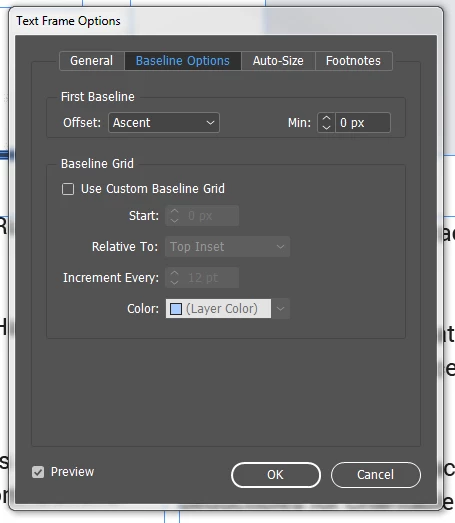

If she switches to "cap height" but leaves the entry as 0px it fixes the problem. But she would have to change the "Ascent 0px" setting to "Cap Height 0px" setting for every single text frame. Yet someone else can open the same file and experience no overset issues.

Any idea what is happening? I've checked/googled/tried everything I can thing of.
Sincere thanks for your help!

Correct answer Barb Binder

So based on my examination of the document, the frame itself is wonky (not the copy). Recomposing All Stories straightens it back out. Then you have to either lengthen the frame or reduce the top offset so that everything fits again.

Moving forward, you should be good to go with that frame on everyone's system.

5 replies

Participant
January 3, 2020

Oh man... I can relate 🙂 After reinstalling Windows, the same issue occurred in all of my documents. Sure, changing the first baseline to "Cap Height" in all of the text frames fixes the problem (and you can do that easily in Find/Change > Object window), but with hundred of documents that would take an absurd amount of time.


After searching for the solution, this blog post gave me an idea: https://indesignsecrets.com/understanding-the-first-baseline-position-of-text.php


This sentence to be exact: "<setting the first baseline offset to Ascent> ensures that the top of a lowercase letter fits inside the frame. Exactly how far below the top of the frame varies, depending on the font you’re using. Some will be dead on. Others, not so much."


The solution (in my case) turned out to be the font, I had installed some different version of the font I've used previously (Roboto) and these two versions were different when it came to the "first baseline" value. After finding the most recent font and reinstalling it, all the files behaved as expected.


Hope it helps someone, cheers.

Barb Binder
Community Expert
Community Expert
June 15, 2017

You know what, it is an issue with that original frame. Recompose the document, and it fixes itself.

Mac: Cmd Opt /

Win: Ctl Alt /

We talk a lot on the forum about InDesign misbehaving because of corrupt preferences, and less about the files themselves. This was a file issue, specifically with that frame.

~Barb at Rocky Mountain Training
joelc95247436
Participating Frequently
June 15, 2017

Rob, when I or other users open, it’s not overset. And then does after one specific user performs copy/paste. I’m not saying the setting changes (it’s always set at 0px), but when one specific user performs copy/paste it oversets whereas before it wasn’t (see video).

Barb, I believe I recomposed the document (this is a deeper level for me) and it doesn’t appear to have fixed it. The problem with copying the frame, and starting from there, is that the issue is only with 1 of 4 users.

Sincere thanks for your time.

Barb Binder
Community Expert
Barb BinderCommunity ExpertCorrect answer
Community Expert
June 15, 2017

So based on my examination of the document, the frame itself is wonky (not the copy). Recomposing All Stories straightens it back out. Then you have to either lengthen the frame or reduce the top offset so that everything fits again.

Moving forward, you should be good to go with that frame on everyone's system.

~Barb at Rocky Mountain Training
rob day
Community Expert
Community Expert
June 14, 2017

If she switches to "cap height" but leaves the entry as 0px it fixes the problem. But she would have to change the "Ascent 0px" setting to "Cap Height 0px" setting for every single text frame.

Have you checked if the Object styles for the source and destination documents are the same?

Object Styles work the same as Paragraph and Character styles, if you copy and paste text and the destination has a style with the same name, the pasted source text will be updated to the destination's styling.

So if you copy a text frame with the [Basic Text Frame] object style assigned from document A and paste it into document B where the definition of the [Basic Text Frame] style is different, the B document's object style will be used.

joelc95247436
Participating Frequently
June 14, 2017

Rob, same comment as I made to Cari.... this is happening in the very same document, just opened by another user on another computer (accessed via a shared server). Which is why I started thinking it was some global InDesign preference, but seeing it change when switching from Ascent to Cap Height, even though the input was 0px on both has really has me miffed.

rob day
Community Expert
Community Expert
June 14, 2017

this is happening in the very same document, just opened by another user on another computer (accessed via a shared server)

Is the document showing any font substitutions in Type>Find Font...?

The baseline grid preference gets saved with the document.

Legend
June 14, 2017

The other thing to look at – and I believe you've already checked this – is to see if the Baseline Options (Object > Text Frame Options) are identical for the 'original' frame and the 'pasted' frame.

  • If you select a text frame with the Selection tool, then Copy and Paste it, these settings should NOT change.
  • However if you select the text with the Type tool, then Copy and Paste a new text frame is created as you paste the text, and in that case the Baseline Options will be whatever the default are for the the document in which you paste.
joelc95247436
Participating Frequently
June 14, 2017

If you select a text frame with the Selection tool, then Copy and Paste it, these settings should NOT change.

Cari, I 100% agree, but it happens. I can try to take video of it later.

Legend
June 14, 2017

I believe you have the right idea in thinking it is related to baseline grid somehow. 

If there is any type of alignment to baseline grid, copying and pasting a frame with text that is aligned to a baseline grid will show some displacement of text IF the vertical position on the page (Y coordinate in Control panel) OR baseline settings vary between the two documents.

Other things to check:

Check document baseline grid

  • InDesign also has a document based baseline grid, check that the settings for that in both documents are identical:
    Preferences > Grids

Is the text set to align to baseline grid?

  • With the Type tool select the first paragraph, at the bottom of the Paragraph panel menu check to see if Align to Baseline Grid is enabled.


Is first line aligned to baseline grid?

  • Select first paragraph, and in the Paragraph panel menu check to see if Only Align First Line to Grid is selected.


joelc95247436
Participating Frequently
June 14, 2017

Cari, I will check the Only Align First Line to Grid option and see if that is it.

In terms of your other two thoughts.... Align to Baseline Grid is disabled and this is where it gets really weird, it shouldn't be a document preferences issue, because it happens in the same document! I open the the document... it's fine. Other designers open the same document... it's fine. She opens the same document... and the overset text happens when she performs copy/paste.