
Answered
Text Shadow
How do I create a text shadow in AI 2018? You think this would be pretty simple even for a 5 yr old, but not me! lol

How do I create a text shadow in AI 2018? You think this would be pretty simple even for a 5 yr old, but not me! lol
Are you trying to recreate that using Illustrator's 3D effect? If you are and you're not really familiar with the 3D feature it can be a bit daunting. In the screen shot below I've outlined some rudimentary steps to working with it:
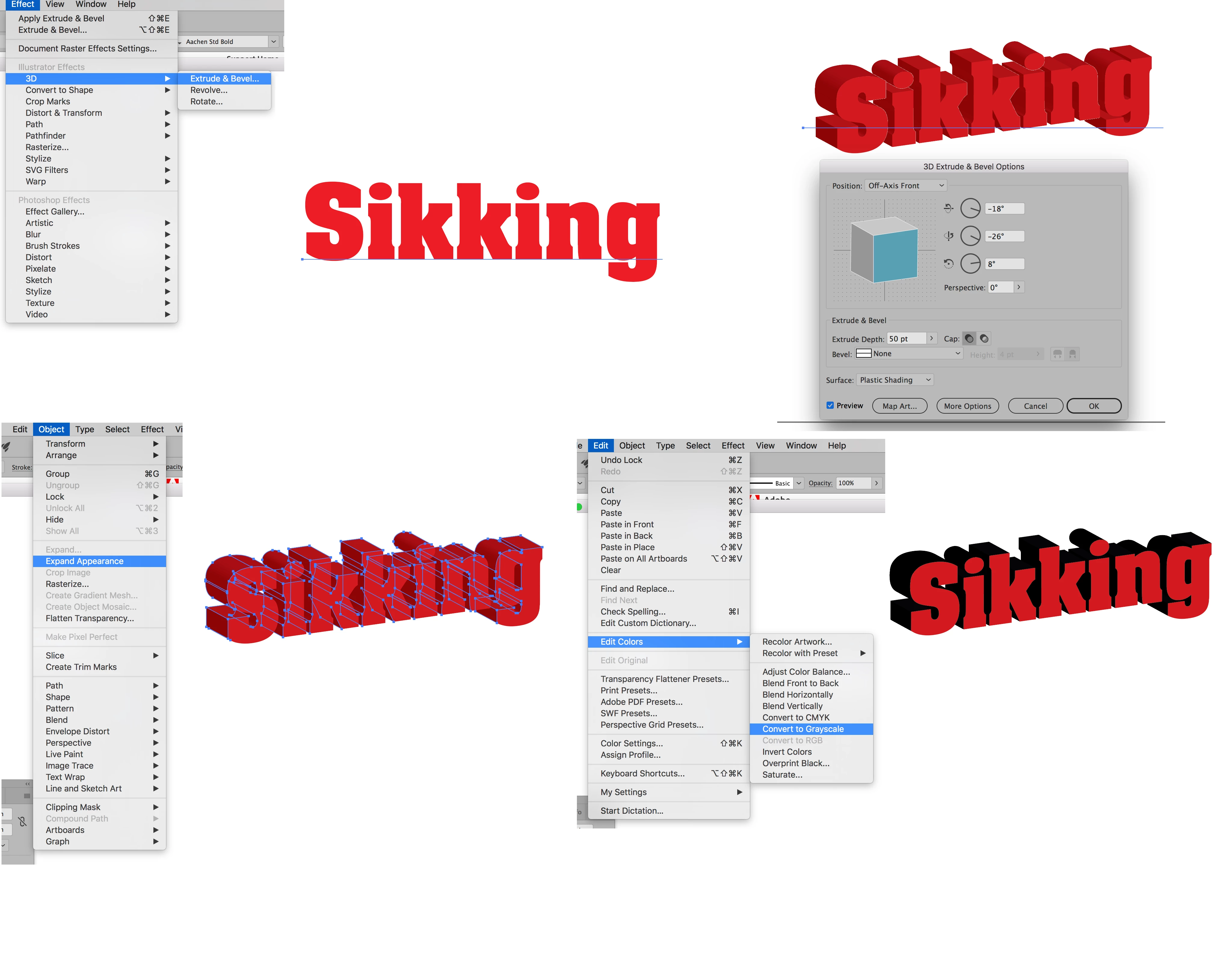
In the first picture I've chosen Extrude & Bevel from the Effect Menu 3D options. Note in the second picture the default dialog window that appears and how the (still live) text is transformed. Since the logo that you are trying to recreate will require quite a bit of customization I've expanded the transformed text into live Illustrator art using Expand Appearance under the Object Menu. Then having separately selected and locked (Command (Mac)/Control (PC)-2) the front text I used the "Convert to Grayscale" option on the dimensionalized part of the text under the Edit Colors found under the Edit Menu. Hopefully, this all should give you a jumping off point.
Already have an account? Login
Enter your E-mail address. We'll send you an e-mail with instructions to reset your password.
 AdChoices