
rafakkuma
Participant
April 14, 2026
Answered

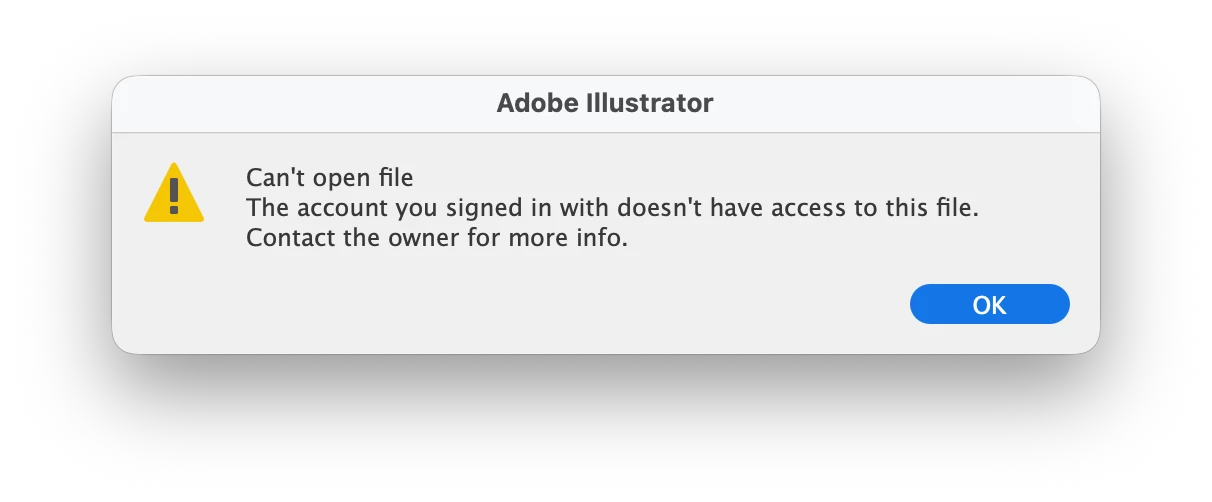
The account you signed in with does not have access to this file

  • April 14, 2026
  • 49 replies
  • 351 views

A week ago, Illustrator has started showing this message. The file was created on my account and using the same account ever since. What is going on?

 

    Correct answer Anubhav M

    Hello everyone,

    The product team has fixed this with the latest release of Illustrator. Kindly update Illustrator using the Creative Cloud Desktop app (https://helpx.adobe.com/creative-cloud/apps/manage-apps/creative-cloud-apps/update-creative-cloud-apps-automatically.html) and let us know how it goes.


    Anubhav

    Note: Marking correct for visibility.

    49 replies

    thepixelsmith
    Community Expert
    Community Expert
    June 19, 2026

    This is still a problem in 2026.

    1. Create a file
    2. save it to the cloud
    3. try to open it later even sometimes in the same work session 
    4. get prompted with this message

    Sometimes turning off all adobe programs and Force Quitting the Creative Cloud Synchronizer fixes it sometimes it doesn’t.

    But this effectively makes documents saved to the cloud useless


    Jerron Smith | www.thepixelsmith.com
    Anubhav M
    Community Manager
    Community Manager
    June 29, 2026

    Hello ​@thepixelsmith 


    I’m sorry to hear about your experience. Could you check if you’re still having trouble with this? If yes, kindly confirm the exact version of the OS/Illustrator installed. Also try the suggestions shared in the Learn More link on the error message and share your observations.

    Looking forward to your response.
    Anubhav

    Jean+Braga
    Participant
    June 15, 2026

    A gente nao tem suporte, ninguem resolve nada e que presta suporte sabe que este bug existe e ficam dando respostas sonsas… resolve isso logo, bota o Claude para ajudar, pelo amos de deus tem muito tempo que este bug chato nos atrapalha. Sejam que vcs querem dizer que sao, competentes

    Anubhav M
    Community Manager
    Anubhav MCommunity ManagerCorrect answer
    Community Manager
    May 29, 2026

    Hello everyone,

    The product team has fixed this with the latest release of Illustrator. Kindly update Illustrator using the Creative Cloud Desktop app (https://helpx.adobe.com/creative-cloud/apps/manage-apps/creative-cloud-apps/update-creative-cloud-apps-automatically.html) and let us know how it goes.


    Anubhav

    Note: Marking correct for visibility.

    MSC Merca
    Participant
    May 25, 2026

    No funciona

    Anubhav M
    Community Manager
    Community Manager
    May 26, 2026

    Hello ​ @MSC Merca,
     

    I'm sorry to hear about your experience. Our product team is currently investigating this issue. Would you mind trying the following steps and letting us know if they help:

    Go to System Settings > General > Login Items > Enable CC Library.
    Relaunch Illustrator

    If it's already enabled, remove it from the items, re-enable and then quit and relaunch the Creative Cloud Desktop app and Illustrator to see if it helps.


    If the problem persists, try enabling Full Disk Access for the Creative Cloud Desktop app from system preferences, restart your computer and relaunch to see if it helps.


    If the steps above failed, try the following steps and let us know how it goes:

    Close all Adobe applications
    Remove the Creative Cloud Desktop app, Core Sync, CC Library and Illustrator using the Creative Cloud Cleaner Tool (https://helpx.adobe.com/creative-cloud/kb/cc-cleaner-tool-installation-problems.html)
    Reinstall the Creative Cloud Desktop application (https://helpx.adobe.com/download-install/kb/creative-cloud-desktop-app-download.html)
    Reinstall and relaunch Illustrator


    Looking forward to hearing from you.
    Anubhav

    Amber0807
    Participant
    May 24, 2026

    I am also having this issue after having tried all trouble shooting techniques. 

    Anubhav M
    Community Manager
    Community Manager
    May 27, 2026

    Hello ​@Amber0807 


    Sorry for the late response. I hope the problem is resolved by now. If not, please try the following steps and let us know how it goes:

    • Close all Adobe applications
    • Remove the Creative Cloud Desktop app, Core Sync, CC Library and Illustrator using the Creative Cloud Cleaner Tool (https://helpx.adobe.com/creative-cloud/kb/cc-cleaner-tool-installation-problems.html)
    • Reinstall the Creative Cloud Desktop application (https://helpx.adobe.com/download-install/kb/creative-cloud-desktop-app-download.html)
    • Reinstall and relaunch Illustrator


    Looking forward to hearing from you.
    Anubhav

    kar.zaklikiewicz
    Participant
    May 22, 2026

    Od 2 tygodni pliki z iPada zapisane w chmurze Adobe Ilustratora są widoczne na MacBooku, ale nie mogę ich otworzyć. System pisze, że nie mam uprawnień administratora, mimo że jestem zalogowana na to samo konto Adobe.

    Anubhav M
    Community Manager
    Community Manager
    May 27, 2026

    Hello ​@kar.zaklikiewicz 


    Our team has tried fixing this with the latest Illustrator update. Would you mind updating the application (https://helpx.adobe.com/creative-cloud/apps/manage-apps/creative-cloud-apps/update-creative-cloud-apps-automatically.html) and then relaunching to see if it helps?
     

    Looking forward to hearing from you.
    Anubhav

    ReemNader
    Participant
    May 17, 2026

    I have the same issue and it is UTTERLY frustrating. 

    We spend hours working on a file for it to decide not to open and then spend DAYS trying to solve an issue for a program that we pay hundreds every year that is SUPPOSED to make sure things like this doesn't ruin our whole WORK. 

    I TRIED EVERYTHING AND IT DIDN'T WORK

    I need my files.

    Anubhav M
    Community Manager
    Community Manager
    May 18, 2026

    Hello ​@ReemNader 


    I’m sorry to hear the suggestions did not help. I have sent you a DM. Kindly check.


    Please don’t hesitate to reach out if you have more questions or need further assistance. We’d be happy to help.

    Anubhav

    Anubhav M
    Community Manager
    Community Manager
    May 14, 2026

    Hello ​@Rachel38744444mgd4 


    I’m sorry to hear about your experience. Our product team is currently investigating this issue. Would you mind trying the following steps and letting us know if they help:

    • Go to System Settings > General > Login Items > Enable CC Library.
    • Relaunch Illustrator

    If it’s already enabled, remove it from the items, re-enable and then quit and relaunch the Creative Cloud Desktop app and Illustrator to see if it helps.

    If the problem persists, try enabling Full Disk Access for the Creative Cloud Desktop app from system preferences, restart your computer and relaunch to see if it helps.

    If the steps above failed, try the following steps and let us know how it goes:

    • Close all Adobe applications
    • Remove the Creative Cloud Desktop app, Core Sync, CC Library and Illustrator using the Creative Cloud Cleaner Tool (https://helpx.adobe.com/creative-cloud/kb/cc-cleaner-tool-installation-problems.html)
    • Reinstall the Creative Cloud Desktop application (https://helpx.adobe.com/download-install/kb/creative-cloud-desktop-app-download.html)
    • Reinstall and relaunch Illustrator


    Looking forward to hearing from you.
    Anubhav

    Ton Frederiks
    Community Expert
    Community Expert
    May 12, 2026

    @Rachel38744444mgd4 Is it this message: ““Can’t open file. The account you signed in with doesn’t have access to this file”?

    There were a few more posts like this during the past few days.

    I agree with Bobby that it is worth trying to download them from the Files section in the CC app.


    Community Expert
    May 12, 2026

    Are your files stored in a cloud location? If you haven't already tried this step try opening the Creative Cloud desktop app, going to the Files section. Hopefully your files will be properly synced and visible there. If the files are visible try downloading the file that won't open to your computer's hard disc. Then try opening the file in Illustrator from that local disc location.