rafakkuma
Participant
April 14, 2026
Answered

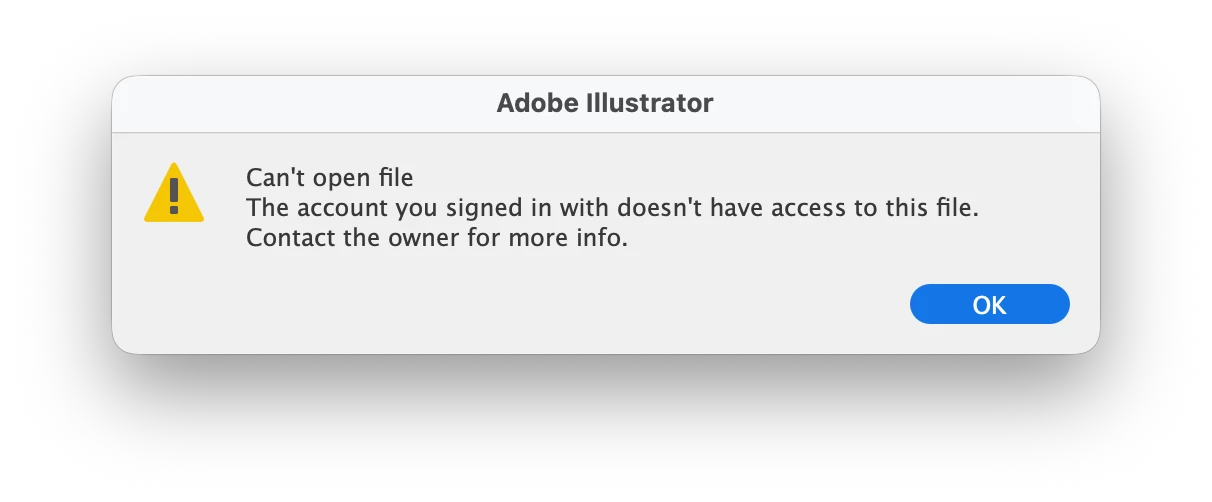
The account you signed in with does not have access to this file

  • April 14, 2026
  • 49 replies
  • 351 views

A week ago, Illustrator has started showing this message. The file was created on my account and using the same account ever since. What is going on?

 

    Correct answer Anubhav M

    Hello everyone,

    The product team has fixed this with the latest release of Illustrator. Kindly update Illustrator using the Creative Cloud Desktop app (https://helpx.adobe.com/creative-cloud/apps/manage-apps/creative-cloud-apps/update-creative-cloud-apps-automatically.html) and let us know how it goes.


    Anubhav

    Note: Marking correct for visibility.

    49 replies

    DeadSky
    Participant
    April 21, 2026

    It’s been happening for 24h. This bug has been around for years, but now nothing is working. Shame on Adobe for not fixing this thing already. 

    ilkcankose
    Participating Frequently
    April 21, 2026

    You can access your files on Adobe's website. The same issue happens to me sometimes — just download it manually from there. At least the file isn't lost. https://www.adobe.com/files

    IsabelSD
    Participant
    April 22, 2026

    How do you download from the web? I don’t have the option, unless I’m being completely blind. It’s giving me only Open, Share, Copy Link, Rename, and Duplicate.

    raselp
    Participant
    April 21, 2026

    The same thing happened to me earlier this morning!


    oscarchiquete
    Participant
    April 21, 2026

    Hello! I am facing the same issue, I can not access to any file saved in the cloud. Do you find a way to fix it? I already sign out and even restarted the computer. I am on MAC if that helps. 

    raque.guzman
    Participant
    April 20, 2026

    Hi, I’m having this problem. I already tried the signing out and logging back in. Does anybody have any other solution?
    I only have one account and don’t share it with anybody.
    thx.

    raque.guzman
    Participant
    April 20, 2026

    UPDATE: I can’t access any file.

    Anubhav M
    Community Manager
    Community Manager
    April 20, 2026

    Hello ​@raque.guzman 


    I’m sorry to hear about your experience. Would you mind confirming if you’re still facing this problem, so we can investigate further?
     

    Looking forward to your response.
    Anubhav

    Anubhav M
    Community Manager
    Community Manager
    April 15, 2026

    Hello @rafakkuma,

    I'm sorry to hear about your experience. Would you mind trying to sign out and then logging in back with the correct profile (https://adobe.ly/4cLXU2g) to see if it helps resolve the problem?

    Looking forward to hearing from you.

    Anubhav

    mirjamm89087759
    Participant
    April 17, 2026

    Hello, I have exactly the same problem. Have logged out and in againg but that does not help. It opens my photoshop files from the cloud but not the illustrator files. I can download them and then open them locally. Please let me know how to solve this.

    Anubhav M
    Community Manager
    Community Manager
    April 17, 2026

    Hello ​@mirjamm89087759 
     

    I’m sorry to hear the suggestions did not help. I have sent you a DM. Kindly check.

    Please don’t hesitate to reach out if you have more questions or need assistance. We’d be happy to help.

    Anubhav

    Rubisa2220
    Participant
    April 15, 2026

    I've been having that problem for three days now and I need to hand in some assignments; I use Windows 😣


    Legend
    April 15, 2026

    Hi ​@Rubisa2220 

    Sorry to hear you’re facing this issue, especially with deadlines approaching.

    Since you're on Windows, the Mac-specific fix shared earlier (Full Disk Access) will not apply. Based on the behavior described, this issue is most commonly related to a mismatch between the account/profile that owns the cloud documents and the one currently signed in.

    Please try the following steps:

    • Sign out of all Adobe apps (Creative Cloud Desktop, Illustrator, and browser)
    • Sign back in and ensure you select the correct profile if prompted (Personal vs School/Work). As you have an active individual subscription, please select the Personal profile while logging in
    • Open Illustrator → Home → Your files and check if the files are accessible

    Additionally, I recommend opening https://www.adobe.com/files/ in a browser and checking whether your files are visible there. If the files are visible but you are still unable to access them using the Adobe desktop apps, please follow the steps mentioned in this document:
    https://helpx.adobe.com/download-install/apps/troubleshoot/licensing-activation-issues/user-license-information-creative-cloud-2022.html

    Please try these steps and let us know if the issue persists.

    Awaiting your response.

    Regards,

    ^AN

    Rubisa2220
    Participant
    April 16, 2026

    Hi there, in my case I tried your methods but it turns out that Illustrator Beta was causing a conflict with Adobe Cloud Sync. What I did was uninstall both programmes and log out of the cloud, restart the computer, log back into my Adobe account on the cloud, and then just install the standard version of Illustrator. It works, but with some files – it opens some of them fine, but with others I still have that problem. The files are fine; they appear and can be downloaded. What I’d recommend if this happens is to work directly with the files you have on your computers, download them and save those files to a USB stick or some other portable storage device 🫤😖

    Inspiring
    April 14, 2026

    Came here because I have the same issue.

    Inspiring
    April 14, 2026

    This worked for me:

    1. Closed Illustrator
    2. I signed out of the CC app
    3. Signed back in
    4. Re-launched illustrator


    oscarchiquete
    Participant
    April 21, 2026

    Is not working for me 

    pepot_23
    Participant
    April 14, 2026

    I am encountering the same problem right now and it’s so frustrating. Did you get any solutions?

    Participating Frequently
    April 14, 2026

    Not really.  I was able to open my file on a newer system, then save a copy to a drive then open it on the original authoring system… I didn’t really invest much time prying a solution out of this forum

    Jiya2323
    Participant
    April 6, 2026

    Hi guys, I know it’s been a while since this was posted, but I wanted to share how I fixed this. I recently updated my Mac and started having the same issue. Here’s the fix for Mac users:

    1. Go to System SettingsPrivacy & Security.

    2. Select Full Disk Access.

    3. Toggle the switch ON for Creative Cloud.

    After doing this, my files opened perfectly as usual. Hope this helps!"


    Participant
    April 7, 2026

    omg this fixed the issue. so annoyed w adobe rn