
rafakkuma
Participant
April 14, 2026
Answered

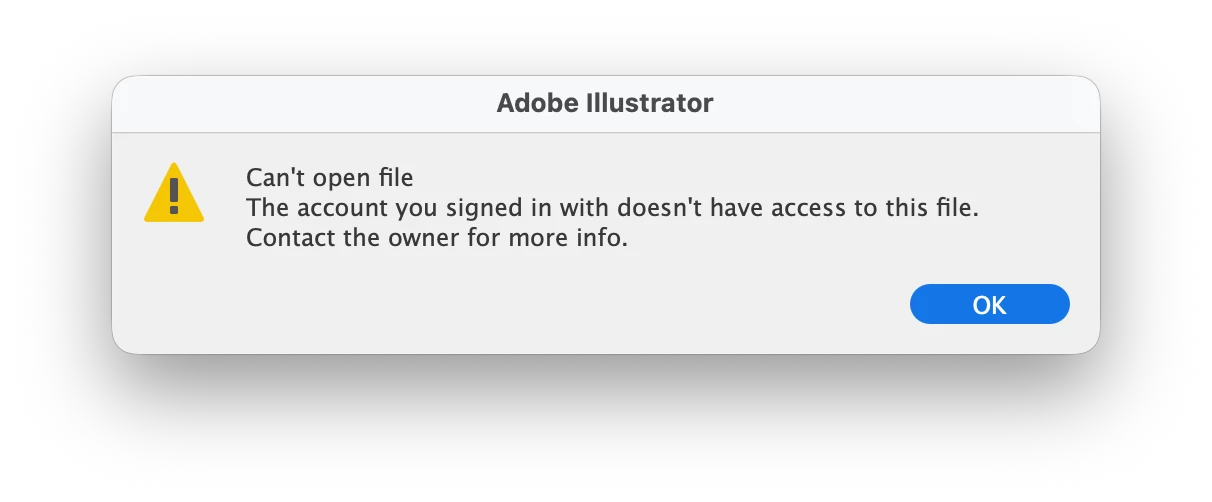
The account you signed in with does not have access to this file

  • April 14, 2026
  • 49 replies
  • 351 views

A week ago, Illustrator has started showing this message. The file was created on my account and using the same account ever since. What is going on?

 

    Correct answer Anubhav M

    Hello everyone,

    The product team has fixed this with the latest release of Illustrator. Kindly update Illustrator using the Creative Cloud Desktop app (https://helpx.adobe.com/creative-cloud/apps/manage-apps/creative-cloud-apps/update-creative-cloud-apps-automatically.html) and let us know how it goes.


    Anubhav

    Note: Marking correct for visibility.

    49 replies

    Anubhav M
    Community Manager
    Community Manager
    April 23, 2026

    Hello everyone,

    Our product team is currently investigating this issue. Would you mind trying the following steps and letting us know if they help:

    • Go to System Settings > General > Login Items > Enable CC Library.
    • Relaunch Illustrator

    If it’s already enabled, remove it from the items, re-enable and then quit and relaunch the Creative Cloud Desktop app and Illustrator to see if it helps.

    If the problem persists, try enabling Full Disk Access for the Creative Cloud Desktop app from system preferences, restart your computer and relaunch to see if it helps.

    If the steps above failed, try the following steps and let us know how it goes:

    • Close all Adobe applications
    • Remove the Creative Cloud Desktop app, Core Sync, CC Library and Illustrator using the Creative Cloud Cleaner Tool (https://helpx.adobe.com/creative-cloud/kb/cc-cleaner-tool-installation-problems.html)
    • Reinstall the Creative Cloud Desktop application (https://helpx.adobe.com/download-install/kb/creative-cloud-desktop-app-download.html)
    • Reinstall and relaunch Illustrator


    Looking forward to hearing from you.
    Anubhav

    DMTR29
    Participant
    April 26, 2026

    Hey Anubhav,


    Login item ‘CC Library’ was already enabled on my computer, but I went ahead and turned it off and then on again. Quitted and reopend both CC App and Illustrator and the issue disappeared.

    I hope this helps others as well!


    kglad
    Community Expert
    Community Expert
    April 23, 2026

    use a browser. there are several tabs and link to check:


    https://assets.adobe.com

    https://lightroom.adobe.com

    https://documentcloud.adobe.com

    https://spark.adobe.com

    Participant
    April 23, 2026

    This is happening for me. ​@adobe any fix? Signing out of all apps and CC and signing back in has not helped.

    lynnnnxd
    Participant
    April 23, 2026

    I am unable to access to all my files in Illustrator. It keeps saying I am not the owner when I am in fact the creator of those files! I have a lot of important files stored in the cloud but I can’t seem to access any of it. They show up in my files panel and everything but I just can’t open them.. My email is correct as I only have one account and I’m not even sharing my account with anybody. 

    This issue has been happening alot lately so can someone please help me out? I have tried uninstalling / reinstalling, logging in and out, I’ve tried everything and nothing works! Adobe can you please fix this issue?? it’s been affecting my work lately

    ilkcankose
    Participating Frequently
    April 23, 2026

    I connected to Adobe remote support and it worked for me.

    Agent said: "Due to an internet issue or cloud sync with the application, this error occurs. However, I just made a few changes and it works now. If this occurs again, I would recommend you to log out from the Creative Cloud application, then kill all the applications from Activity Monitor, and then log back in."

    If you want to contact support, they solved my problem.

    ilkcankose
    Participating Frequently
    April 23, 2026

    I’m using Mac

    frankvega
    Participant
    April 23, 2026

    I just updated my Illustrator because a pop up said in my 2025 version it was outdated. I updated to 2026 version and now I can’t access none of my cloud files… This must be a cloud issue. I am the only person running my account. Running MAcOS

    All my production files are in cloud. So for my business this really SUCKS!!!!!

    This needs a proper solution. not ad-hoc patches.

    What did you guys do????

    frankvega
    Participant
    April 23, 2026

    I found a temp workaround.

    1. Open file in browser from Creative Cloud.
    2. In browser choose to open file in Desktop App
    Participant
    April 25, 2026

    This is not working for me and I have tried everything suggested.

    LeeDownshift
    Participant
    April 23, 2026

    I, too, am experiencing this issue. I have tried logging out of my Adobe Cloud account and logging back in, and yes, I am logged into the correct account (I only have one account)  , yet I am still getting this error:


    This is making it extremely difficult to get any work done as I can’t even download the files to work on them locally.

    Participant
    April 23, 2026

    Hello,

    I am experiencing a specific issue with Adobe Illustrator when trying to open files stored in the cloud.

    The error message displayed is:
    “Cannot open the file. It is not possible to access this file with the account you are currently signed in with. Please contact the owner for more information.”

    This problem only occurs with cloud-based files (Creative Cloud or other synced locations). Local files (.ai stored on disk) open without any issues.

    I have already tried the following:

    • Signing out and back into Creative Cloud
    • Restarting the system
    • Verifying that the files are properly synced
    • Downloading files locally (which sometimes works, but is not a viable workflow)

    I would like clarification on:

    1. Why Illustrator blocks access to cloud files despite being properly authenticated
    2. Whether there is a permissions or synchronization conflict with Creative Cloud
    3. How to work directly with cloud files without needing to download them locally

    This issue is directly affecting my professional workflow, as I regularly work with files in synced environments.

    I would appreciate a clear solution or guidance on how to resolve this.

    What the FUCK!

    IsabelSD
    Participant
    April 22, 2026

    I’m having the same issue and can’t access a file that I actively need to deliver to a client today—I’m trying to download it from Chrome but I don’t see a “download” option.


    @adobe help please, this is absurd!

    Anubhav M
    Community Manager
    Community Manager
    April 22, 2026

    Hello ​@IsabelSD 


    I’m sorry to hear you’re having similar trouble with Illustrator. Could you try signing out and then signing back in with the correct profile to see if it helps?

    Looking forward to your response.
    Anubhav

    IsabelSD
    Participant
    April 23, 2026

    @Anubhav M  I did sign out and back in, I even ended up uninstalling and reinstalling Illustrator on my laptop. Unfortunately nothing worked. In the end I was able to download the file from Chrome and work on it locally, but the version in my cloud still will not open no matter what I’ve tried.

    hudsont71159484
    Participant
    April 21, 2026

    Same thing happening for me. can’t access a file i was literally working on yesterday which I need for work

    ilkcankose
    Participating Frequently
    April 21, 2026

    You can access your files on Adobe's website. The same issue happens to me sometimes — just download it manually from there. At least the file isn't lost. https://www.adobe.com/files/


    hudsont71159484
    Participant
    April 21, 2026

    Thanks for the tip! still bit annoying 🙄