
Scott Falkner
Community Expert
Community Expert
July 11, 2020
Answered

Transform effects are appearing below content, not above

  • July 11, 2020
  • 13 replies
  • 774 views

I'm experimenting with spirograph like patterns and effects, To do this I have created primitive shapes like squares and hexagons and applied transfrom effects like this…
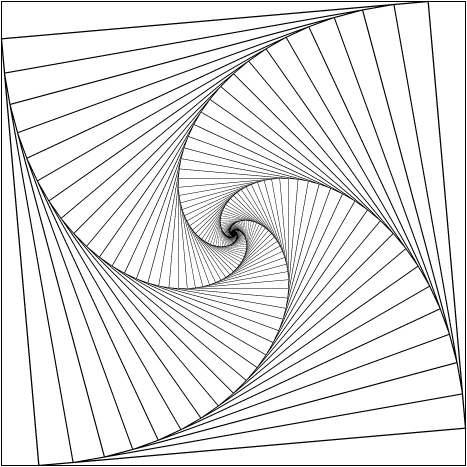
In the above example there is one square with a black stroke and no fill. Even though I tell the stroke not to scale, it is scaled.


The problem is the duplicates are stacked below the primary object or group. I don’t think this has always been the case. See this one…
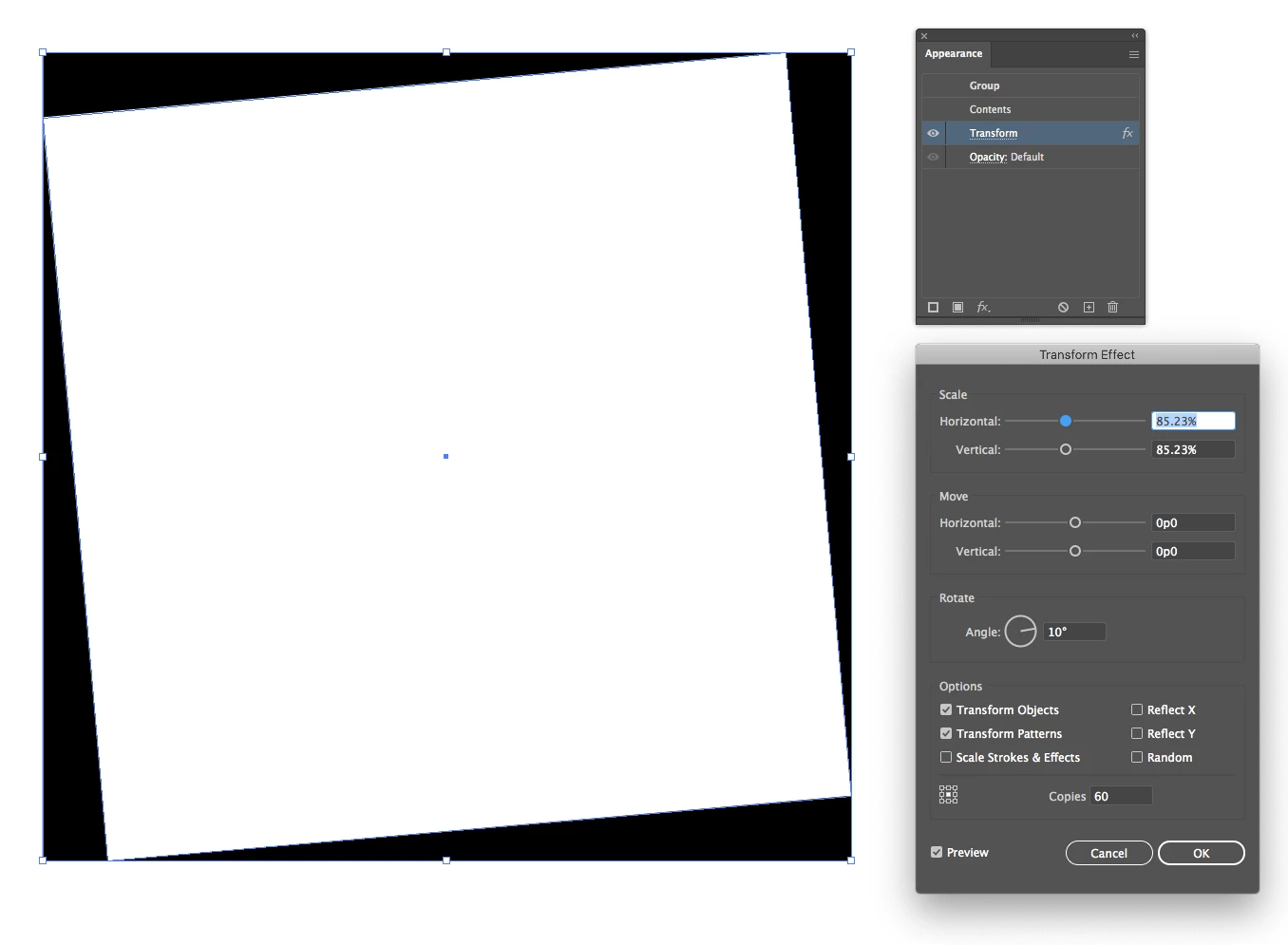
If I expand the appearance I can see outlines for all the shapes. But I need the duplicates to appear above the source image. Is thee a way to do this? Is this a bug?

This topic has been closed for replies.
Correct answer tromboniator

Scott,

If you start with a small shape and scale it up (that is, greater than 100%), it stacks the other way. And I'm not seeing stroke scaling unless I tell it to.


Peter

13 replies

Jacob Bugge
Community Expert
Community Expert
July 13, 2020

Quite right, Kurt.


But I believe they will claim to be misunderstood lizards.


Kurt Gold
Community Expert
Community Expert
July 13, 2020

Jacob, consequentially your second red shot shows the crocodile death rolls, as far as I can see. Is that right?


Pretty coherent sketch.


Jacob Bugge
Community Expert
Community Expert
July 13, 2020

Peter,


Would that be the Scottish play, or are you too close to the theatre to give an answer?


tromboniator
Community Expert
Community Expert
July 13, 2020

Henry IV, part 2, and I'm not superstitious.

Jacob Bugge
Community Expert
Community Expert
July 13, 2020

Indeed, Kurt, ever waiting for those foolhardy enough to plunge in(to the unknown).


Hence the (rather solid) colour of the water.


tromboniator
Community Expert
Community Expert
July 13, 2020

Thanks, Jacob, for clarifying my blather. I've been Shakespeareing all day, and haven't checked back here to survey the damage. Yes, I am in an off-the-beaten-track time zone, and keep out-of-standard hours therein.

Kurt Gold
Community Expert
Community Expert
July 12, 2020

Apparantly, there are four snoopy crocodiles at the edges in your first red sketch, Jacob.


What are they doing there? Are they dangerous?

Jacob Bugge
Community Expert
Community Expert
July 12, 2020

Obviously, Kurt.


I forgot to mention that it is, of course, possible to correct the (almost) desired size of the largest one, simply multiplying/dividing by the relative inaccuracy in the Transform palette (in the case below it was about 1.0002).


The switch of order as suggested by Peter can be seen here, with a filled square and a slower scaling, showing the inversion of the stacking order quite clearly.


Kurt Gold
Community Expert
Community Expert
July 12, 2020

Obviously, your last sentence is rather insane, Jacob, but all in all I think that you clarified a bit and Peter may have a well-deserved catnap.

Jacob Bugge
Community Expert
Community Expert
July 12, 2020

Kurt,


I am certain that Peter (it is rather early/late for him) means that the effect of the inherent and unchangeable order is countered by starting from the small end, so larger will be behind smaller, as desired.


Obviously, to get (almost) the same size of the largest one, it is necessary to invert the settings (inverse scaling and rotation and a starting size that equals the desired ending size divided by the [number of copies]th power of the (inverse) scaling (was that sane speak?).


Kurt Gold
Community Expert
Community Expert
July 12, 2020

Your approach sounds promising, Peter. Unfortunately I cannot confirm the reverse order.


Guess by "it stacks the other way" you mean that the copies are then created above the original path, don't you?


What am I missing?