
ananth padmakarp64550037
Known Participant
October 9, 2017
Answered

want to open .ai file in illustrator using javascript

  • October 9, 2017
  • 14 replies
  • 7167 views

Hi.

i want to open a .ai file in illustrator using javascript.

1.my file structure is like this.
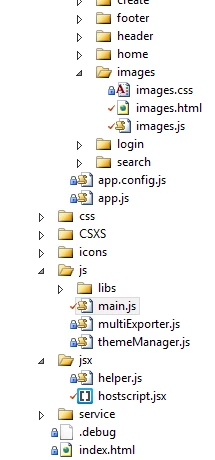
2.added script in main.js
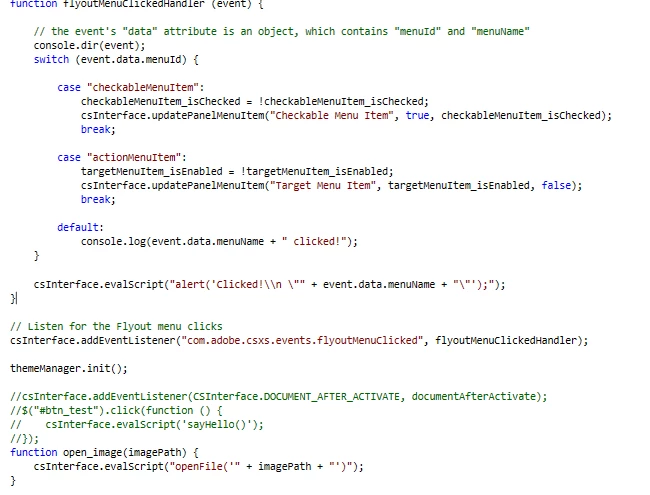
the code above the function open_image is developed before and i have added this function atlast.

3. code inserted in hostscript.jsx
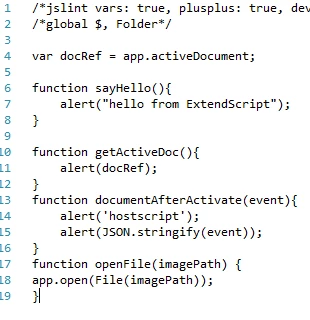
in the above file i have inserted the function openfile

4. now in html

<img ng-src="data:image/png;base64,{{item.imageByte}}"  onclick="open_image({{item.aIimagePath}});" class="hover" alt="..." data-toggle="tooltip" data-placement="top" title={{item.aIimagePath}}>

that is a image and upon clicking the image i need to open that ai file. and the item.alimagepath contains the path of the .ai file.

upon executing this an error occured stating that anonymous function.

could you please help me with this issue or how to open an .ai file.

This topic has been closed for replies.
Correct answer Silly-V

Well it's an angular error, so that needs to be fixed before anything can run. Do you have your remote debugger chrome inspector panel running?

14 replies

ananth padmakarp64550037
Known Participant
October 24, 2017

when we open a file from remote server mac copies in location with the url as i said before with volumes prefixed. now if we trim that volumes and try to send it to app.open and then it works fine.

ananth padmakarp64550037
Known Participant
October 23, 2017

hey silly. sorry for the late reply. found the solution.

Silly-V
Legend
October 23, 2017

Great! Okay what was it?

ananth padmakarp64550037
Known Participant
October 16, 2017

how to use this..?

Silly-V
Legend
October 16, 2017

Maybe like this: File(File("/Volumes/Scan/SKPULDANDA/Cheshire Cat [Converted].ai").fsName);

ananth padmakarp64550037
Known Participant
October 13, 2017

Its not necessary to connect specifically only to that shared location. what ever may be the shared location on windows if we want to access on mac it shows a path with smb prefixed. shall we discuss privately. i mean in any messenger service..?

Silly-V
Legend
October 13, 2017

Hey have you tried using the File.fsName property? Check out what it says?

ananth padmakarp64550037
Known Participant
October 13, 2017

and now the major problem is that unable to open .ai images from shared location in mac

copying the file location and searching and unable to find it. even if i save an image in illustrator and try to open that image its converting the path to a different one.

actual path :  smb://10.7.8.9/scan/skpuldanda/cheshire Cat.ai.

changed path:/Volumes/Scan/SKPULDANDA/Cheshire Cat [Converted].ai

Silly-V
Legend
October 13, 2017

This is now an entirely different question- unfortunately I am not in an environment currently where I can test on a Mac, a network location. Do you think such a test could be performed if someone uses an external hard drive to simulate such a shared location?

Can you make a new post with just this question too?

ananth padmakarp64550037
Known Participant
October 13, 2017

Thank you so much for the help

ananth padmakarp64550037
Known Participant
October 12, 2017

what if i want to catch an error if app.open fails to open an path

Silly-V
Legend
October 12, 2017

You can keep building a try-catch statement into your js string which would return any piece of data indicative that an error occurred, and check in your callback function to examine if the returned data contains your error information.

ananth padmakarp64550037
Known Participant
October 11, 2017

i thought its a jquery function.. and next thing is that instead of selecting a file  from window i want to open a file through path directly

filePath contains the path of the image file with .ai extension. instead of opening the dialog box how to open image directly by file path.

example of filePath : \\Corp-file01.cgsinc.local\vg\VG40\LOGIN\PQA\Attachments\AI\BCDress- sen copy.ai

Silly-V
Legend
October 11, 2017

you just put your filePath variable into the string:

+ ...

+ "var f = File(" + filePath + ");"
+ ...

ananth padmakarp64550037
Known Participant
October 10, 2017

I have changed that jquery function to angular function and click event to ngclick..

Silly-V
Legend
October 10, 2017

That by the way was not a jquery function , just a regular html event attribute with a plain javascript function.

ananth padmakarp64550037
Known Participant
October 10, 2017

no. i have tried that too.. or could you suggest me a script to open an .ai file

Silly-V
Silly-VCorrect answer
Legend
October 10, 2017

Well it's an angular error, so that needs to be fixed before anything can run. Do you have your remote debugger chrome inspector panel running?

ananth padmakarp64550037
Known Participant
October 10, 2017

yes.. and its solved. thanks for the help. its an angular error.

is there an tutorial for scripting illustrator extensions. whether it may be a paid one too.. no problem. could you please suggest me..?