


Known Participant
September 18, 2017
Answered

Why alt+ctrl+shift +s is not working on my illustrator ?

  • September 18, 2017
  • 2 replies
  • 10085 views

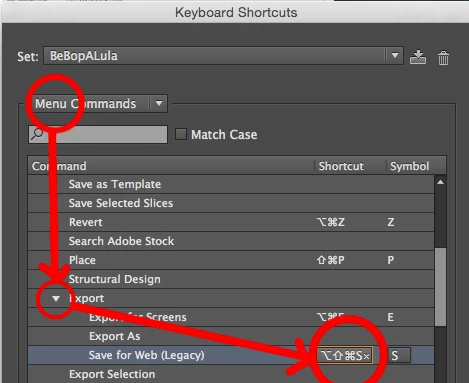
this is the save for web(legacy) when I press the shortcuts buttons is not working but all my keys are working. This is the first time I encounter this problem in using illustrator. thankyou
    This topic has been closed for replies.
    Correct answer Mike_Gondek10189183

    I think yes. but other key commands like alt+ctrl+shift + I and also alt+ctrl+shift + p are working properly and I only got this problem with my new Lenovo legion y520, and this is the first time I encounter this.


    The problem must be something unique to your Lenovo legion y520. Either find what  software tis system that conflicts and disable or change the key command, or in illustrator assign a new key command to save for Web.

    Edit >> Keyboard Shortcuts

    Good luck finding something unused already.

    2 replies

    Participant
    February 21, 2018

    Hey guys, i just had a similar problem and after searchings for some time i figured out that i installed radeon relive with my last driver updates. relive is a tool of amd to capture and record your games/programs. after disabling relive i could use the ctrl + shift + s shortcut again. hope it helped.

    regards

    Monika Gause
    Community Expert
    Community Expert
    September 18, 2017

    Which version?

    Which system?

    Which language on your computer, keyboard and in Illustrator?

    Did you check Edit > Shortcuts if the keys are correctly assigned?

    Filipin0Author
    Known Participant
    September 18, 2017

    I use illustrator cc 2017 , yes the keyboard shortcut alt +ctrl+shift +s is not working but if you click the save for web on the export its working. I already check that also the edit>shortcut the keys are correctly assigned

    Filipin0Author
    Known Participant
    September 18, 2017

    I use Lenovo legion y520 laptop