
Participant
January 13, 2015
Question

Workspace Panels Disappearing and/or not opening

  • January 13, 2015
  • 56 replies
  • 126306 views

Hello.

I'm on Mac OSX Yosemite and Adobe CC 2014. I am having a constant issue with my workspaces disappearing and/or panels not opening. I can fix the problem by deleting preferences, but I'd rather not do that every time I start up. Also, for workflow efficiency, I would REALLY love for my preference to be customized and saved. This problem is preventing me from doing that.

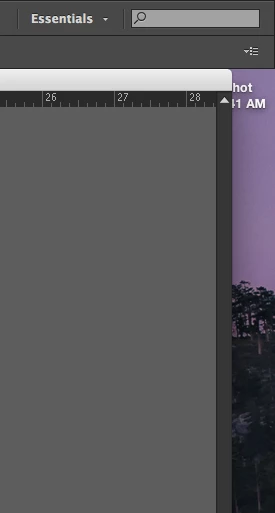
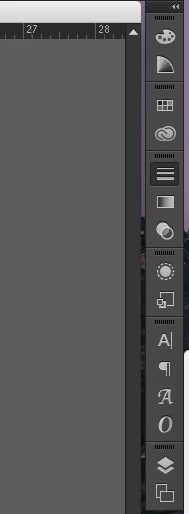
Specifically, when I launch Illustrator, my workspace panels will sometimes have all been removed. There is nothing there. If this happens, I can add my panels manually from the Windows menu. If I do that, I can only use the panels with the panel dock expanded. If I collapse the panels and click on a panel icon, it will not open. Let me know any way I can further help to solve this issue.

Below: Essentials workspace at start up. All panels missing.
Below: After manually opening panel windows. Collapsed view. Notice Strokes panel highlighted, but not open.
This topic has been closed for replies.

56 replies

September 7, 2016
Participating Frequently
September 7, 2016

I appreciate the attempt at help but the sound quality on that is horrible; combine that with his thick accent and I can't understand what's being said, which makes it not very helpful.

Monika Gause
Community Expert
Community Expert
September 7, 2016

kate.paullin schrieb:

I appreciate the attempt at help but the sound quality on that is horrible; combine that with his thick accent and I can't understand what's being said, which makes it not very helpful.

It just tells you how to reset the workspace, that's all.

Participant
August 9, 2016

I've been having the same problem with flyouts not working in InDesign CC 2015 for the past few days.

A solution for me was just dettaching the panel from the top bar. You can still snap it back into the right hand corner without merging it into the top bar. You'll know it's dettached if it has an 'x' at the top. Flyouts have continued to work for me from this setup.

Hope this helps.

Participating Frequently
September 25, 2016

I've been having this problem intermittently with InDesign CC 2015 for nearly 9 months now. It shows up many days in a row, then ID works fine for a week, or a month, and then it's back again. Re-installed ID, no help. Checked for corrupted fonts, repaired permissions, etc., etc. -- all to no avail. Also, it doesn't seem to be a corrupted preferences file. I've fixed those a couple of times, and the problem still persists.

However (and if Adobe is listening, this might be a clue for you, assuming you ever want to fix this bug!): if I delete my ID caches (~/Library/Caches/Adobe InDesign/Version 11.0), everything works just fine for that session. I can work all day with no problems. It really appears that the caches, when ID closes and writes them to disk, are the source of the problem.

Any thoughts or feedback from anyone else about what you've discovered? What could be the source of the corrupted cache files? (especially since I've literally had a full month without this problem, in the middle of 9 months of otherwise pretty much continuous frustration).

Known Participant
August 3, 2016

Had this just happen with Muse CC 2015.2.

The panels didn't appear on start-up, applied App Frame (yuk! ) and they appeared, but clicking on them yields no response.

Doesn't look like Muse has a Workspace feature, FWIW.

Participant
August 3, 2016

Window -- workspace -- clicking on essentials worked for me.

Participant
August 3, 2016

This is a work around for the same problem in indesign, if you just grab an older version of the .xml file and replace the most current version.

How do I import my custom InDesign workspace to a new computer? - Graphic Design Stack Exchange

Participating Frequently
June 14, 2016

Doing the same thing for me for 2015 CC InDesign! Only fix I found for this was to go into the Windows panel and select a palette I knew should have been opened; then all panels opened back up. It's just frustrating! And I have to do it EVERY single time I open a new document. Come on, Adobe, you should have fixed this glitch by now!

Known Participant
May 20, 2016

I'm getting sick of Adobe products crashing and/or not working properly.

Which is what happened when Illustrator suddenly crashed and reopened without any panels except the tool bar.

I've expressed my frustration in a new splash screen, as I just can't take this app seriously anymore.

Known Participant
May 20, 2016

PS. Sorry for the HUGE file size. It appears I can't edit the post and the 'Actions' drop-down has no actions associated with it. Typical of Adobe, I suppose ...

jmorenajr
Participating Frequently
April 26, 2016

Well after a few weeks of no problems, this happened again.  Anyone have any other suggestions?

jmorenajr
Participating Frequently
April 14, 2016

So it's been a week since I switched the "Open Documents as Tabs" off in the User Interface Preferences and I haven't had this problem since.  Hard to confirm if this is an actual fix but it seems to have worked.  Hope I didn't jinx it haha

Can someone else try this and confirm or deny if this is working for you?

April 11, 2016