
Participant
January 13, 2015
Question

Workspace Panels Disappearing and/or not opening

  • January 13, 2015
  • 56 replies
  • 126306 views

Hello.

I'm on Mac OSX Yosemite and Adobe CC 2014. I am having a constant issue with my workspaces disappearing and/or panels not opening. I can fix the problem by deleting preferences, but I'd rather not do that every time I start up. Also, for workflow efficiency, I would REALLY love for my preference to be customized and saved. This problem is preventing me from doing that.

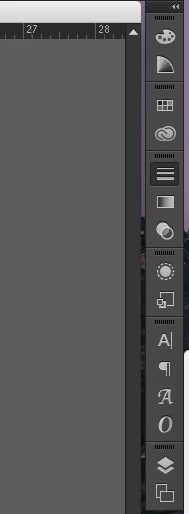
Specifically, when I launch Illustrator, my workspace panels will sometimes have all been removed. There is nothing there. If this happens, I can add my panels manually from the Windows menu. If I do that, I can only use the panels with the panel dock expanded. If I collapse the panels and click on a panel icon, it will not open. Let me know any way I can further help to solve this issue.

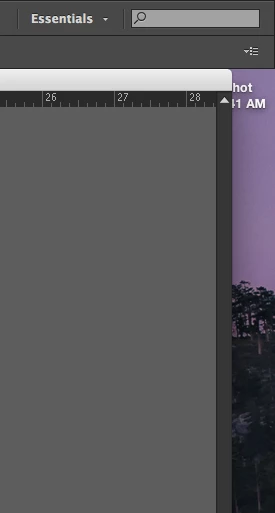
Below: Essentials workspace at start up. All panels missing.
Below: After manually opening panel windows. Collapsed view. Notice Strokes panel highlighted, but not open.
This topic has been closed for replies.

56 replies

jmorenajr
Participating Frequently
April 5, 2016

Having this issue as well.  Have to restart the computer in order for the Panels to appear again.  I wonder if the bug has something to do with the docked panels and documents being Opened as Tabs instead of free floating?  I turned it off in the Preferences so will see if it's an issue going forward.

April 7, 2016

It seems like there is still no actual fix for this? I am using indesign CC with Yosemite on mac and can see my swatch panel load and then disappear each time I start up the program. "reset workspace" does work (@jmorenajr you might want to try this instead of restarting), but is rather irritating to do this each time I start up. I did try your idea about tabs vs free floating and there is something to it, since when I leave the swatch panel free and clear before I quit it loads up fine the next time I start up. Again, not a fix, but perhaps better than resetting all the time.

jmorenajr
Participating Frequently
April 7, 2016

Yeah...today was the first time I open Illustrator after switching the "Open Documents as Tabs" off and the panels opened fine. Layers, Tools, Pathfinder...everything.  Hard to say with out checking that on a daily.  I'll post again in a few days if this seems to work or not.

ryank74578718
Participant
February 14, 2016

I guess Adobe doesn't care about this because nothing has been done to fix it!

Kreshteena
Participating Frequently
March 11, 2016

Sorry to hear that you guys have been experiencing this problem for some time now. My panels (e.g. Book panel, Paragraph Styles, Character Styles Panels in INDESIGN CC2014 have now just disappeared.

Hope we can get some advice from Adobe about what to do to make them appear again. I have rebooted, restarted InDesign but same problem ... no items appearing inside the panels.

Kreshteena
Participating Frequently
March 13, 2016

Found the answer in Anne Marie Concepcion's article:   http://indesignsecrets.com/rebuilding-indesign-preferences.php

It works!

Larstown
Participating Frequently
February 2, 2016

I have been having the same irritating problem in InDesign for some months...

(Running the latest version 11.2.0.99 on a Apple Mac OSX El Capitan 10.11.3)

Not every time, but very often when I leave InDesign and go to some other program and get back to InDesign the control panel is not visible.

The only way to fix it is to choose some of the other workspace settings – and then choose my own workspace setting again.

I have tried to delete the settings plus created a new workspace setup, it didn't work.

Known Participant
February 8, 2016

I had this happen just now upon opening InDesign.

Infuriating!

Participating Frequently
January 25, 2016

The same bug is present in the latest version of Photoshop as well.

andream1004
Participant
January 18, 2016

I also had this issues and finally got mine to show up by going to Window > Workspace > Reset [name of workspace]

ryank74578718
Participant
December 17, 2015

Running Win 10.. same crap.. Panels are not open by default. I have to hit reset workspace to get them  all to be open.

Participant
December 15, 2015

Today's Photoshop Update seems to have fixed the problem.

dSparks
Inspiring
December 2, 2015

I'm having this issue as well.

Mac 10.11.1

Illustrator CC 2015

The issue I see is when I try to open an illustrator file from the InDesign Links Panel. I then close Illustrator and restart it using my dock shortcut and panels show fine.

Known Participant
December 2, 2015

Since the new update from yesterday,  atleast for Photoshop, everytime i open a PSD file, sometimes yes sometimes no, eeeeevery workspace panel DISAPPEARS and i have to go to Window->Essentials or something to re-enable it, though some shortcuts like G and W are reset to their default values (while i set 'em to Paint Bucket and Magic Wand)

Is there any way to prevent that?..

PS: The new version didn't fixed the "Brush Lag" yet...on a super high-end PC...

Ncosgrove
Known Participant
December 3, 2015

I am having the same exact issue you are having and it is annoying... Should have followed my gut and waited to do the update. Not to mention they changed up some icons.

Hope there is a solution here sometime soon...

Participant
November 27, 2015

I just had the same problem with my panels not showing the content but acting like they were open in Indesign CC 2015. I read through the thread and tried the different solutions given, only one of which seemed to help (Switching to Application Frame) but I didn't want to keep my workspace like that...

I wanted to see if (in Application Bar Mode) I could move the whole panel group to the left on my screen and have it work and it did! After that I haven't had that problem. I even quit and restarted Indesign and it's working fine again... Very strange, but it worked! Give it a try, it might help you too.

Participant
November 22, 2015

Here's a suggestion, since I had this same problem and it drove me crazy!

Try going to Window > Application Frame (Illustrator CC). If it's unchecked, I don't think it will show up. (It didn't with mine, at least.) Once I checked it again, though, it all popped up, and I'm able to use that bar again.

Hope this helps!