
Participant
January 13, 2015
Question

Workspace Panels Disappearing and/or not opening

  • January 13, 2015
  • 56 replies
  • 126306 views

Hello.

I'm on Mac OSX Yosemite and Adobe CC 2014. I am having a constant issue with my workspaces disappearing and/or panels not opening. I can fix the problem by deleting preferences, but I'd rather not do that every time I start up. Also, for workflow efficiency, I would REALLY love for my preference to be customized and saved. This problem is preventing me from doing that.

Specifically, when I launch Illustrator, my workspace panels will sometimes have all been removed. There is nothing there. If this happens, I can add my panels manually from the Windows menu. If I do that, I can only use the panels with the panel dock expanded. If I collapse the panels and click on a panel icon, it will not open. Let me know any way I can further help to solve this issue.

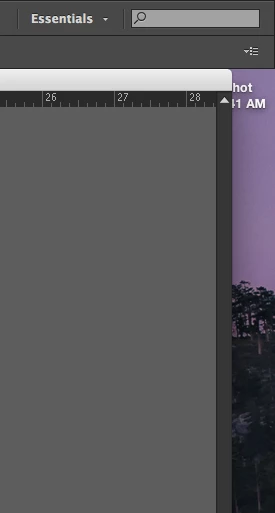
Below: Essentials workspace at start up. All panels missing.
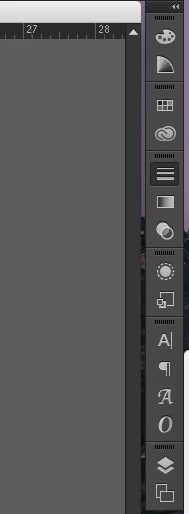
Below: After manually opening panel windows. Collapsed view. Notice Strokes panel highlighted, but not open.
This topic has been closed for replies.

56 replies

Participant
March 5, 2015

I found one odd hack that at least allows me to use some of the panels. I went to: Window > Application Frame (which I don't normally use), but it now allows me to keep and use my current workspace as expected. Not sure who it will work for, but maybe try and see.

Yosemite 10.10.2, MacBook Pro Mid 2012

Illustrator CC v18.1.1

Participant
January 27, 2016

This did it for me! Great find!

Participant
March 4, 2015

As of today, I am now having the exact same issue. Has anyone found a good work around to it as of yet? And, the other issue, which was mentioned above, even when temporarily switching to a different workspace some of the panels don't fly-out. You have to undock them to use them, then re-dock them when you're done.

Participant
March 5, 2015

Actually put up a new post re this (sorry didn't search well enough!).

This is happening to me exactly as the OP says.

It seems to be getting more and more frequent so maybe the preference file is getting corrupt and a dump is on the cards.

Extremely annoying.

I'm on Yosemite 10.10.1, Mac Pro (Trashcan) using Illy CC 18.1.1

Participating Frequently
February 26, 2015

Same here, as GPGW explained. Sometimes, panels won’t show up at all. Activating and deactivating the application frame will bring them back, but then collapsed panels won’t work. However, if I then quit Illustrator and restart it, panels (usually) work again as they should. This is extremely annoying.

Participant
January 27, 2015

this is happening to me too, they seem to come back when i turn on menu>window>application frame. but if i turn it off the panes start coming up blank. 1st time researching this issue.

Participant
August 20, 2017

This sorted me out. Thank you!

Participating Frequently
August 20, 2017

How the heck did this "sort you out"? And what is the "this" that you're referring to? There is no solution posted, and no real workaround -- just a lot of crap to try that sometimes/temporarily makes the app behave -- and Adobe doesn't bother to fix it. So, again: what sorted you out??

Known Participant
January 22, 2015

I'm having the same issue periodically.

My custom workspace is not showing and for today at least Essentials is not showing either.

Known Participant
January 27, 2015

Automation, Essentials and my Custom workspace not showing today.

What will tomorrow bring ... ?

**EDIT**

Interestingly, showing and hiding the Application Frame brought my Custom workspace back to life.

But as kspond has noted, only by expanding the panel can I use them.

So close ...

Jacob Bugge
Community Expert
Community Expert
January 13, 2015

kspond,

Are there no viable Workspaces that you can select and enjoy?

kspondAuthor
Participant
January 13, 2015

Jacob,

No, there are sadly no workspaces that fulfill all of my needs. In every preset workspace, I will have to add a few, which gets old. I need to be able to create a custom workspace, or at the very least, have the Essentials workspace available.

Jacob Bugge
Community Expert
Community Expert
January 13, 2015

kspond,

So if you create a custom workspace and save it, it will not turn up at startup?