
Participant
January 13, 2015
Question

Workspace Panels Disappearing and/or not opening

  • January 13, 2015
  • 56 replies
  • 126306 views

Hello.

I'm on Mac OSX Yosemite and Adobe CC 2014. I am having a constant issue with my workspaces disappearing and/or panels not opening. I can fix the problem by deleting preferences, but I'd rather not do that every time I start up. Also, for workflow efficiency, I would REALLY love for my preference to be customized and saved. This problem is preventing me from doing that.

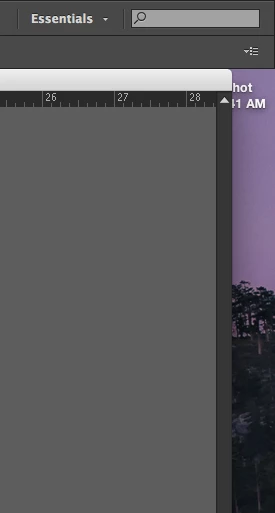
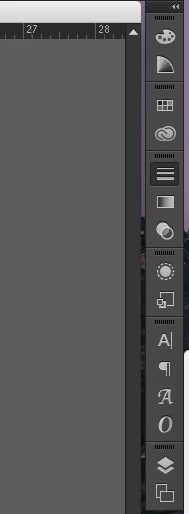
Specifically, when I launch Illustrator, my workspace panels will sometimes have all been removed. There is nothing there. If this happens, I can add my panels manually from the Windows menu. If I do that, I can only use the panels with the panel dock expanded. If I collapse the panels and click on a panel icon, it will not open. Let me know any way I can further help to solve this issue.

Below: Essentials workspace at start up. All panels missing.
Below: After manually opening panel windows. Collapsed view. Notice Strokes panel highlighted, but not open.
This topic has been closed for replies.

56 replies

illusionstoo
Participating Frequently
September 6, 2015

Sadly, the only thing that worked for me is to turn on Application Frame. This isn't my favorite way to work, so I'm considering this a less than satisfactory workaround. I'd love to see this problem fixed in a ear future version. Please?

Monika Gause
Community Expert
Community Expert
September 6, 2015
illusionstoo
Participating Frequently
September 6, 2015

Thanks, Monika. I should have mentioned that was the first thing I did.

Participant
July 23, 2015

Hey, I followed the procedure to reset all prefs.  It worked for me, but it might not work for folks who have prefs—mine was a fresh install.

I guess theoretically you could export your prefs before hand, but then you might just be reimporting the issue.

Anyway, hope this helps whomever :_)

Illustrator Help | Setting preferences

Reset all preferences to default settings

Resetting preferences can be helpful if you are having problems with the application.

  • Do one of the following:

    • Press and hold Alt+Control+Shift (Windows) or Option+Command+Shift (Mac OS) as you start Illustrator. Your current settings are deleted.


Inspiring
September 5, 2015

I still have the same problem and tried everything of above.

Participant
July 22, 2015

+1 on the Issue here

Running a very fresh install of 10.10 and current CC.  Just starting out with Illustrator, no preset migrations.  Issue is ongoing...

Participant
July 22, 2015

I opened the Actions workspace, added to and altered what was showing then used Manage Workspace and saved my own space.

If you use reset with Essentials then it is going to revert back to the default of nothing, so don't do that.

rologica
Participant
July 13, 2015

This is bugging me too on Illustrator and inDesign CC 2015.

I have found a work-around:

Don't open a file by double clicking it in the finder, first open the application and go to the file > open menu, and select the file there…

Participant
July 14, 2015

I'm having the same problem. Anyone actually resolve it? I'm thinking of deleting the plist preferences file but don't know what approach to take?

Has anyone called Adobe on this?

Participant
July 10, 2015

I just had the exact same thing happen to me. I'm on OSX 10.8 btw.. not 10.10.

Turning on and off the Application Frame brought it all back (layers and the entire panel) but I still can't do the panels drop out like history, actions, etc

Really annoying to have to deal with this in front of a client for 30 minutes today looking like an idiot.

UPDATE: The history/action buttons work fine in application frame. They stop working when I switch the application frame off.

Participant
July 9, 2015

Been having an issue with this for some time now as well. I have a personal workspace set up as well and sometimes it won't load even after resetting the workspace the panels won't open. Only way I can work around this is by reopening Illustrator a few times to bring the panels up.

robertp82205399
Participant
July 2, 2015

To add to this, I've also experienced dropped panels (Illustrator as well as Photoshop, InDesign, etc.) and pop-out panels that refuse to pop out (Illustrator). While the Reset Workspace option works for the dropped/missing panels, I need to restart Illustrator to gain the pop-out access again; otherwise, I can only expand the entire second-tier of panels.

Definitely a productivity issue that needs to be resolved. Thanks for the original post, Kspond.

RP

BTW, same configuration: Adobe CC 2015 w/ Yosemite 10.10.3 on a Mac Pro (late 2013, the 'Darth Vader' edition).

Participant
June 4, 2015

This has been driving me bonkers! So far the only fix is the working once you've selected Application Frame from the Window menu. The panels then follow their designated auto-hide and auto collapse functions. Once out of the App Frame the issue occurs. Icon selected but panel doesn't pop out ( like it's popping out somewhere else on other side of screen that's not there..) Regardless Reset Workspace has no effect on this issue on both Custom and preset workspaces.

Let's hope this get's at least some attention as it's quite annoying, especially on a smaller screen which is no more covered with menus than art.

Enjoy.

Known Participant
May 21, 2015

OP here, on a different login.

Still no answer out there? I've started having this issue in InDesign CC 2014 as well. Switching to application frame effectively doing nothing in InD, and not a valid workaround for AI.

Known Participant
May 21, 2015

Good news!

I've found a solution. Please test and confirm with likes if it works for you so people know this is the solution. Credits for this solution goes to KerrHowTo Youtube channel, where I found the fix.

Here's what to do:

With the problem workspace active, you will go to Windows > Workspace > Reset (name of workspace)

That's it! Thanks, KerrHowTo!

See the video here: How To Bring Back Missing Panels / Workspace / Toolbars (Adobe Photoshop CC, CS6, CS5, CS4, etc..) - YouTube

Known Participant
May 21, 2015

Not sure what to do, this is the correct answer, but I cannot mark it as such because the OP was my old, inactive work account.