
Participant
July 10, 2023
Answered

Can't reorder layers (Illustrator on iPad) - please help

  • July 10, 2023
  • 1 reply
  • 1707 views

The reorder of layers functionality on Illustrator for ipad isn't working and I can't find anyway to fix it. Really need some help.

All tutorials I have read suggest that you simply click and hold then layer, then drag into new order. But my version won't allow you to drag the layer at all. What am I doing wrong?

This topic has been closed for replies.
Correct answer Michael J. Hoffman

Hi Benjamin,


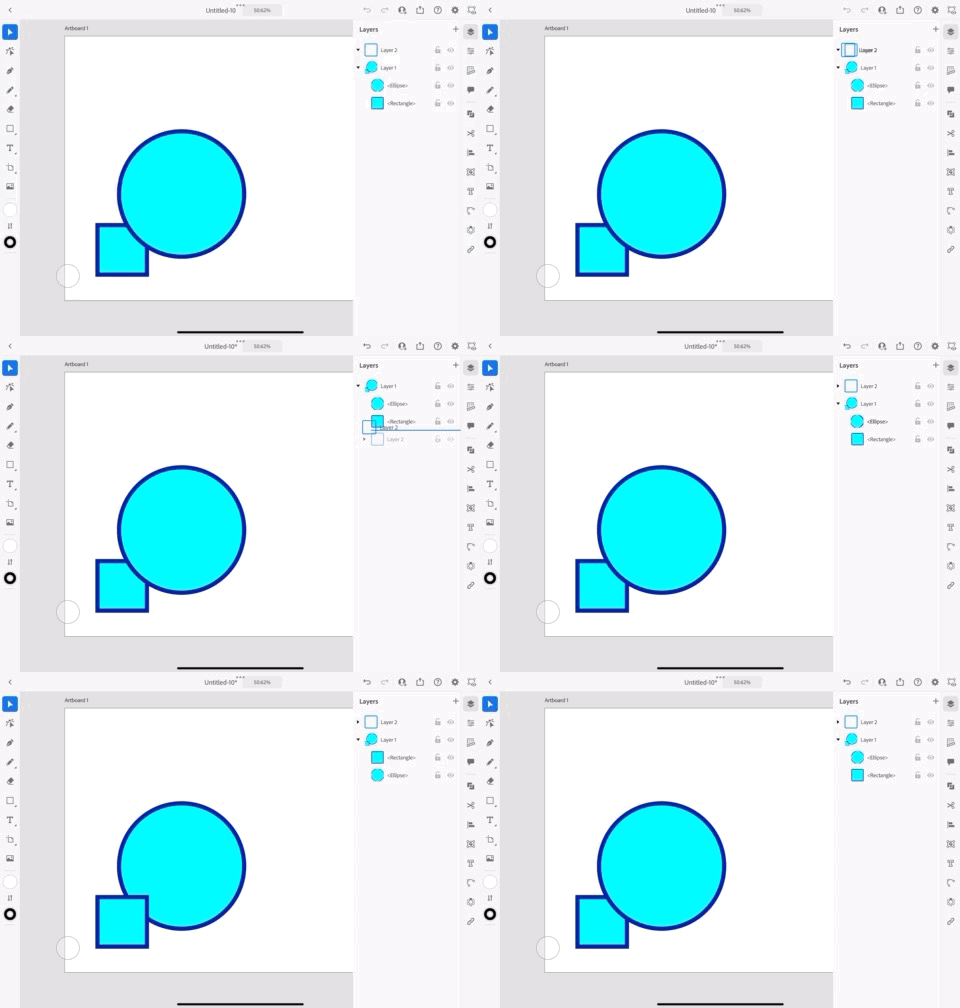
yes, you should be able to long press the layer in the layers panel, and once you see it shift slightly, you can drag to a new position in the stack. What happens when you long press a layer? Below is a low res gif (sorry for the quality) showing how it looks for me when I long press, then drag. 

1 reply

Michael J. Hoffman
Community Expert
Michael J. HoffmanCommunity ExpertCorrect answer
Community Expert
July 10, 2023

Hi Benjamin,


yes, you should be able to long press the layer in the layers panel, and once you see it shift slightly, you can drag to a new position in the stack. What happens when you long press a layer? Below is a low res gif (sorry for the quality) showing how it looks for me when I long press, then drag. 

Participant
July 10, 2023

Thanks Michael, I wasn't "long pressing" the layer for sufficient time. Your explanation has been a great help. Many thanks

Michael J. Hoffman
Community Expert
Community Expert
July 10, 2023

I'm glad you got it sorted, Benjamin.