Participant
October 20, 2020
Answered

Create a Guide

  • October 20, 2020
  • 2 replies
  • 586 views

How do i create a guide in Illustrator on the iPad?

I only see the option to show guides but how do i create a guide?



This topic has been closed for replies.
Correct answer Nitish Agarwal

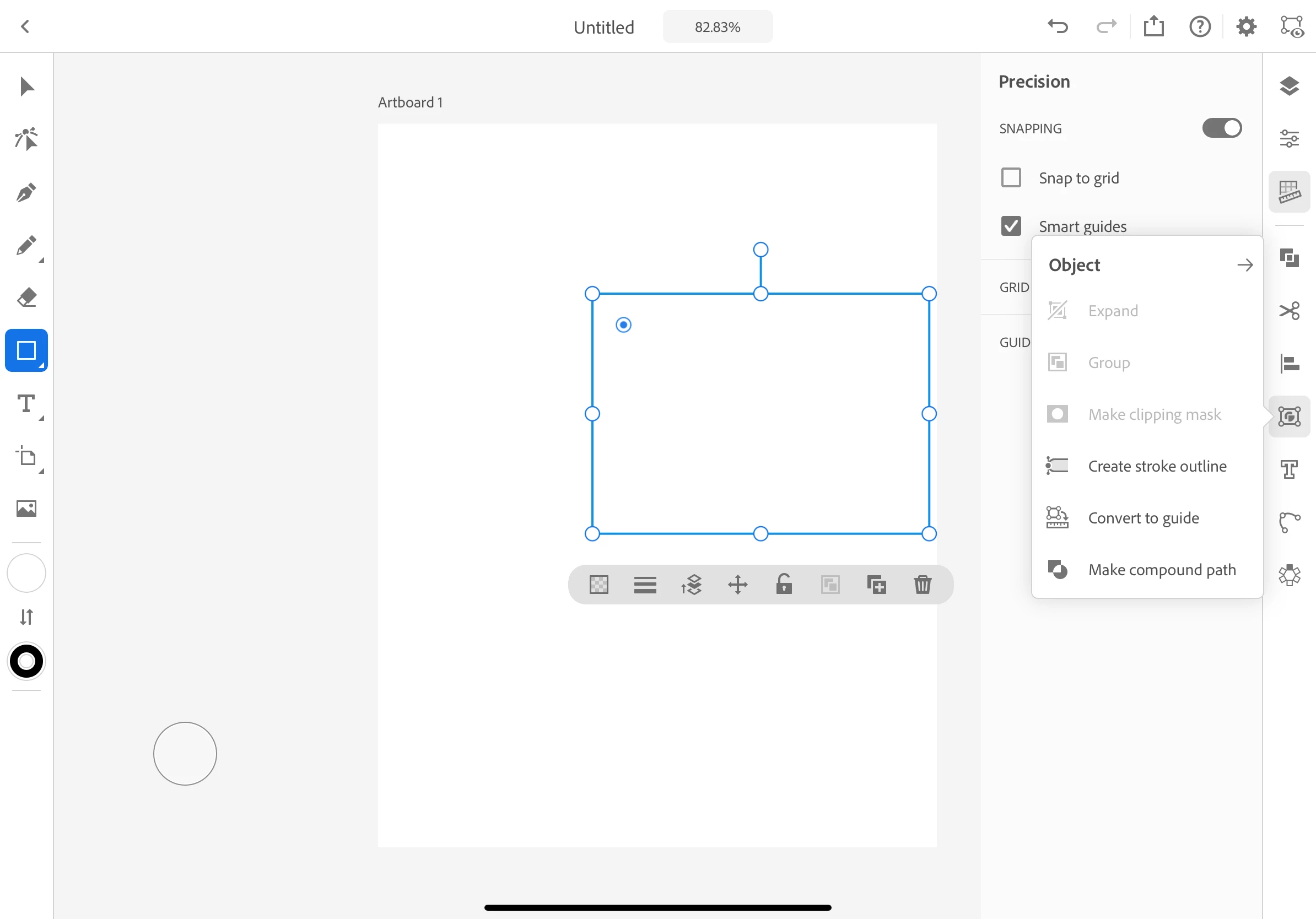
You can convert art into guide from Object menu in the right bar. Please refer to the attached image.

2 replies

Nitish Agarwal
Adobe Employee
Nitish AgarwalCorrect answer
Adobe Employee
October 21, 2020

You can convert art into guide from Object menu in the right bar. Please refer to the attached image.

Participant
October 21, 2020

Thanks for the fast reply!


But this solution is kind of a workaround, right?

Will it be possible in future Updates to create a guide by dragging from outside of the screen, for example?

Nitish Agarwal
Adobe Employee
Adobe Employee
October 21, 2020

This is on our roadmap.

Participant
October 21, 2020

Following…I am trying to figure out the same thing.