Participating Frequently
April 13, 2022
Answered

How to draw vertical and horizontal lines with the pen tool on iPad

  • April 13, 2022
  • 1 reply
  • 2064 views

hello
I have difficulty using the pen tool in Adobe Illustrator on iPad
On the desktop, I could draw a vertical line by pressing the shift key with the pen tool.
However, when there is no Bluetooth keyboard on the iPad, I want to draw only with the Apple Pencil, but I can't find a way to draw vertical lines with the Pen tool.
There is no primary or secondary touch key, nor is there a context widget.

Is the feature not out yet?

Anyone who knows please reply 🙂
thank you

This topic has been closed for replies.
Correct answer jane-e


@eunac97298854 wrote:

There is no primary or secondary touch key, nor is there a context widget.


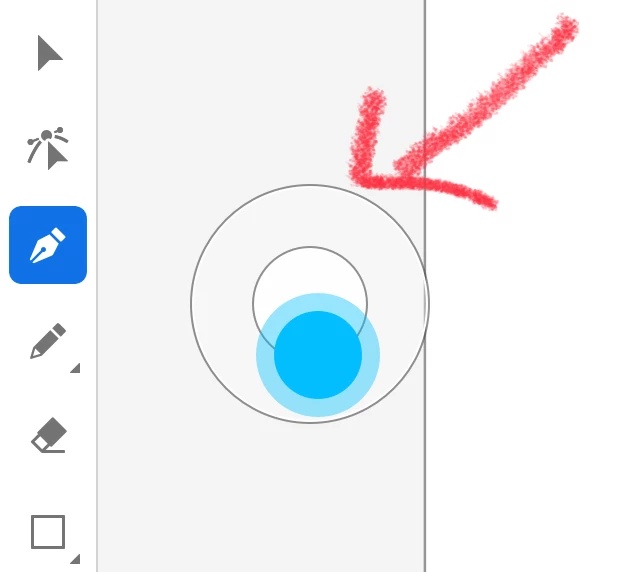
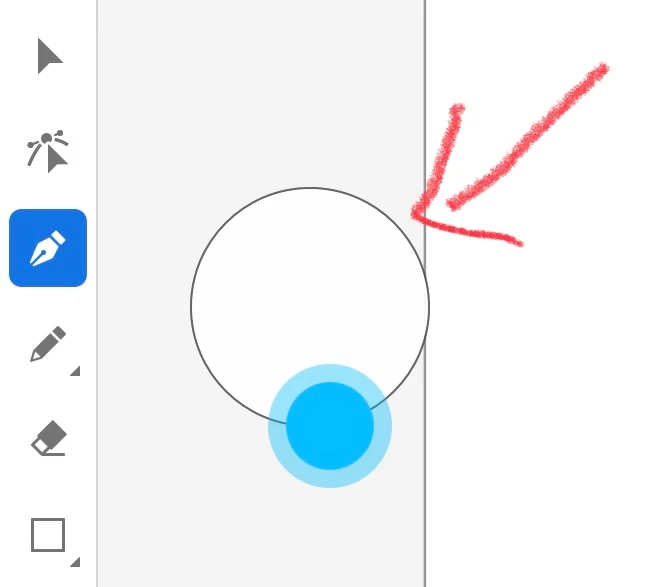
You can press and hold the circle, which is the modifier key, as you click with Pen tool. 

  • The circle can be dragged to a convenient location
  • The circle has two modes. You can drag to get one or the other. See both screenshots.
  • Ignore the blue — that just shows where my finger was when I took the screenshots.
  • Make sure you have the double circle as in the first screen shot to constrain to 45°.


~ Jane


1 reply

jane-e
Community Expert
jane-eCommunity ExpertCorrect answer
Community Expert
April 14, 2022


@eunac97298854 wrote:

There is no primary or secondary touch key, nor is there a context widget.


You can press and hold the circle, which is the modifier key, as you click with Pen tool. 

  • The circle can be dragged to a convenient location
  • The circle has two modes. You can drag to get one or the other. See both screenshots.
  • Ignore the blue — that just shows where my finger was when I took the screenshots.
  • Make sure you have the double circle as in the first screen shot to constrain to 45°.


~ Jane


Participating Frequently
April 14, 2022

because it's english
I didn't understand exactly
Thank you so much for your kind reply!

I want to draw 90-degree vertical lines and 180-degree horizontal lines with the pen tool in Adobe Illustrator on iPad.
The pencil tool is possible... Is there any way to use the pen tool?:)