Participant
September 8, 2026
Answered

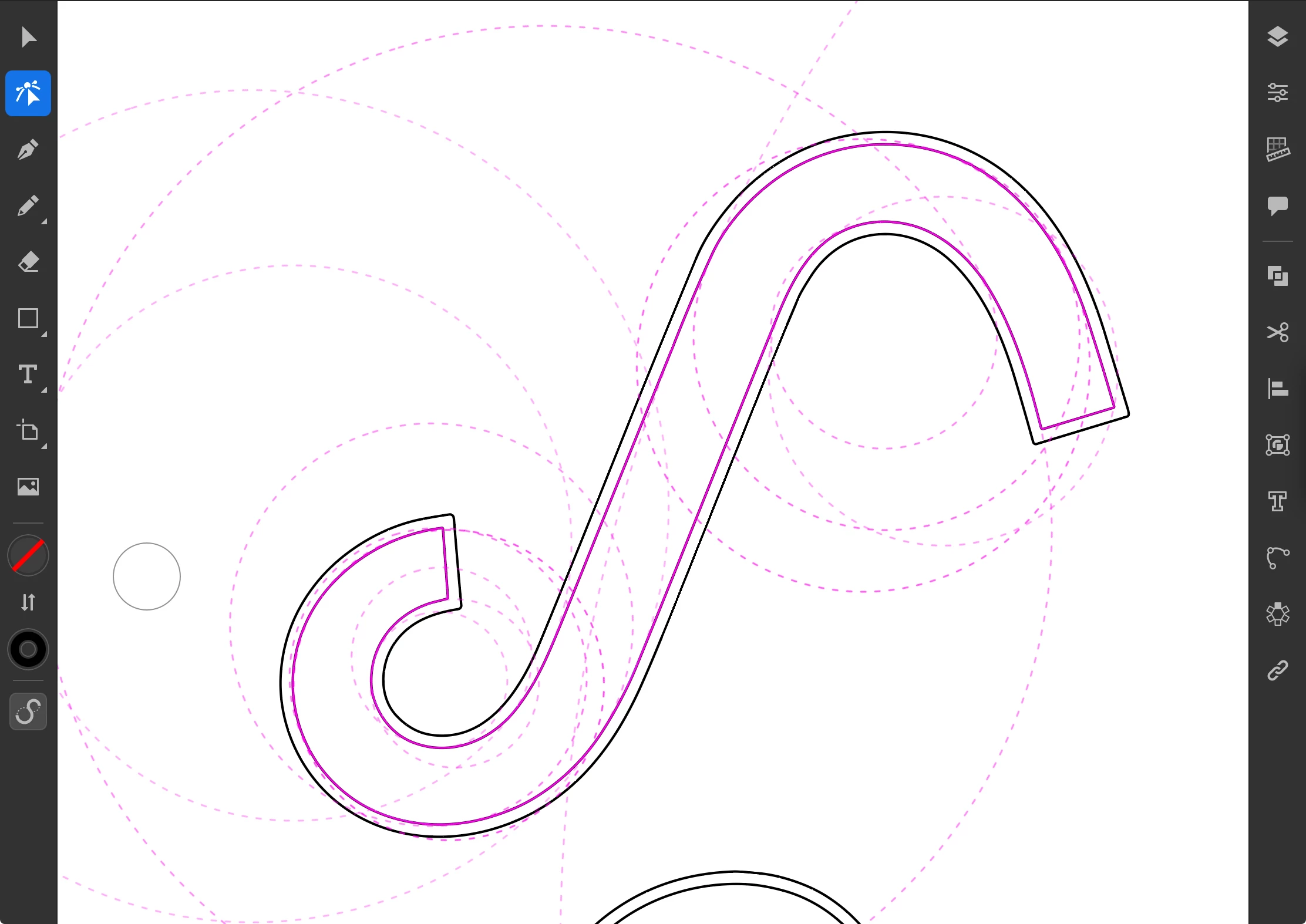
I am trying to figure out what this contextual tool does

  • September 8, 2026
  • 4 replies
  • 26 views

Hi all — this may be the first time in 20 years I’ve had to post a question because I just can’t find an answer in the docs or on forums. Does anyone have a name for (or any insight about) this tool that appears below the tool palette when you select a path with the Direct Selection tool? It gives a visualization of the radii of the curves in the path, but doesn’t seem to be editable or perform any actions. I am not aware of an equivalent in Illustrator for desktop, but it’s always possible I have just never come across it before.

Would love to get the name and features documented here, so that anyone else searching can find out more! 



    Correct answer jane-e

    @cmyink 

    I got a reply and have the answer for you. You have also use the touch icon with the Direct Selection tool to adjust the shape. See this help page and scroll to “Transform Shapes”. There is a video that really helps.

    https://helpx.adobe.com/illustrator/ipad/draw-and-edit-objects/draw-edit-shapes-ipad.html


    Transform shapes

    With the Shape transform tool  ,  you can analyze and modify the geometric structure of complex shapes without manually adjusting each path and anchor point.

    Transform shapes using Shape transform tool

    Select the object using the Selection tool   .

    Tap the Direct selection tool    to enable the Shape aware transform tool.

    Select the Shape aware transform tool    to view the geometric construct of the object.

    Tap the path you want to modify. 

    Press and hold the center of the touch shortcut icon and tap the path to select or deselect a path.

    Drag the path to modify the shape of the object. 


    Jane


    4 replies

    jane-e
    Community Expert
    jane-eCommunity ExpertCorrect answer
    Community Expert
    September 14, 2026

    @cmyink 

    I got a reply and have the answer for you. You have also use the touch icon with the Direct Selection tool to adjust the shape. See this help page and scroll to “Transform Shapes”. There is a video that really helps.

    https://helpx.adobe.com/illustrator/ipad/draw-and-edit-objects/draw-edit-shapes-ipad.html


    Transform shapes

    With the Shape transform tool  ,  you can analyze and modify the geometric structure of complex shapes without manually adjusting each path and anchor point.

    Transform shapes using Shape transform tool

    Select the object using the Selection tool   .

    Tap the Direct selection tool    to enable the Shape aware transform tool.

    Select the Shape aware transform tool    to view the geometric construct of the object.

    Tap the path you want to modify. 

    Press and hold the center of the touch shortcut icon and tap the path to select or deselect a path.

    Drag the path to modify the shape of the object. 


    Jane


    cmyinkAuthor
    Participant
    September 14, 2026

    @jane-e First of all, thank you so much for taking the time to read my question and look into this.

    You identified the exact feature I was puzzling over and helped give it a name (“Shape Transform Tool” — for the sake of SEO I will describe it here as an S-shaped tool icon). My instinct was that this is exactly what it was, but without the video in the link you shared, I hadn’t managed to figure out how to use it. 

    Thank you again! I’ve marked this answered by your second response! 

    jane-e
    Community Expert
    Community Expert
    September 14, 2026

    You’re welcome, ​@cmyink, I learned something new as well and don’t know how I missed it before!

    Laura Coyle sent me a link to a video on her YouTube channel that explains it even better. The video is 21 minutes long and worth a watch. You can modify one shape or all shapes that are copies of the original and are selected.

    https://www.youtube.com/watch?v=-DfkHZCtr-4


    Cheers,

    Jane

    jane-e
    Community Expert
    Community Expert
    September 13, 2026


    @cmyink 

    Good question! Adobe’s Help page does not show the icon at the bottom of the toolbar at all.

    https://helpx.adobe.com/illustrator/ipad/get-started/overview-and-setup/workspace-on-iPad.html

    Tapping it appears to hide/show the anchor points. I think it’s new.

    I’ll ask the Illustrator team on Slack and will get back to you if I get an answer.


    Jane