
Terence Lo
Participant
October 20, 2020
Answered

Illustrator for iPad - Colour Selection

  • October 20, 2020
  • 2 replies
  • 932 views

Just getting to grips with Illustrator for iPad.

It would be helpful if the name of the swatch selected was displayed in the Color selection on the left, or in the Properties popout on the right, not just an on-screen colour.

It's useful to be able to see if I've selected an RGB, CMYK or Spot, even if they look the same on-screen.

This topic has been closed for replies.
Correct answer Nitish Agarwal

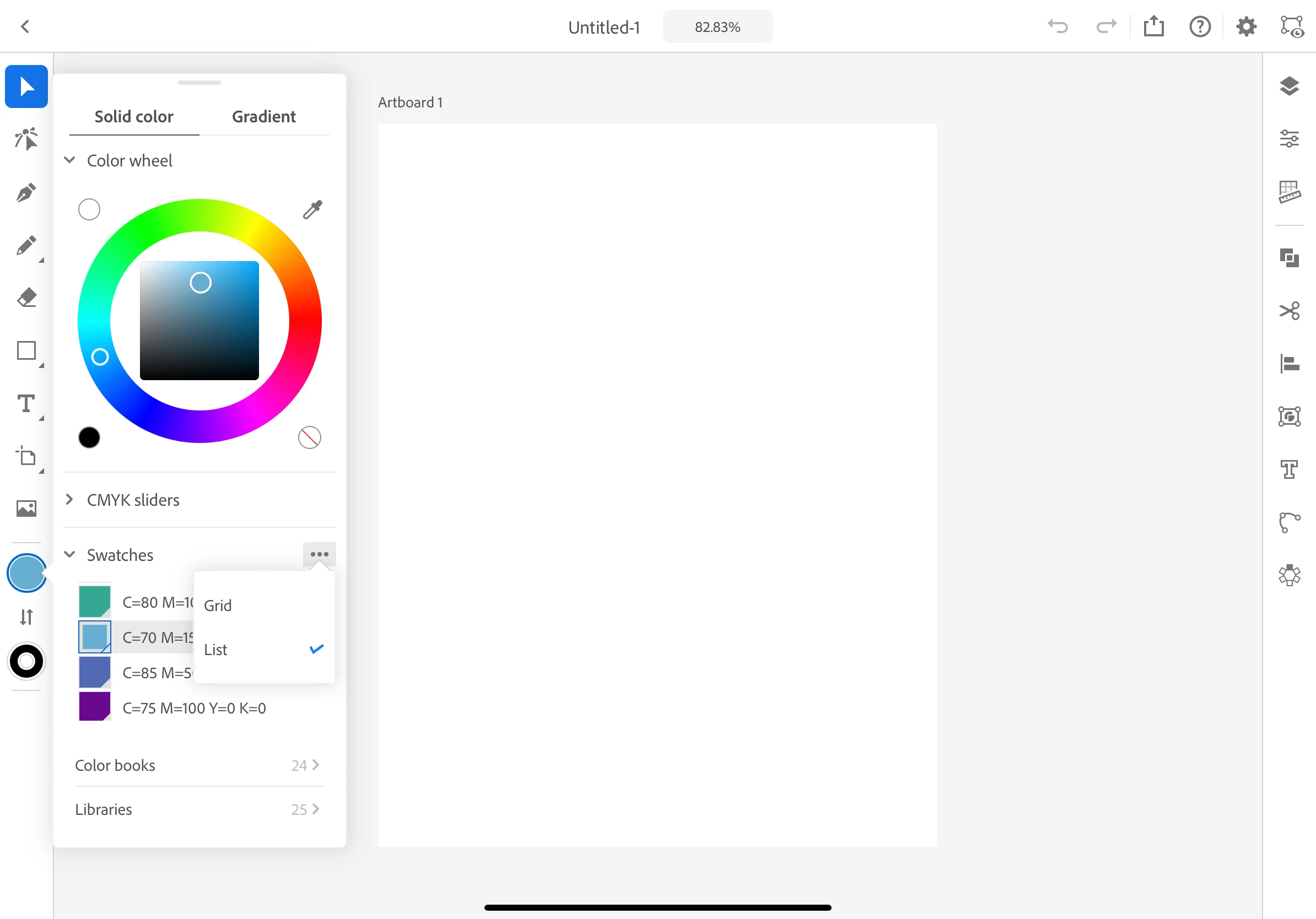
There is small work around to see the name of the swatches. In the color panel clivk on the 3 dots(...) against the swataches and select "List". You can see the name of the selected color. Please see the screenshot for reference.

2 replies

Nitish Agarwal
Adobe Employee
Nitish AgarwalCorrect answer
Adobe Employee
October 21, 2020

There is small work around to see the name of the swatches. In the color panel clivk on the 3 dots(...) against the swataches and select "List". You can see the name of the selected color. Please see the screenshot for reference.

Terence Lo
Participant
October 21, 2020

Dear nitishagarwal123,


Thank you for your feedback.  This option is fine for selecting colours to use, but is not so great for displaying the colour of an item in the artwork.  I've created an example for your reference here:

I made 4 circles using PMS Cool Gray 11C, 10C, 9C and 8C.  However after I've deselected the item and go back to select one of the circles, all I get is a shade in the colour wheel and no other text/detailed information about the colour of the item I've selected.  What makes it more confusing is there are CMYK sliders and values available despite this being set to a Spot Colour.


It would be nice to have a Colour palette that works like the full version of Illustrator, where the palette/options change according to the item selected.  I work in print and colour setup is very important to me.


I've submitted a feature request as per Shrshti's feedback above, I hope this makes it through.


Thanks!!


Terence

Nitish Agarwal
Adobe Employee
Adobe Employee
October 22, 2020

Hi Terence,


You have a valid request. I just wanted to share a work around for this which might help you a little.

Srishti Bali
Community Manager
Community Manager
October 21, 2020

Hi there,


Thanks for reaching out. I'd request that if you could take out a moment and post this as a feature request here: https://illustrator.uservoice.com/. This way, you will keep getting all the updates related to this feature & other users can also upvote, which would help us prioritize.


Regards,

Srishti