
Participant
December 4, 2020
Answered

Reflecting in Illustrator for iPad

  • December 4, 2020
  • 3 replies
  • 8325 views

Is it possible to reflect an object in Illustrator for iPad? Mirroring locks the two objects together - but can't figure out a way to separate them. Is there a way to reflect and still have two idependant objects that aren't locked together - can be moved independently? Thanks if anyone has info / experience with this.

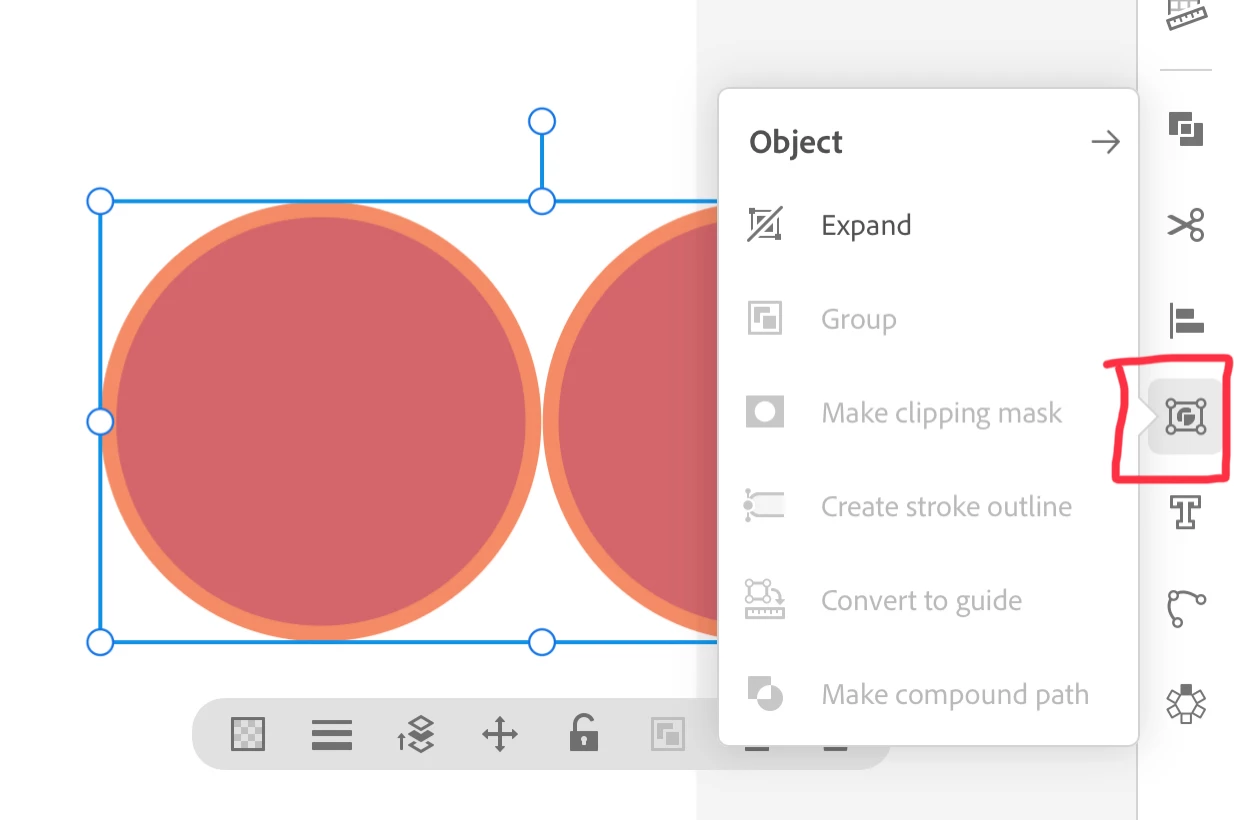
Correct answer jane-e

The Object menu is in the right-side panel.

~ Jane

3 replies

DougKatz17096006
Inspiring
December 5, 2020

Donnie, I was referring to the iPad version too! You mirror your objects, then go to the Object menu, the click Expand, then Ungroup. I did this on the iPad before I posted to you.

Monika Gause
Community Expert
Community Expert
December 4, 2020

Are you using the repeat function?

Can you please post a screenshot?

DougKatz17096006
Inspiring
December 4, 2020

Object>Expand, then Ungroup. You'll have separate objects.

Participant
December 4, 2020

Thank you Doug. Was referring to Illustrator App for iPad. The App version doesn't have the standard menus that the desktop version has.


Post moved by moderator

jane-e
Community Expert
jane-eCommunity ExpertCorrect answer
Community Expert
December 6, 2020

The Object menu is in the right-side panel.

~ Jane