Participant
November 17, 2022
Answered

Unable to access apps on Ipad "This account does not have access to a sync storage location."

  • November 17, 2022
  • 4 replies
  • 10976 views

Hello,

I have an Adobe ID for Business account which allows me to access all applications on my laptop without any problem.
I would like to draw on my iPad (with the "mobile" apps), but when I connect to the apps (Fresco or illustrator or photoshop)  with my Adobe ID, I get the following error message: "Access required - This account does not have access to a sync storage location. Use another account."

Do you know if it's normal not to be able to access apps without storage space?


Thank you in advance for your help !

Correct answer branjo!

Hi there, I was experiencing the same issue.

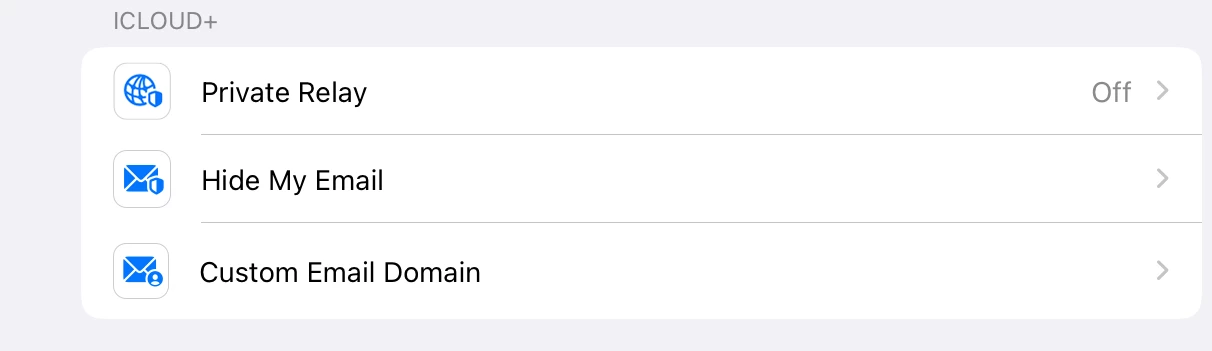
I got the message to disappear and was able to brows my cloud files by goring to my iPad's Settings -> tapping on my Apple ID -> iCloud ... and turning off "Private Relay" 

I hope that helps someone!

I'm on an iPad trying to access my Creative Cloud files through illustrator. My first desperate search on this forum mentioned accounts in china, which got me thinking of IP addresses. I knew I had private relay on. I quit illustrator, turned off private relay, and relaunched illustrator. Login was a success!

4 replies

Participant
October 30, 2025

Had the same issue. Erased the app from the Ipad and reinstalled it. Worked.

branjo!
branjo!Correct answer
Participant
June 4, 2023

Hi there, I was experiencing the same issue.

I got the message to disappear and was able to brows my cloud files by goring to my iPad's Settings -> tapping on my Apple ID -> iCloud ... and turning off "Private Relay" 

I hope that helps someone!

I'm on an iPad trying to access my Creative Cloud files through illustrator. My first desperate search on this forum mentioned accounts in china, which got me thinking of IP addresses. I knew I had private relay on. I quit illustrator, turned off private relay, and relaunched illustrator. Login was a success!

Philip Stancil
Participant
June 10, 2023

I tested this, and it worked for me!


However, afterwards I deleted the app, turned Private Relay back on, reinstalled the app, and tried again, and it worked, so while this solution works, I recommend the delete and reinstall solution provided by @Nicoya24 above as a better long-term solution. 🙂


tl;dr: Delete and reinstall.

Nicoya24
Participant
January 4, 2023

I have this exact same issue and it's only with Illustrator on the iPad. PS, LR work just fine under the same account. I have an Adobe CC subscription so app store isn't a culprit here.

Monika Gause
Community Expert
Community Expert
January 4, 2023

How is the file storage in your account set up?

The error says that there is no storage associated with it. This might happen when it's a company account and IT has set the storage to not be Creative Cloud.

Nicoya24
Participant
January 4, 2023

It's a personal subscription with the 100GB plan and 40ish GBs of free space. All other apps have no issues. I ended up deleting the app and reinstalling it on my ipad. It works now.

Participant
December 31, 2022

I'm in South Africa. I have an Adobe Illustrator subscription which includes the Adobe Illustrator for iPad access. I am not able to login to Adobe Illustrator for iPad. I get a message saying "This account does not have access to a sync storage location. Please use a different login." If I create a new login, I am prompted to subscribe for a further $10USD a month. I can't really afford to pay for another subscription.