

Open more than one document per session (in Open > Recent)
Hello,
I've made this request at the Adobe InDesign Feature Requests but for no avail, and nobody answered nor voted for my request. So I'm posting this problem here so that I can find a solution.
I'll basically repost the text I wrote last year on InDesign Feature Requests:
I copydesk book files using InCopy. The book comes to me in chapters, 1 chapter per file (usually 8), each in a separate subfolder. I work on each book/chapters for several weeks, so I have to close/open them several times a week (and turn off my computer every day, of course). I know there must be a way to merge these documents into a book or something like that, but that's not the point here (I have to accept this workflow and manage it as best I can). Also, I'm not talking here about file tabs, of course (I open several documents in tabs using the workflow I've just mentioned). The point is that there should be a way of opening more than one file at a time without me having to click Open Recent > [choose file] for each chapter/file I have to edit (if there's already a way of doing this, I would be very thankful if someone could tell me), just like in Windows Explorer/MacOS files management; but, as we all know, we can only open one file at a time, then wait for the file/chapter to be opened for editing and then doing the same with the other remaining files/cahpters: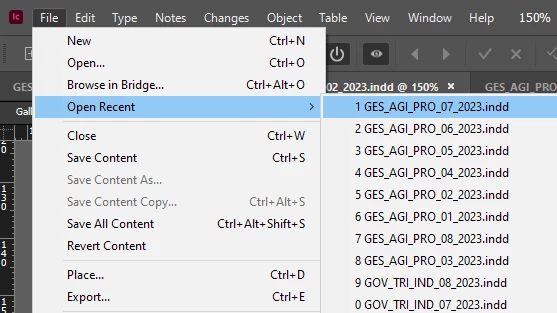
Workflow details: as I always work with book chapters (usually 😎 that are stored in different subfolders; that is, it is not possible to go to a single folder/directory, select the eight chapters that I will edit and open them whenever I need to edit these chapters (and I always need to have the 8 chapters open because I need to standardize terms, acronyms, etc. in all of them, saving time). Needless to mention, obviously I can't move the files I'm going to edit into the same/single folder as those files contain links to images and other details that prevent me from considering such a solution.
I'm an exclusive InCopy user (I'm a copyeditor, not a designer), so any alternatives (including opening/editing such files in InDesign or similar possible solutions) are out of the question. It is also worth mentioning that, as a professional copyeditor, I receive many books per month to be edited over the course of weeks (so that, over the course of days, as I said, when turning the computer off and on, I have to open each of the chapters one by one each time); so it's not a one-time problem.
I recognize that opening more than one file at once already demands a high computer/RAM processing, and opening 8 files/tabs may require a longer 'initialization', but an option that allows selecting, in 'Recent files', more than a file for them to be opened sequentially would be of great help.
If this option doesn't exist, it would be very helpful a new feature for opening more than one document at a time (for example, by selecting more than one file in Open > Recent or something like that). This would save me a lot of time (and procrastination-induced time wasting).
Regards,
Allan


 AdChoices