


Inspiring
April 22, 2026
Answered

テキストボックスで表示されない

  • April 22, 2026
  • 1 reply
  • 67 views

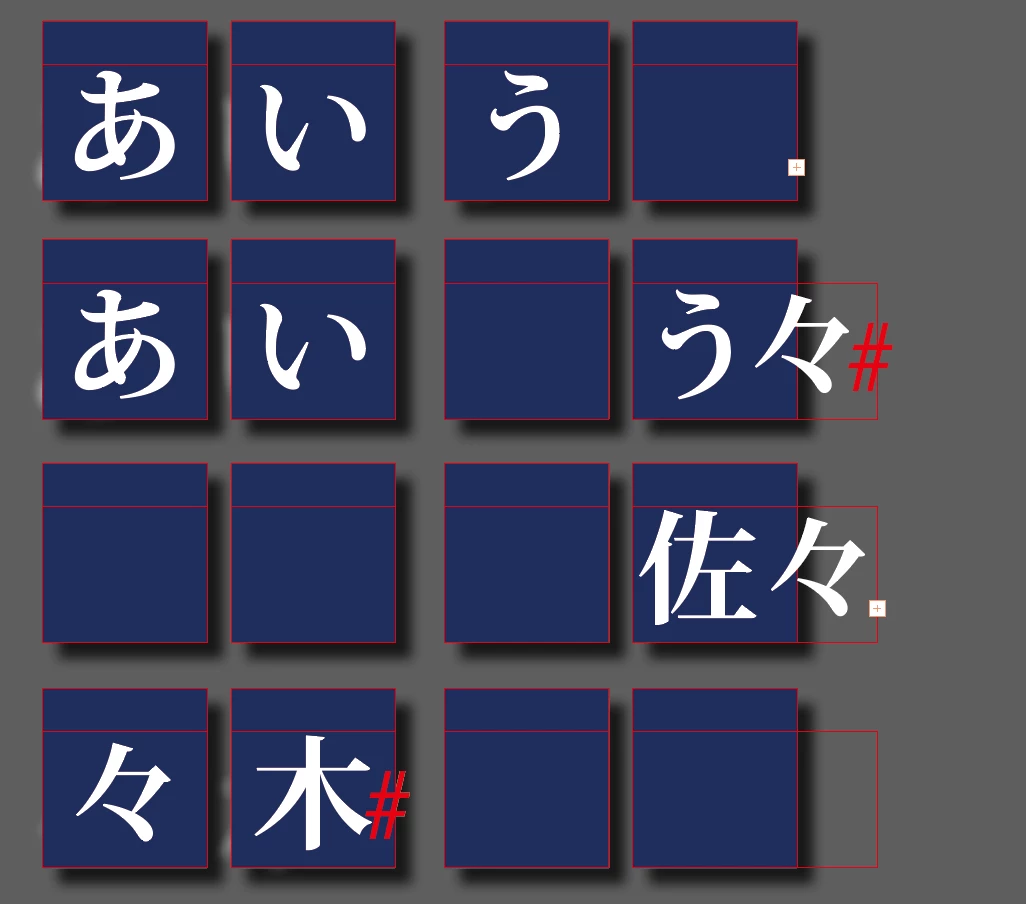
Indesignで、小さめのテキストボックスを連結して文字を流し込みました。
普通の文字列だと、問題なく表示されるのですが
「々」の文字が入った場合のみ、文字が表示されず
最後のテキストボックスのサイズを広げると初めて表示されるようになります。
「佐々木」のようなものだと一番後ろのテキストボックスに表示され、
「々」の文字が先頭にあると逆に問題なく表示されます。
解決方法がわかりません。よろしくお願いいたします。

(imac / mac OS sonoma 14.6.1 /  indesign2026)
 

    Correct answer Kyonko-t

    @Abhishek Rao 
    日本語における 段落の禁則処理をなしにしたら解決しました!
    盲点でした。本当にありがとうございます!

    1 reply

    nik.m
    Community Manager
    Community Manager
    April 22, 2026

    Hi ​@Kyonko-t , thanks for reaching out! 

    Please let us know the version of InDesign you’re using along with your computer’s operating system. It would be helpful if you could share a video of the issue while you’re inputting the characters so that we can see what’s happening and try to reproduce it. 


    Waiting to hear from you. 

    Thanks, 

    Nikunj

    Kyonko-tAuthor
    Inspiring
    April 23, 2026


    imac
    mac OS sonoma 14.6.1
    indesign2026(21.3.0.60)

    こちらの動画でわかりますか?
    よろしくお願いいたします。

    Abhishek Rao
    Community Manager
    Community Manager
    April 23, 2026

    Hi ​@Kyonko-t


    Thanks for sharing the details and the video.

    I was able to reproduce the same behavior on my end in the Japanese version of InDesign. I’m checking this further with the product team to confirm whether this is expected behavior, and I’ll update you here as soon as I have more information.


    Thanks for your patience.

    Abhishek