
Participant
April 27, 2020
Answered

1st Page won't delete in Indesign

  • April 27, 2020
  • 1 reply
  • 426 views

Greeitngs;

I have imported word file and placed it in indesign which is 30 pages long. When I try to delee the 1st page, it keeps deleting the last page (30) and the 1st page appears again and not deleted. Could anyone help what shud be the resolution. Thanks 
This topic has been closed for replies.
Correct answer ajabon grinsmith

Since there is little information, I will answer by guessing.

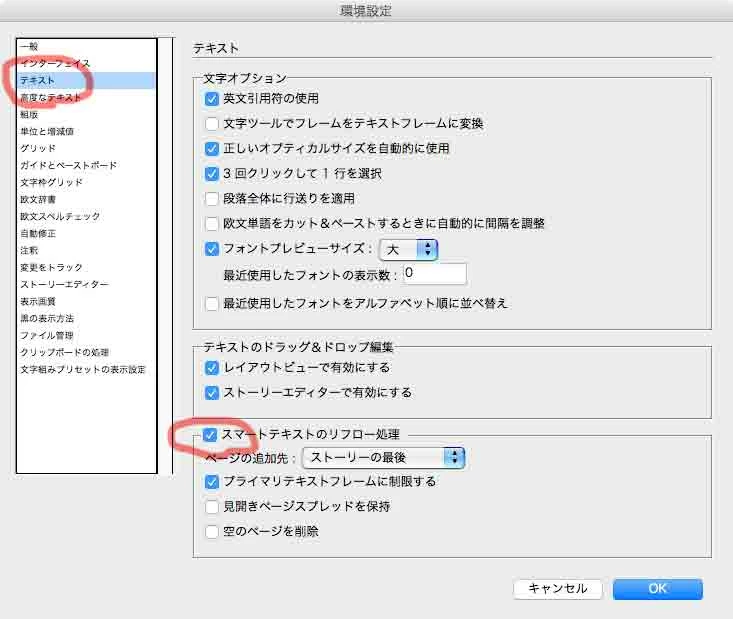
The text frames on all pages are concatenated and the first page is deleted as you manipulated it. However, it doesn't mean that the story is lost by the first page, only the first page and the first text frame are lost.

And if the story overflows, the page will automatically reflow as set in the document preferences.

I think this screenshot is different from your language, but it should be helpful.

1 reply

ajabon grinsmith
Community Expert
ajabon grinsmithCommunity ExpertCorrect answer
Community Expert
April 27, 2020

Since there is little information, I will answer by guessing.

The text frames on all pages are concatenated and the first page is deleted as you manipulated it. However, it doesn't mean that the story is lost by the first page, only the first page and the first text frame are lost.

And if the story overflows, the page will automatically reflow as set in the document preferences.

I think this screenshot is different from your language, but it should be helpful.