
Participant
August 13, 2025
Question

4K-Zweitmonitor: Fenster falsch skaliert/unscharf

  • August 13, 2025
  • 4 replies
  • 319 views

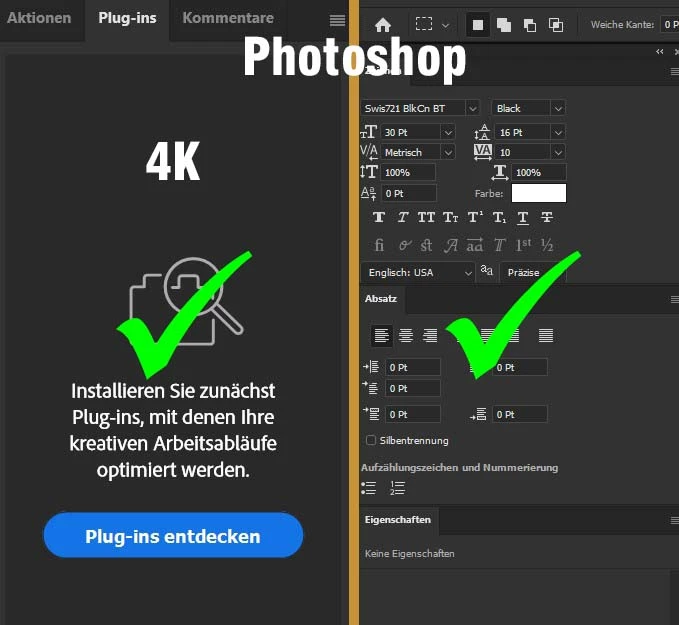
Photoshop und Illustrator machen alles richtig - die Fenster auf dem 4k-Zweitbildschirm sind richtig skaliert und scharf:


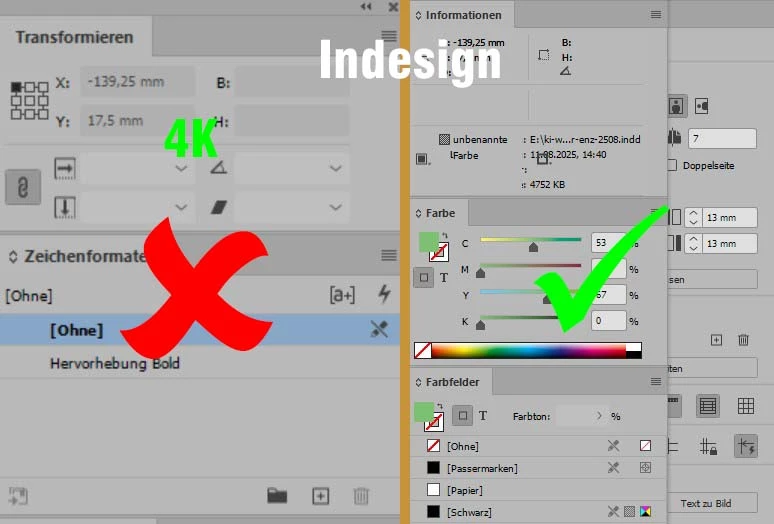
Anders Indesign - hier sind die Fenster auf dem 4k-Zweitbildschirm falsch skaliert und unscharf:


Was muss ich wo einstellen?


4 replies

rob day
Community Expert
Community Expert
August 13, 2025

Hi @holger_8433 , By default the InDesign 100% view is the Print view—Photoshop’s 100% is a 1:1 image to screen resolution.


I’m not using the most recent InDesign version, but in CC versions there is a hidden preference that you can access via scripting that lets you set a custom or Photoshop’s 1:1 100% view.


This script will let you match Photoshop’s 100% (a 1:1 ratio of screen to image pixels). The dialog looks like this:


You can get the script here:


https://www.dropbox.com/scl/fo/40psjmf85ha08gl3s5isw/AGfqsF_EDyNv4NetCKnnRC8?rlkey=lb1yxdhv2m5nioi481unvrk1h&dl=0

Mike Witherell
Community Expert
Community Expert
August 13, 2025

Guten tag, Holger,

Have you checked also on your Windows 11 settings?

What is Windows > Display doing? Accessibility > Text Size?

What is InDesign Preferences > Interface doing?

I recommend that you have two monitors that are the same native resolution, whether that is 4k or FullHD or whatever. Otherwise, Windows might get confused.

Mike Witherell
Participant
August 13, 2025

Hi Mike,

the monitor with the working-area has 100%, the 4K-Monitor has 150%. BUT: as I told, in Photoshop and Illustrator it works great. Only Indesign don't want to display the windows correctly.

Anubhav M
Community Manager
Community Manager
August 13, 2025

Hello @holger_8433,

Would you mind changing the resolution and scaling under the OS settings to the defaults for the monitor(s) (Windows / macOS), restarting your computer, and then relaunching InDesign to check if it helps?

If the problem persists, try the suggestions in this post (https://adobe.ly/3Jf3Cxx) and share your observations.

Looking forward to hearing from you.

Anubhav

Abhishek Rao
Community Manager
Community Manager
August 13, 2025

Hi @holger_8433,


Thanks for explaining the issue in these details. To start with, I would recommend try renaming the CEP folder to CEP.old from C:\Program Files (x86)\Common Files\Adobe. If that doesn't make a difference, rename the UXP folder to UXP.old from both C:\Program Files\Common Files\Adobe\ and C:\Program Files (x86)\Common Files\Adobe. Once done, relaunch InDesign and check if the scaling and sharpness improve on your 4K monitor.


Looking forward to hearing how it goes.

Abhishek

Participant
August 13, 2025

Hi Abhishek,

thanks for your ideas, but that didn't work. 😞

Do you have more ideas?

Thanks

Holger


Participant
August 13, 2025

Nachtrag zum Verständnis: Ich arbeite an zwei Monitoren - einem Grafik-Monitor (Arbeitsfläche) und einem 4K-sRGB Monitor (sonstige Andockfenster). Leider haben die Bilder beim Hochladen gelitten: Die Bilder zeigen zwei Screenshots über beide Monitore. Jeweils links sieht man den 4K-Monitor, rechts den Grafik-Bildschirm. Während im oberen Bild (Screenshot Photoshop) beide Seiten scharf sind, ist im unteren Bild (Screenshot Indesign) nur die rechte Seite scharf. Die Fenster auf dem 4k-Monitor sehen unscharf (falsch skaliert) aus.

Participant
August 13, 2025

Und noch ein Nachtrag: ich arbeite mit der aktuellen CC unter Windows 11 pro