
Participant
November 25, 2024
Answered

A bracketed list in InDesign

Hi all. I am not super familiar with GREPs in InDesign. 


I need to create a list like this...

(a) 

(b)

(c)


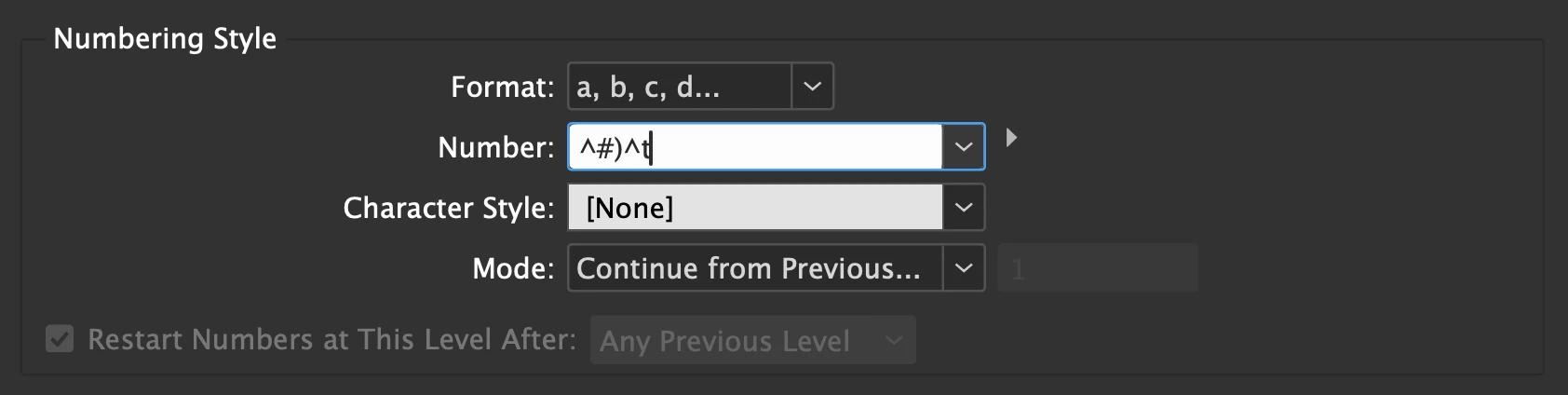
I have managed to update it to have one bracket after the number but not sure how to get the bracket before the letter. Any help would be appreciated!



This topic is closed to new replies. Start a new post to keep the conversation going.
Robert at ID-Tasker
Robert at ID-TaskerCorrect answer
Legend
November 25, 2024

"^#" represents one character - same way as "^t" - and it means "current level".


For lower levels - you can use higher level - "^1" will insert value of the 1st level. You can insert them using the small triangle on the right of the "Number" field. 


3 replies

Robert at ID-Tasker
Legend
November 25, 2024

Just add opening bracket:


Translate
Participant
November 25, 2024

Thank you so much, I was adding ti before the hashtag and it wasn't working, but now I see why!

Translate
Robert at ID-Tasker
Robert at ID-TaskerCorrect answer
Legend
November 25, 2024

"^#" represents one character - same way as "^t" - and it means "current level".


For lower levels - you can use higher level - "^1" will insert value of the 1st level. You can insert them using the small triangle on the right of the "Number" field. 


Translate