Inspiring
January 8, 2017
Answered

A character/paragraph style question

  • January 8, 2017
  • 2 replies
  • 704 views

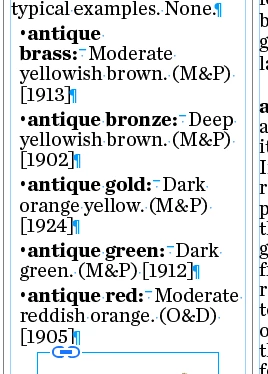
How do I stop very annoying line breaks like the first one in this list?
    This topic has been closed for replies.
    Correct answer smoothsea

    Hi Marie,

    The problem is caused by the fixed en space after "brass:". Because Indesign won't break a line after such a space, you have to either replace it with a normal variable space (with the spacebar), or you need to put a shift-return after the colon and remove the space.

    Unless someone has a better idea ...

    Regards,

    Malcolm

    2 replies

    smoothseaCorrect answer
    Inspiring
    January 8, 2017

    Hi Marie,

    The problem is caused by the fixed en space after "brass:". Because Indesign won't break a line after such a space, you have to either replace it with a normal variable space (with the spacebar), or you need to put a shift-return after the colon and remove the space.

    Unless someone has a better idea ...

    Regards,

    Malcolm

    Inspiring
    January 8, 2017

    For now I have to keep the en space - there is a bit of formatting code that depends on it and I lack the courage to try to change it. Could I do I a find/change and add something after each en space  than InDesign will break on? What is the code/character for a variable space?

    Inspiring
    January 8, 2017

    Duh! ^> then hit the space bar! It works, thanks.

    Jeff Witchel, ACI
    Community Expert
    Community Expert
    January 8, 2017

    Select •antique brass: and under the options menu of the Character panel, select "No Break." You can also save "No Break" as part of a Character Style to apply it wherever you need it.

    Inspiring
    January 8, 2017

    ... and that was the better idea!

    Thanks Jeff :-)

    Regards,

    Malcolm