
Participant
February 9, 2024
Question

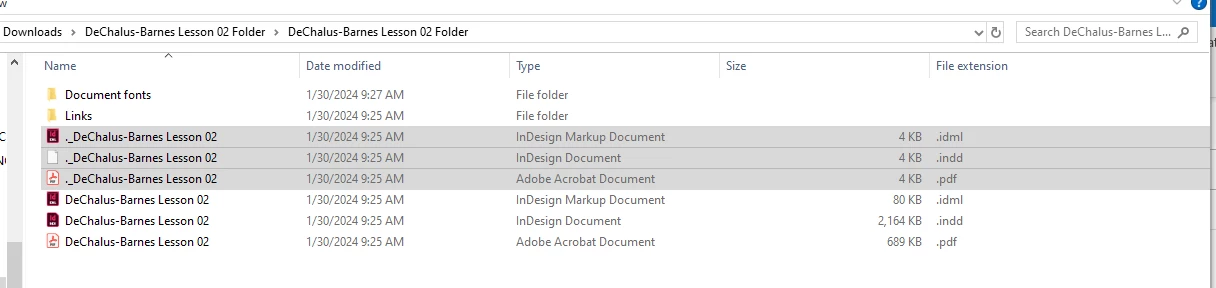
A second .indd, .idml, and .pdf file displaying in package folder

  • February 9, 2024
  • 4 replies
  • 212 views

I have a student packaging her files on a mac and the package folder looks correct on her computer.  I open them on a PC and I see doubles of the .indd, .idml, and .pdf files but all are very small size and don't open.  I have plenty of students that work on macs that I then open on PCs and have not seen this before.  The other three files work as expected.  So far all of her packaged submissions look like this.  Any thoughts on why this may be occuring?  Thanks!
 

This topic has been closed for replies.

4 replies

BobLevine
Community Expert
Community Expert
February 9, 2024

And one more thing. Turn on file extensions for all file types.

leo.r
Community Expert
Community Expert
February 9, 2024

Files starting with "." are invisible on Mac. Frankly, I don't know why these files were created in the first place but like others already mentioned you can ignore/delete them.

Robert at ID-Tasker
Legend
February 9, 2024

@BobLevine is right - it's a Mac thing.


But I think, there was an extra folder one level up named "MacOS" or something like that and those files were there - not in the same folder with original files? 


BobLevine
Community Expert
Community Expert
February 9, 2024

This has absolutely nothing to do with InDesign or any other application. That is how it has always worked going from Mac to Windows.


Assuming these files will reside only on your computer, you can safely delete all of the files beginning with a "." If those files are being shared, just leave them alone and ignore them.