Inspiring
July 11, 2018
Answered

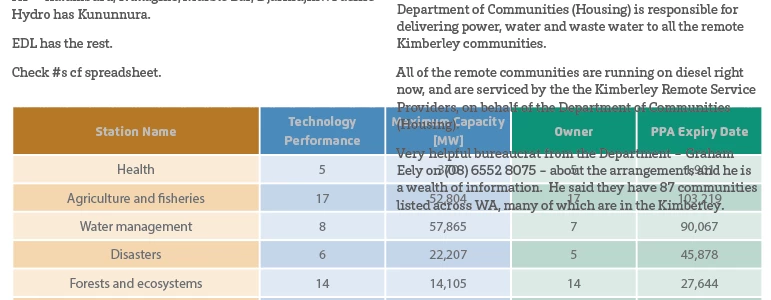
A table inserted into a two column text frame has text from right column over the table text.

  • July 11, 2018
  • 2 replies
  • 583 views

This is my problem:

The left column never runs over the table but the right column seems to all the time. I tried setting the Table Paragraph style to spacing multiple columns but nothing doing (which isn't logical but I wanted to try a few things before posting this request for help). The more I try tacky ways to solve this the more I have problems like the next table going into tight column one top of this table. Hoping there is a canonical way to deal with this. Never had this problem before in InDesign. I think I usually put Tables in separate frames and manually adjust position as text reflows. Trying to find a way to avoid that extra work. 
This topic has been closed for replies.
Correct answer Laubender

Hi,

to solve this you have to give the table its own paragraph.

Select the paragraph special character where the table sits and span that paragraph to all text columns.

And you would run the text in two column text frames.

The downside:

Text above the table will stay above the table.

Text below the table will stay below.

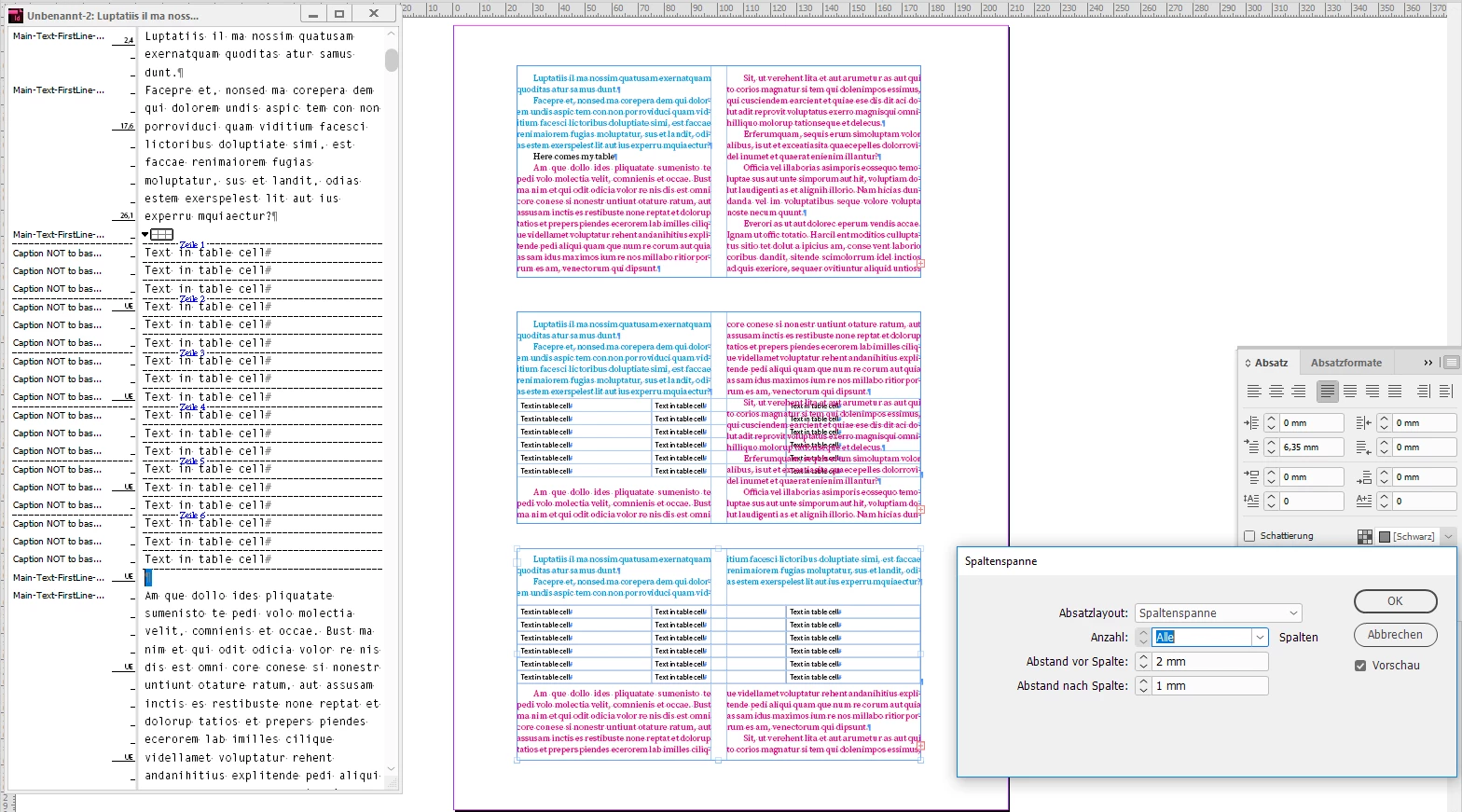
A screenshot from my German InDesign is illustrating this.
Three steps to a solution.

Paragraph special character selected in Story Editor Window.

The paragraph contains the table. And only the table.

Column Span is set to span All columns. And I did some values for distance above and below as well.

Regards,
Uwe

2 replies

Barb Binder
Community Expert
Community Expert
July 11, 2018

Hi again, wideEyedPupil:

I think I usually put Tables in separate frames and manually adjust position as text reflows.

Alternatively, to maintain the normal flow, you can put the table back into its own frame with text wrap, and anchor the frame so that it reflows automatically. For wide tables (and graphics) like yours, I set the Anchored Object Options to keep the tables (and graphics) at bottom of the page with the anchor. This can be a little flakey, so you may still need to move the anchors around after edits, but it should reduce the amount of work that you are doing now.

~Barb

~Barb at Rocky Mountain Training
Inspiring
July 11, 2018

Ah, yes. Thanks, Barb now I recall, that is what I used to do, a table frame inside main text frame, and yes the anchoring did seem a bit flaky and I was always rejigging the vertical position or space before/after them to stay perfectly consistent.

Been so long since I used InDesign I forgot how to do that, either that or its early onset senile dementia!

Must say that the table styles are driving me crazy and not behaving as they should with random rows and cells not formatting even though they have no overrides. And seeing as copy/pasting from one table to another can't use "Paste Without Formatting"I continually need to reapply styles either manually or with a Table Style and Cell Styles. What a time waster when it doesn't work as advertised.

I'll post a separate forum question about it though.

LaubenderCommunity ExpertCorrect answer
Community Expert
July 11, 2018

Hi,

to solve this you have to give the table its own paragraph.

Select the paragraph special character where the table sits and span that paragraph to all text columns.

And you would run the text in two column text frames.

The downside:

Text above the table will stay above the table.

Text below the table will stay below.

A screenshot from my German InDesign is illustrating this.
Three steps to a solution.

Paragraph special character selected in Story Editor Window.

The paragraph contains the table. And only the table.

Column Span is set to span All columns. And I did some values for distance above and below as well.

Regards,
Uwe

Inspiring
July 11, 2018

Thanks Laubender, that's what I was after.