Participant
Jan 6, 2023 5:09 PM UTC
Answered

A very basic find and replace question

Hi, I have always wanted to do the following:

Find all text with a certain format and then add a special character in front of all instances of the formatted text.


For example:

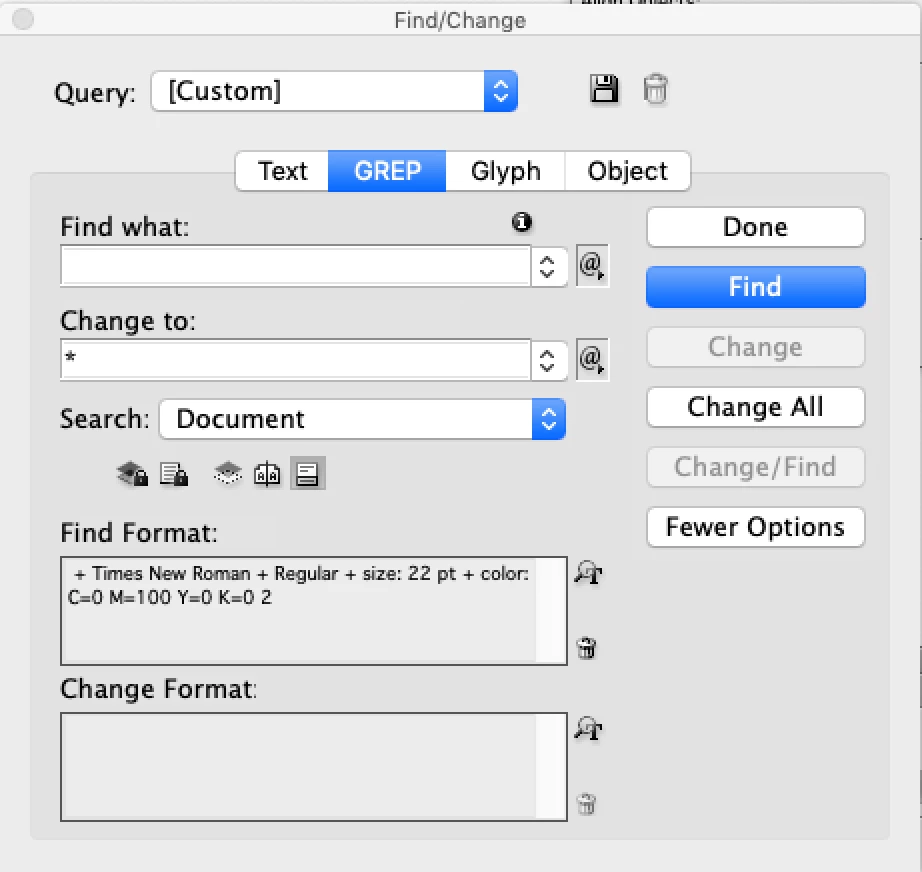
Find format: Times New Roman + Regular + size: 22 pt + color: C=0 M=100 Y=0 K=0

and then I want to add an asterisk in front of occurrence of this format in my document.


Can this be done with GREP?
 

This topic is closed to new replies. Start a new post to keep the conversation going.
FRIdNGE
FRIdNGECorrect answer
Jan 6, 2023 5:38 PM UTC

Basically:


Find: .+

Replace by: *$0


(^/)  The Jedi

9 replies

pixxxelschubser
Community Expert
Community Expert
Jan 6, 2023 8:00 PM UTC

@Chris22040923b75s 

Why not just activate the bullet and numbering function in your paragraph style sheet with the asterisk as a bullet?


Translate
Participant
Jan 6, 2023 8:09 PM UTC

Well, I just used an asterisk as a stand-in for any string of text I might want to do in the future.

Translate
Robert at ID-Tasker
Legend
Jan 6, 2023 6:49 PM UTC

@FRIdNGE is perfectly right 😉 BUT @Chris22040923b75s, you need to tell us more about the text you are looking for - only in front of a paragraph or every word or phrase ?


Translate
Participant
Jan 6, 2023 6:54 PM UTC

in front of a paragraph. But I could see putting it in front of a phrase being very useful as well.

Translate
Robert at ID-Tasker
Legend
Jan 6, 2023 7:16 PM UTC

Then @FRIdNGE's solution should work perfectly fine.


Translate
Barb Binder
Community Expert
Community Expert
Jan 6, 2023 6:39 PM UTC

Hi @Chris22040923b75s:


Note you need to enable GREP tab at the top of the dialog box. This won't work if you leave the default Text tab selected. 


~Barb

Translate
~Barb at Rocky Mountain Training
Participant
Jan 6, 2023 6:53 PM UTC

Yes, that's correct. excuse my poor screenshot etiquette. I did switch the tab when I tried "the Jedi's" method.

Translate
FRIdNGE
FRIdNGECorrect answer
Jan 6, 2023 5:38 PM UTC

Basically:


Find: .+

Replace by: *$0


(^/)  The Jedi

Translate
Participant
Jan 6, 2023 6:51 PM UTC

Thank you! this did work.

Translate