

dublove
Legend
February 19, 2025
Question

A way to handle columns that span multiple rows. Request a script.

  • February 19, 2025
  • 1 reply
  • 492 views

This solution does not require merging cells, you may need to manually modify the contents of a column that spans multiple rows to the appropriate position (of course it would be best to automate this). 


I think this is a bit safer and less work, and easier to implement .

The biggest benefit is that only the initial discharge needs to be treated.


A specific program:

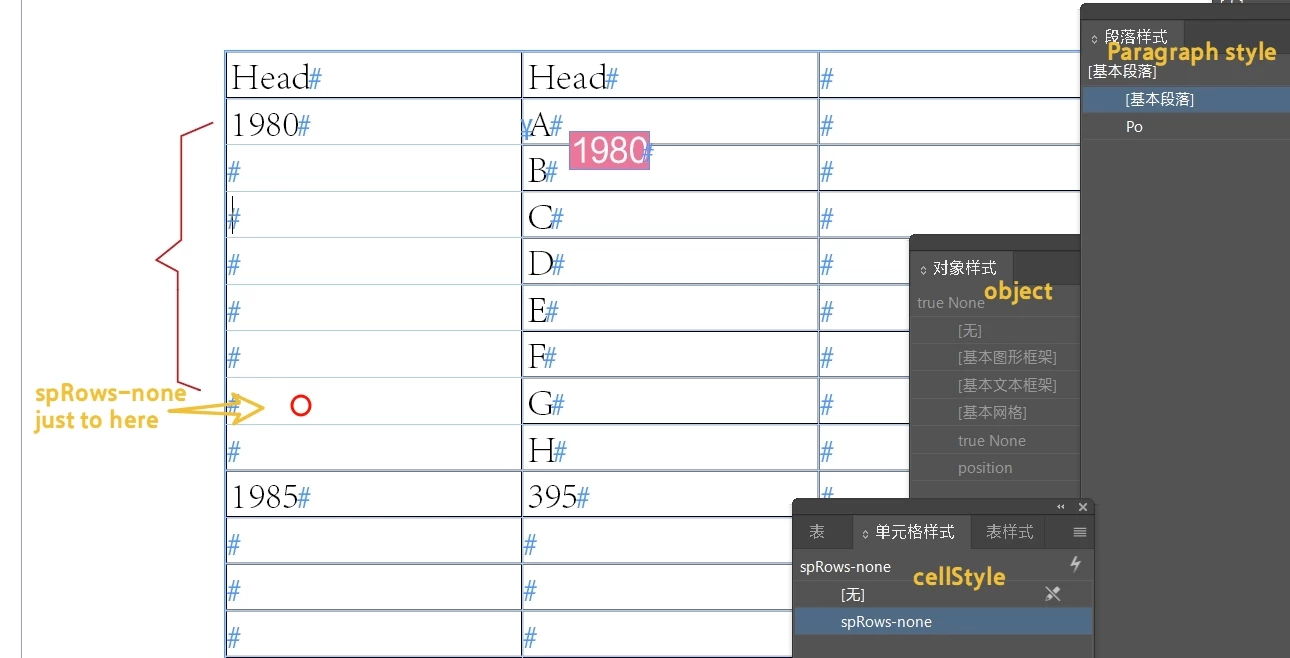
Insert a block at the cursor and apply the object style "point".

The point object style has automatic height and width adjustments and has non-printing properties.


The content of the block is  "content across columns". 

From the first row of the spanning column, to the penultimate row, apply the cell style "spRows-none". 


Ask for a script.

Thank you very much.

1 reply

m1b
Community Expert
Community Expert
February 19, 2025

Hi @dublove, I am having trouble understanding this post. Would it be possible to post a BEFORE and AFTER document? Make it as simple as possible, but showing what you want.

- Mark

dublove
dubloveAuthor
Legend
February 19, 2025

Hi @m1b  Thanks a lot for the reply!

New samples have been provided


I would like Trying to automate it:
In the 1st row and 2nd column of each span, insert an in color block that fills in the contents of the span.
Automatically apply spRows-none cell style.

As for, 1980, 1985, 2001, 2002 vertical centering may have to be done manually.


Maybe it's safer to execute the script once per spanRow


Or do you have some other way to label it that will show up clearly ,and but won't be printed