Participant
March 27, 2019
Answered

Accessability

  • March 27, 2019
  • 1 reply
  • 1082 views

Hello,

I am trying to tag a document, I have done everything that is needed. But when I export for PDF it is reading two separate text boxes as one. They have sepereate paragraph styles and one is H1 and one is H2. They are separate in the articles panel as well. But as soon as I export as PDF these two elements become one and read as span and they do not follow the order I have in the articles in InDesign?

Any helps would be appreciated.

Thanks

    This topic has been closed for replies.
    Correct answer Bevi Chagnon - PubCom.com

    This is a case where a picture is worth a thousand words!

    There are several issues for what you're seeing.

    1. You posted in the Accessibility forum, but your InDesign file is using XML tags.  That's when you use the "Tags" and "Structure" panels in InDesign, and you see colored brackets [ ] around your content.

    XML tags are NOT the same as PDF tags for accessibility. There are a bazillion-and-one mark-up languages and technologies that use tags, all kinds of tags with different names. HTML, XML, PDF, EPUB are just a few of the most common in publishing.

    Accessibility requires that the PDF be tagged with those for accessibility, not XML.

    So ditch the XML. We haven't needed to use XML since CS 5.5 (2011) when Adobe built tools into InDesign specifically for making accessible PDFs that are tagged to meet the PDF standards. And your XML just gets in the way of making your PDFs accessible.

    2. Your second screen shots are of Acrobat's Order panel, not the Tags panel.

    First, the accessibility standards do not require that the Order panel (aka, the architectural/construction panel) have a correct reading order. Only the Tags panel is required to have a logical reading order. So in theory, you don't need to worry about what you see in the Order panel.

    But it is wise to get it into decent shape because other technologies use it. The Order panel's reading order is only partly controlled by InDesign's Articles panel: the other key factor is the Layers panel and the elements' stacking order within the layers. Fix them if you want to fix the Order panel's reading order.

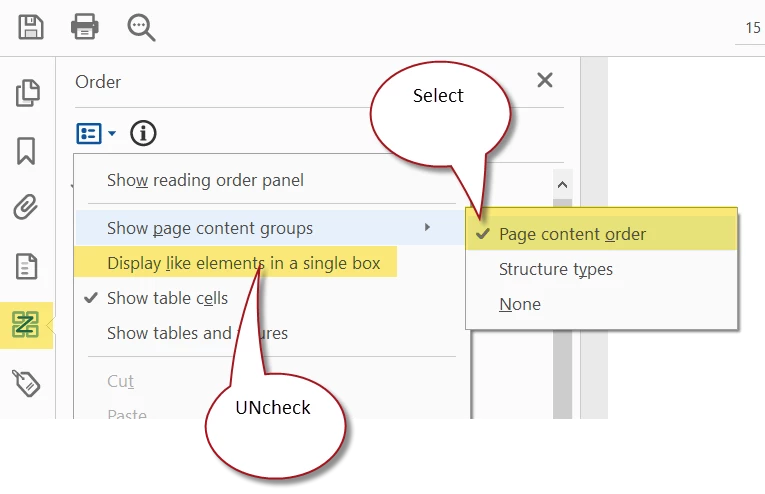
    Second, adjust how Acrobat displays elements in the Order panel:
    3. I'd love to know where you heard to use XML tags for accessibility. I get about 3-4 students a month who make the same mistake and have to relearn how to make accessible PDFs from InDesign.

    Several of us designers specialize in accessible documents, and we're working hard every day with Adobe and Microsoft to provide the right tools in our programs to make it easier to be compliant with the standards. XML has nothing to do with accessibility: therefore XML tools can't help you make documents that meet today's accessibility standards (PDF and PDF/UA-1).

    Don't want to harp, but want to make sure it's clear:

    XML tags are NOT the same as PDF tags for accessibility.

    1 reply

    Bevi Chagnon - PubCom.com
    Legend
    March 27, 2019

    Where are you seeing the 2 elements as 1?

    In which Acrobat panel do you see that?

    To help us diagnose the problem, please answer the following questions:

    • What version of InDesign are you using.
    • What platform.
    • Are there hard returns between the paragraphs or line breaks.
      "Hard Return" = the Enter/Return key on your keyboard.
      "Line Break" = Shift+Enter.

    FYI, the reading order most likely is a different issue.

    |    Bevi Chagnon   |  Designer, Trainer, & Technologist for Accessible Documents ||    PubCom |    Classes & Books for Accessible InDesign, PDFs & MS Office |
    Participant
    March 27, 2019

    In InDesign I have it set out like this:

    When exporting to PDF and checking in acrobat pro it is doing the below?

    This is also happening for my following pages, when exporting to a PDF it is not following the order in indesign?

    All the elements are sepereate boxes in regards to text.

    I am using adobe indesign CC 2018

    Bevi Chagnon - PubCom.com
    Legend
    March 27, 2019

    This is a case where a picture is worth a thousand words!

    There are several issues for what you're seeing.

    1. You posted in the Accessibility forum, but your InDesign file is using XML tags.  That's when you use the "Tags" and "Structure" panels in InDesign, and you see colored brackets [ ] around your content.

    XML tags are NOT the same as PDF tags for accessibility. There are a bazillion-and-one mark-up languages and technologies that use tags, all kinds of tags with different names. HTML, XML, PDF, EPUB are just a few of the most common in publishing.

    Accessibility requires that the PDF be tagged with those for accessibility, not XML.

    So ditch the XML. We haven't needed to use XML since CS 5.5 (2011) when Adobe built tools into InDesign specifically for making accessible PDFs that are tagged to meet the PDF standards. And your XML just gets in the way of making your PDFs accessible.

    2. Your second screen shots are of Acrobat's Order panel, not the Tags panel.

    First, the accessibility standards do not require that the Order panel (aka, the architectural/construction panel) have a correct reading order. Only the Tags panel is required to have a logical reading order. So in theory, you don't need to worry about what you see in the Order panel.

    But it is wise to get it into decent shape because other technologies use it. The Order panel's reading order is only partly controlled by InDesign's Articles panel: the other key factor is the Layers panel and the elements' stacking order within the layers. Fix them if you want to fix the Order panel's reading order.

    Second, adjust how Acrobat displays elements in the Order panel:

    3. I'd love to know where you heard to use XML tags for accessibility. I get about 3-4 students a month who make the same mistake and have to relearn how to make accessible PDFs from InDesign.

    Several of us designers specialize in accessible documents, and we're working hard every day with Adobe and Microsoft to provide the right tools in our programs to make it easier to be compliant with the standards. XML has nothing to do with accessibility: therefore XML tools can't help you make documents that meet today's accessibility standards (PDF and PDF/UA-1).

    Don't want to harp, but want to make sure it's clear:

    XML tags are NOT the same as PDF tags for accessibility.

    |    Bevi Chagnon   |  Designer, Trainer, & Technologist for Accessible Documents ||    PubCom |    Classes & Books for Accessible InDesign, PDFs & MS Office |