
Inspiring
November 11, 2022
Question

Accessibility Reading order not come as single (container) while creating tagged pdf from InDesign

  • November 11, 2022
  • 1 reply
  • 830 views

Hi

I am using InDesig 2023 I just placed some paragraphs and create Interactive PDF with tagged PDF option enabled.  While checking the reading order it put reading order 1 is heading no issue from 2 to 7 separate reading order for single para.


Becuase of the separate reading order for each and everyline while reading in JAWS screen reader for each line I need to press down arrow. 

There is any option to fix single reading order number while exporting tagged PDF from InDesign.
InDesign output PDF
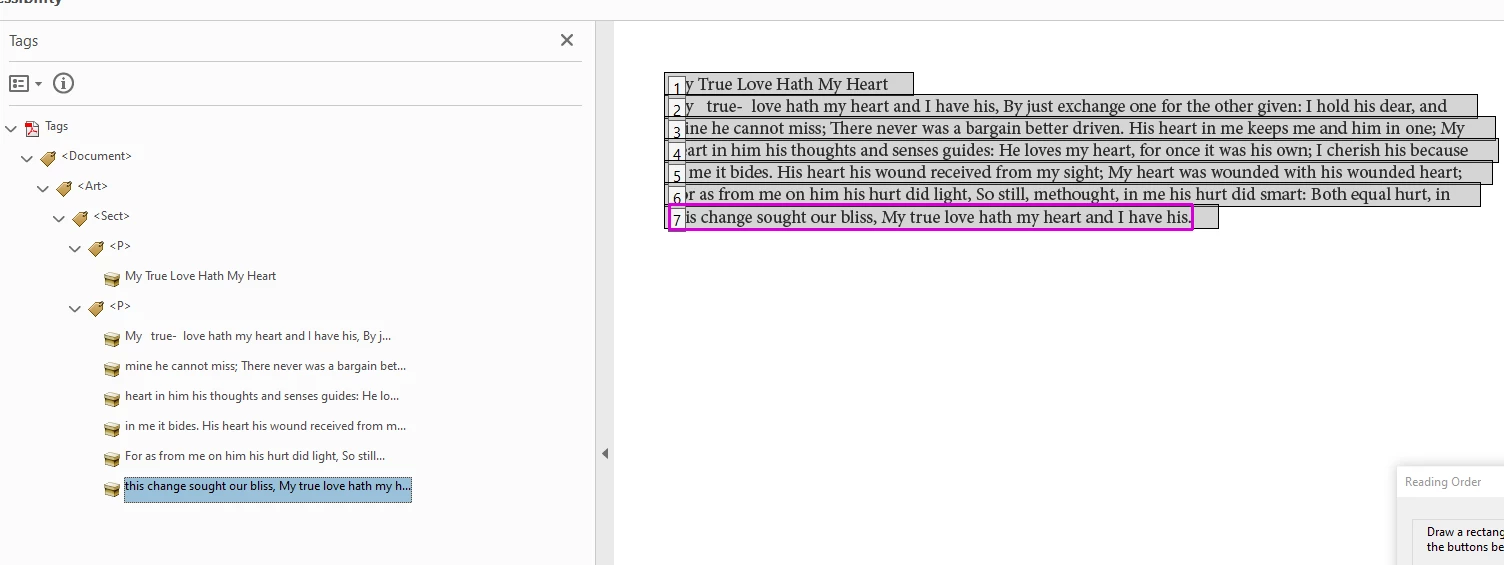
For the same paragraph if we tag in PDF it say only single reading order. Please refer the below screenshot. If I read the 2 reading order in JAWS reader it read continuously.
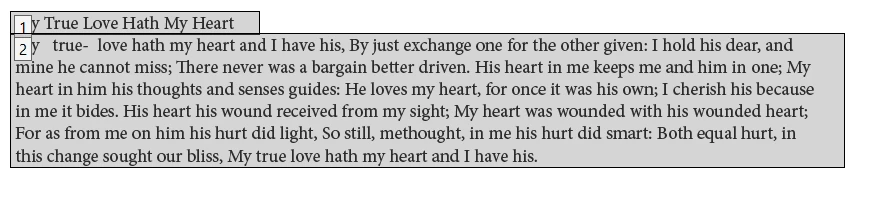
 

Thanks

Ganesh.R


Accessibility Reading order not come as single (container) while creating tagged pdf from InDesign

This topic has been closed for replies.

1 reply

Mike Witherell
Community Expert
Community Expert
November 16, 2022

Did you use the Article panel? And in the Article panel menu button flyout, did you turn on "Use for Tagging Order in PDF"?

And when exporting a PDF, did you turn on "Use Structure for Tag Order" and "Create Tagged PDF"?

Mike Witherell
Ganesh_InAuthor
Inspiring
November 17, 2022

Hi @Mike Witherell 

I already checked the above option but it not works. please refer the below screenshot. I attached InDesign file for your reference. Other than this there is any option to tag as single reading while exporing into pdf

Bevi Chagnon - PubCom.com
Legend
November 20, 2022

@Ganesh_In, after looking at your screen captures, your page layout has a lot of separate text frames that are not threaded into one continuous story. Learn how to do this at https://helpx.adobe.com/indesign/using/threading-text.html 


quote

Becuase of the separate reading order for each and everyline while reading in JAWS screen reader for each line I need to press down arrow.


You're seeing the individual content containers (the yellow boxes in the tag tree), InDesign creates these for each line of text because InDesign composes type (aka, typesetting).


Having a content container for each line does not affect accessibility. Be concerned more about the tags that surround the content containers, and, of course, the tag reading order.


RE: JAWS, check that you're using the correct keyboard shortcut to have the screen reader read sequentially. JAWS hotkeys list is at https://www.freedomscientific.com/training/jaws/hotkeys/


You can also use NVDA screen reader to test your PDF for accessibility. It's a free download. https://www.nvaccess.org/download/


|    Bevi Chagnon   |  Designer, Trainer, & Technologist for Accessible Documents ||    PubCom |    Classes & Books for Accessible InDesign, PDFs & MS Office |