Participant
June 18, 2021
Answered

Accessibility: Span tags for hyphenation

  • June 18, 2021
  • 1 reply
  • 1779 views

Hi,

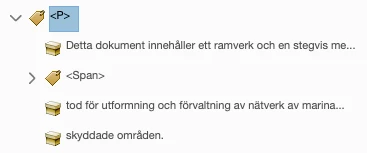
I'm working on a document with a couple hundred pages in Swedish, hyphenation on. When I export to (interactive) PDF, Acrobat's Tags panel shows a Span tag around each and every hyphen. Screenshots below. Is this an issue for accessibility, and if it is, how do I fix it while still allowing the text to be hyphenated? I'm fairly experiened with InDesign, but haven't used accessibility features much before.

Correct answer Bevi Chagnon - PubCom.com

Those <Span> tags are normal and required foraccessibility because the hyphens are software hyphens (put in by the software) and not hard hyphens (you pressing the hyphen key).


Screen readers sort of ignore them, other than knowing that the word is hyphenated and needs to be joined together when voiced to the end user. Most screen readers will announce the word correctly, others maybe not, but that's not a "hard stop" barrier.


Just ignore them.


1 reply

Bevi Chagnon - PubCom.com
Legend
June 18, 2021

Those <Span> tags are normal and required foraccessibility because the hyphens are software hyphens (put in by the software) and not hard hyphens (you pressing the hyphen key).


Screen readers sort of ignore them, other than knowing that the word is hyphenated and needs to be joined together when voiced to the end user. Most screen readers will announce the word correctly, others maybe not, but that's not a "hard stop" barrier.


Just ignore them.


|&nbsp;&nbsp;&nbsp;&nbsp;Bevi Chagnon &nbsp;&nbsp;|&nbsp;&nbsp;Designer, Trainer, &amp; Technologist for Accessible Documents ||&nbsp;&nbsp;&nbsp;&nbsp;PubCom |&nbsp;&nbsp;&nbsp;&nbsp;Classes &amp; Books for Accessible InDesign, PDFs &amp; MS Office |
SaraFOSAuthor
Participant
June 18, 2021

Thank you so much, Bevi, for your super quick reply! I'm glad there will now be an answer available for others who are wondering the same.