
Tuire
Participating Frequently
January 29, 2025
Answered

Accessible footnotes from InDesign > pdf document

  • January 29, 2025
  • 3 replies
  • 2300 views

I am in the process of folding a large publication (over 250 pages) and making an accessible version of it. The publication has a lot of numbered footnotes. I tested how the screen reader reads the footnotes and it reads the reference number in the text, but not what is written in the reference information. This publication also contains links as references, but also explanations and the names of the source publication. What would be the best way to solve this so that the reading experience is smooth for the screen reader? It is a terrible job to make links to numbers manually. How have you solved such issues?

The publication has been folded in InDesign and the footnotes have been transferred from the client's Word document to the fold. The footnote numbers have their own style, just like the footnotes for the texts. I have also defined the footnotes in the Document footnote options. As far as I understand, they have been made correctly, but there is no link between the number and the explanation.

I would like to thank you in advance if someone can figure out a way to do this.

Kind regards
Tuire
Correct answer Pariah Burke

Footnotes created in InDesign should automatically be accessible upon export, but may not be read correctly if you point a screenreader directly at InDesign.


  • Can you please post a screenshot a footnote shown in Story Editor (Edit > Edit in Story Editor)?
  • Can you also please post a screenshot of a footnote on the Tags panel in Acrobat after you've exported from InDesign to PDF?


Additional information to think about:

  • Were the footnotes made correctly in Word? Word's footnotes, if made using the Insert Footnote option in Word, are also accessible and do carry through with the same tagging and accessibility into InDesign unless...
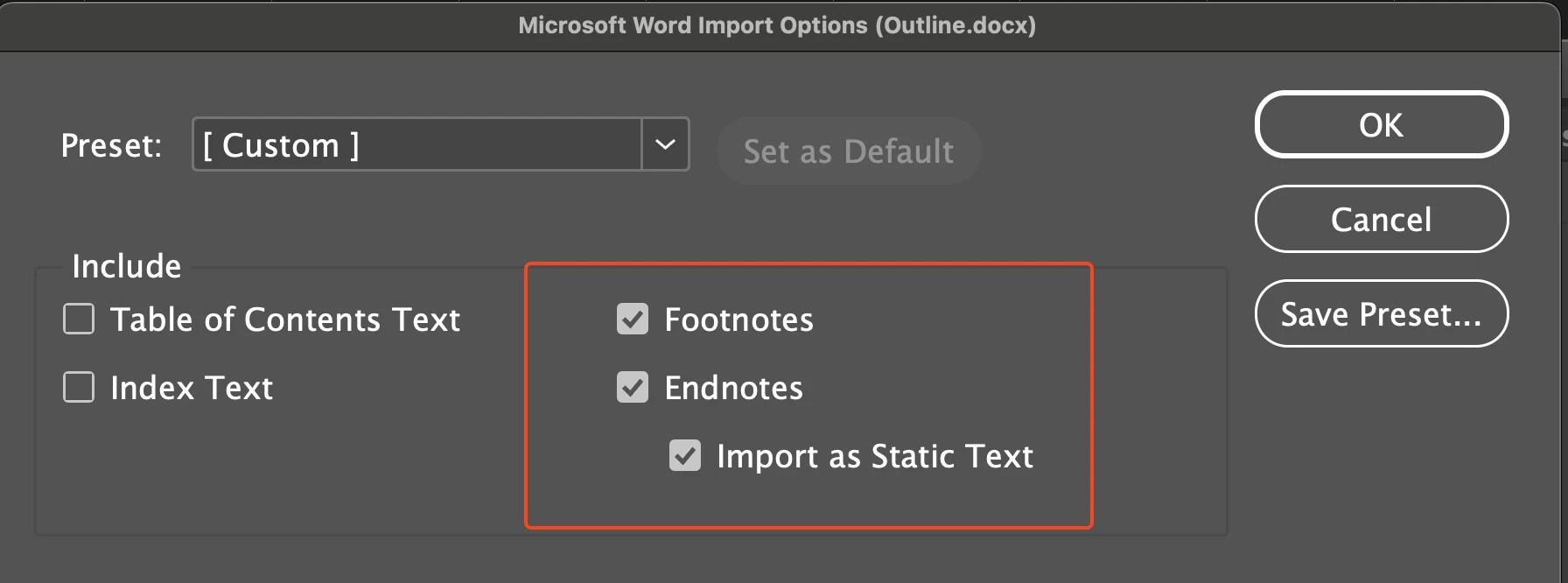
  • While placing the Word doc into InDesign was Import to Static Text activated, as in my screenshot below? That will nix all the accessible tagging and turn your footnotes into disconnected, plain text.


3 replies

Robert at ID-Tasker
Legend
January 30, 2025

@Tuire


Just to confirm - you've Footnote / Endnote numbers in text - but they don't link to Footnote / Endnote contents?


Tuire
TuireAuthor
Participating Frequently
January 30, 2025

Yep. Footnote numbers don't link to their text/info. Is it possible to remove all footnotes at once? Or "hide" them from screen readers?

It would be good if they were left in place for those who see them. Some of their information can be found in the bibliography at the end of the publication.

Robert at ID-Tasker
Legend
January 30, 2025

@Tuire


Send me your file on priv - click my nickname - and I'll re-link them for you. 

I have a great tool for that. 


Pariah Burke
Community Expert
Pariah BurkeCommunity ExpertCorrect answer
Community Expert
January 29, 2025

Footnotes created in InDesign should automatically be accessible upon export, but may not be read correctly if you point a screenreader directly at InDesign.


  • Can you please post a screenshot a footnote shown in Story Editor (Edit > Edit in Story Editor)?
  • Can you also please post a screenshot of a footnote on the Tags panel in Acrobat after you've exported from InDesign to PDF?


Additional information to think about:

  • Were the footnotes made correctly in Word? Word's footnotes, if made using the Insert Footnote option in Word, are also accessible and do carry through with the same tagging and accessibility into InDesign unless...
  • While placing the Word doc into InDesign was Import to Static Text activated, as in my screenshot below? That will nix all the accessible tagging and turn your footnotes into disconnected, plain text.


Tuire
TuireAuthor
Participating Frequently
January 30, 2025

I'm attaching the snapshots you requested. I think I've already found the reason why the links are broken. By default, the Import as Static Text check box is not checked and I remember that at the beginning of the work there was some problem with the endnotes so I must have unchecked it. Funny that removing the endnotes breaks the links in the footnotes.

Äh... it's really annoying. It's a huge job to make the links. But, not so bad that there's nothing good about it. I'll learn how to make them work better next time. So many thanks for guiding me.


Tuire

ps. (The work was originally only done for print and afterwards customer wanted it to be accessible. Maybe I would have thought of this earlier if the work had been ordered as accessible right away.)

Barb Binder
Community Expert
Community Expert
January 29, 2025

Hi @Tuire:


This really should be addressed in InDesign. I'm going to move your post to the InDesign forumn, and want to share a link from one of our InDesign accessibility Experts, @Bevi_Chagnon___PubCom_com. She wrote the article and may be available to answer follow up questions. Please note that the information is embedded in the .indd/.indl files she has included for download. If you are not an InDesign user, I would direct the person that created the InDesign document to pick up from here.


~Barb

~Barb at Rocky Mountain Training
Robert at ID-Tasker
Legend
January 29, 2025

I think this is better - @Bevi Chagnon - PubCom.com?


Tuire
TuireAuthor
Participating Frequently
January 30, 2025

Thank you Robert!