
Known Participant
November 18, 2024
Answered

Accessing nested table in the Plugin through boss hiearchy

  • November 18, 2024
  • 7 replies
  • 774 views

Hi,


I have "pasteInto" my table in to a text frame. This text frame is now "inline anchored" into another text frame. This is how it looks in the Layers window
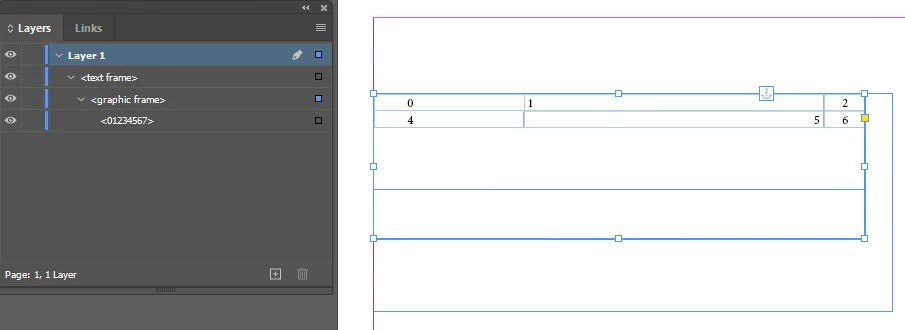


The Content hierarchy shows up like so


TraceContentHierarchy() ********Begin
kDocBoss, uid 0x1
Publish1146Test2-Converted.indd
kSpreadBoss, uid 0xce
Spread 1 content by hierarchy...
kSpreadLayerBoss, uid 0xcf
kPageBoss, uid 0xd3
kSpreadLayerBoss, uid 0xd0
kSpreadLayerBoss, uid 0xd1
kSplineItemBoss, uid 0x2b85
kMultiColumnItemBoss, uid 0x2b87
kFrameItemBoss, uid 0x2b99
kSpreadLayerBoss, uid 0xd2
kMasterPagesBoss, uid 0xd5
A-Parent master spread content by hierarchy...
kSpreadLayerBoss, uid 0xd6
kPageBoss, uid 0xda
kPageBoss, uid 0xdb
kSpreadLayerBoss, uid 0xd7
kSpreadLayerBoss, uid 0xd8
kSpreadLayerBoss, uid 0xd9
TraceContentHierarchy() ********End


The nested table is now accessible from script through the following code


topmostTextFrame.texts[0].paragraphs[0].rectangles[0].textFrames[0].tables[0];


My question is what would be the C++ equivalent of this code. I have the UIDRef for the topmostTextFrame but I am unable to identify the boss classes that will help me get to the nested table.


Here is what I have got


void TraverseToNestedTableItem(const UIDRef& pPageItem)
{
	InterfacePtr<IHierarchy> pageItemHierarchy(pPageItem, UseDefaultIID());

	int32 nChildren = pageItemHierarchy->GetChildCount();

	for (int32 child = 0; child < nChildren; ++child)
	{
		IDataBase* db = pPageItem.GetDataBase();
		UIDRef childUIDRef(pPageItem.GetDataBase(), pageItemHierarchy->GetChildUID(child));

		if (db->GetClass(childUIDRef.GetUID()) == kMultiColumnItemBoss)
		{
			UIDList InlineList(db);
			InterfacePtr<IMultiColumnTextFrame>mcf(childUIDRef, UseDefaultIID());

			if (mcf)
			{
				Utils<IFrameUtils>()->GetUIDListOfInlines(mcf, false, &InlineList);
				int32 inlineLen = InlineList.Length();

				for (int32 j = 0; j < inlineLen; ++j)
				{
					UIDRef inlineRef(childUIDRef.GetDataBase(), InlineList[j]);

					bool16 exists = inlineRef.ExistsInDB();

					auto classID = db->GetClass(InlineList[j]);
					DebugClassUtilsBuffer className;
					DebugClassUtils::GetIDName(&className, classID);

					InterfacePtr<IHierarchy> inlineItemHierarchy(inlineRef, UseDefaultIID());
					InterfacePtr<IHierarchy> inlineItem(inlineItemHierarchy->QueryChild(0));
					if (inlineItem) 
					{
						DebugClassUtilsBuffer className;
						DebugClassUtils::GetIDName(&className, ::GetClass(inlineItem))
					}
				}
			}
		}
	}
}


Both of those diagnostics are giving me 'kSplineItemBoss'. 


Please suggest how to traverse to the nested table


Ref: Solved: Re: Clipping a table in a textframe with pasteInto - Adobe Community - 14973447

Thanks,


Edit: I realize that the content hierarchy wasn't pasted as it should have been. Here's a pic of how it shows up to show the nesting structure
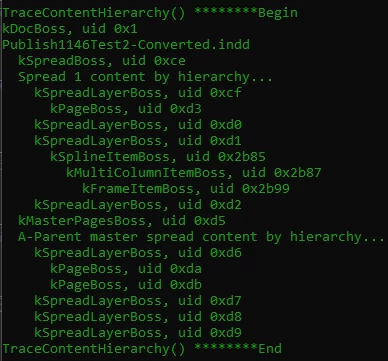


This topic has been closed for replies.
Correct answer Dirk Becker

Ok. That helped me progress a bit (hopefully). Am I in the right direction? All the interface pointers textModel, tableModel, nesteddMCTextFrame and nesteddMCTextFrame2 are coming as null. What may I be missing?


OwnedItemDataList ownedItems;
Utils<ITextUtils>()->CollectOwnedItems(pTextModel, 0, pTextModel->GetPrimaryStoryThreadSpan(), &ownedItems);
DebugClassUtilsBuffer className;

for (auto& ownedItem : ownedItems)
{
	if (ownedItem.fClassID == kInlineBoss)
	{
		auto ownedItemUID = ownedItem.GetInlineID();
		UIDRef ownedItemUIDref(pTextBoxRef.GetDataBase(), ownedItemUID);

		InterfacePtr<IHierarchy> nestedMcTextFrame(ownedItemUIDref, UseDefaultIID());
		CHECK_BREAK(nestedMcTextFrame);

		InterfacePtr<IHierarchy> graphicFrameHierarchy(nestedMcTextFrame->QueryChild(0));
		CHECK_RETURN(graphicFrameHierarchy);
		
		auto nestedGraphicsFrameRef = ::GetUIDRef(graphicFrameHierarchy);
		auto isGraphicFrame = Utils<IPageItemTypeUtils>()->IsGraphicFrame(nestedGraphicsFrameRef);
		// true

		InterfacePtr<IHierarchy> nestedTextFrameHierarchy(graphicFrameHierarchy->QueryChild(0));
		CHECK_RETURN(nestedTextFrameHierarchy);
		auto nestedTextFrameRef = ::GetUIDRef(nestedTextFrameHierarchy);
		auto classIDNestedTextFrame = ::GetClass(nestedTextFrameHierarchy);
		auto isTextFrame = Utils<IPageItemTypeUtils>()->IsTextFrame(nestedTextFrameHierarchy);
		// true
		
		// hopefully now I am at the nested text frame that has the table

		InterfacePtr<ITextModel> textModel(nestedTextFrameHierarchy, UseDefaultIID());
		// null
		InterfacePtr<ITableModel> tableModel(nestedTextFrameHierarchy, UseDefaultIID());
		// null
		InterfacePtr<IMultiColumnTextFrame> nesteddMCTextFrame(nestedTextFrameHierarchy, UseDefaultIID());
		// null
		InterfacePtr<ITextFrameColumn> nesteddMCTextFrame2(nestedTextFrameHierarchy, UseDefaultIID());
		// null
	}
	else if (ownedItem.fClassID == kTableFrameBoss)
	{

		////this is table
		//InterfacePtr<ITableFrame> iTableFrame(db, ownedItems[i].GetInlineID(), UseDefaultIID());
		//if (!iTableFrame)
		//	break;

		//InterfacePtr<ITableModel> iTableModel(iTableFrame->QueryModel());
		//if (!iTableModel)
		//	break;
	}
}


PS: Apologies, but I have very limited experience with these SDK classes and layout fundamentals.


The SDK has more page item types (boss classes) than scripting.

kInlineBoss is one of those page item types, meaning its boss class is based on kPageItemBoss.

As a boss class, it has many interfaces - different methods and properties.


Instances of page item are arranged in hierarchies, meaning they have an interface IHierarchy.

The purpose of the kInlineBoss is to be the root of one hierarchy, anchored as owned item within a text model.

It implements the concept that any page item can get inlined, so that the page item and most other page item related code need not deal with the text model. Therefor you don't see it in the dump / screenshot above, owned items are not covered by that trace. I don't know which might that be, I'm wading thru 445,720 lines produced by an own utility instead.


Whatever comes below can vary - be it a group, an image or another text frame.

You have to descend the hierarchy, look at the child.

For that you query the IHierarchy of the kInlineBoss, as you do with the variable named nestedMcTextFrame . I'd name it ownedItemHierarchy instead following the other names you chose for that boss. Or name all of them "inline…", starting from your ownedItemUID where you already know the boss class is kInlineBoss.


As you say that the "nestedMcTextFrame" interface is null (really?), there must be something wrong, we can stop looking beyond. My guess would be you're using the wrong database, from your pTextBoxRef whose whereabouts are missing in your code snippet. Is it your output variable? Use ::GetDataBase(pTextModel) instead.

Getting further down: Ah, I see, actually "nesteddMcTextFrame" is null, too similar thus confusing name.


Now look at the child. You only know it is one of those page item bosses. Instead of all your IPageItemTypeUtils tests, use DebugClassUtilsBuffer to determine which. Should be kSplineItemBoss*, the shape surrounding the text frame with its columns. It could be the same for blank rectangles or others. Continue descending the hierarchy to get to the nested text frame, that would be kMultiColumnItemBoss, then even deeper the kFrameItemBoss - a column. Same as with your screenshot above.


* with all that nesting one can get easily lost, in DM I wrongly suggested the child of kInlineBoss was already the kMultiColumnItemBoss. Also be prepared that other InDesign features can optionally add other levels within the hierarchy. IHierarchy has a call so you can ignore most of that nesting, GetDescendents lets you deep-search for an interface such as IID_IMULTICOLUMNTEXTFRAME .


Unlike the spline, both kMultiColumnItemBoss and kFrameItemBoss are already part of the nested text frame as known from scripting - the actual frame and a column. So you'd take the earliest chance to determine the (nested) story, using kMultiColumnItemBoss:IMultiColumnTextFrame.


Since the text story is a different boss object (boss class is kTextStoryBoss), you can't just feed the MCTF boss into an InterfacePtr, instead you have to use one of the Query or Get methods in the interface.


Now you have to find the table within the nested story. Knowing it is an owned item you can again use CollectOwnedItems, but I'd use interface kTextStoryBoss:ITableModelList instead.

7 replies

Inspiring
November 18, 2024

There is no straight forward way. You will need to write your own business logic. Refer the below snippet -


OwnedItemDataList ownedItems;
Utils<ITextUtils>()->CollectOwnedItems(iTextModel, 0, iTextModel->GetPrimaryStoryThreadSpan(), &ownedItems);


// Note - now ownedItems could kInlineBoss or kTableFrameBoss.

kInlineBoss could be text frame or image frame.


Iterate ownedItems -

if (ownedItems[i].fClassID == kInlineBoss)
{
// this could be text frame or image frame

// USE -  ownedItems[i].GetInlineID() and validate which boss class you get.

// From there you detect if it is text frame and traverse again. 


}
else if(ownedItems[i].fClassID == kTableFrameBoss)
{

//this is table


InterfacePtr<ITableFrame> iTableFrame(db, ownedItems[i].GetInlineID(), UseDefaultIID());
if(!iTableFrame)
break;
 
InterfacePtr<ITableModel> iTableModel(iTableFrame->QueryModel());
if(!iTableModel)
break;

}

- Rahul Rastogi


asaxenaAuthor
Known Participant
November 18, 2024

In my case, I get only 1 item in the ownedItems and that is kInlineBoss. Both isGraphicFrame and isTextFrame are false

if (ownedItem.fClassID == kInlineBoss)
{
	auto ownedItemUID = ownedItem.GetInlineID();
	UIDRef ownedItemUIDref(pTextBoxRef.GetDataBase(), ownedItemUID);

	auto isGrahicFrame = Utils<IPageItemTypeUtils>()->IsGraphicFrame(ownedItemUIDref);
	auto isTextFrame = Utils<IPageItemTypeUtils>()->IsTextFrame(ownedItemUIDref);
}

 Can you please elaborate a bit on how to code for the below

// USE -  ownedItems[i].GetInlineID() and validate which boss class you get.

// From there you detect if it is text frame and traverse again. 

TᴀW
Legend
November 18, 2024

(If this is copy-pasted from your code, you've got a typo: isGrahicFrame instead of isGraphicFrame)

id-extras.com | InDesign tools & scripts for typesetters, form designers, and translators