
Participant
June 1, 2023
Answered

"Activating Font" background task won't stop

  • June 1, 2023
  • 7 replies
  • 50141 views

Hello! 


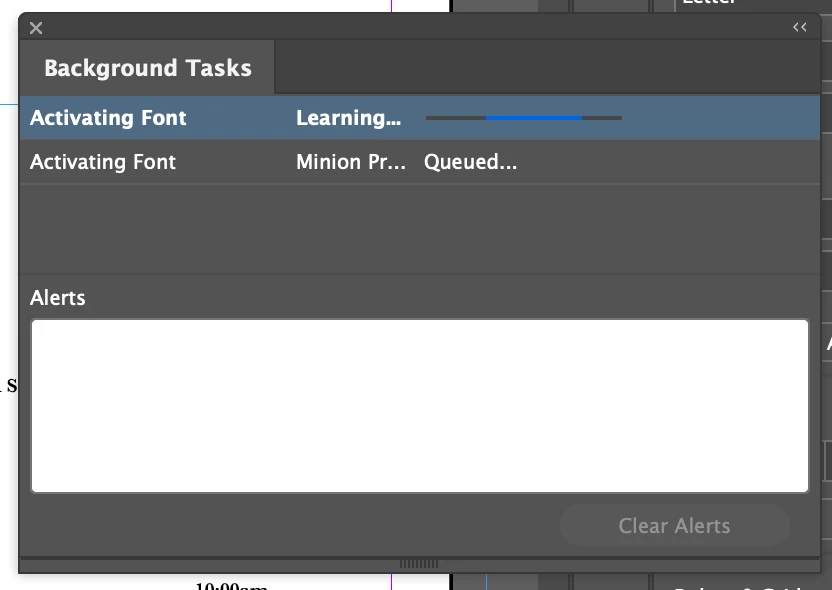
I'm having an trouble the background task feature on InDesign. I downloaded two fonts from DaFont to spice up my magazine, and since then I haven't been able to save or export my document because it is continuously "activating font" under background tasks and isn't stopping. There is no option to delete (see picture). Has anyone had experience with this? I'm afraid to ctrl-alt-delete because I don't want my document to not be saved. 


This post from 2020 had a similar issue, but after I did what the commentor suggested (went to Find/Replace Font and clicked "Redefine Style When Changing All" for all the non-normalized fonts) it still didn't work. I'm at a loss as to what to do. 
Correct answer razzledazzle019

I use Extensis Connect Fonts to manage my fonts.  I can search fonts through that and either deactivate them or delete them. 


In our case it was FontExplorer that had a VERY old Type 1 font active on the system. Because this font was still installed, Adobe's version of the same name wouldn't fully install. Once I removed all references to the old fonts with that name in the system and restarted just to be sure, Adobe was able to successfully install the font family as well as automatically substitute the font. Previously it remained hung as a background task if set to auto-add fonts or with that deselected, it just stayed processing when manually choosing to substitute the font.

7 replies

Participant
July 7, 2025

Just go to "edit", "preferences" and down to "file handling", uncheck the box that says "auto activate Adobe Fonts. Then RESTART the software. 

Participating Frequently
April 1, 2025

I have the same isue and the fonts aren't even in the document I am working on.

Also, it is fonts that are already active in Creative Cloud! I have found a "sometimes" fix for this is: Find the font in Cloud and click "install family" button (even though I am working in Adobe apps only). This seems to clear the background task without having to restart InDesign. I will also turn off auto-activation as I have always had issue with synched fonts appear as missing even though they are installed.

Participant
April 11, 2025

Same... Everything, everywhere, all the time issues nowadays. So much wasted time, I didn't sign up for this. Sorry for the rant but I do miss the old days where you bought your software once every 4 years and it ran smooth as butter.

Participating Frequently
May 26, 2025

I agree 100%. Never had these issues before subscription. While I can see the advantages, I much preferred the old setup (been working with InDesign since the first programme), I do get sick of the bugs, constant updates to fix the bugs. I hate using Adobe Fonts as I quite often have to close the programme and reopen because installed Adobe fonts are being picked up even though they were fine the day before when I opened the same file). And of course, you don't own a licence a physical font file.

My issue is not being caused my a Type 1 conflict as the "correct answer " suggests as the font in question isn't even in the job.

Inspiring
September 17, 2024

Hey guys, I'm having the same problem, thing is i DO want to activate the fonts since I need them in the project. I wonder if there's a way of fixing this. Internet connection is ok, I'm logged into my CC account... Happens with every file now. Any ideas?

Community Expert
September 18, 2024

Hi @Bera35005021f6ve ,

do you have checked option:

Preferences > File Handling >

[ x ] Auto Activate Adobe Fonts


Are the missing fonts available in Adobe Fonts?


If yes and auto activation does not work, activate the fonts in:

https://fonts.adobe.com/


Regards,
Uwe Laubender
( Adobe Community Expert )

Inspiring
September 18, 2024

The fonts are availavable in Adobe Fonts, however the task won't stop. I've had to quit Indesign several times just to save a file, for example. These are old files, I'm not trying to activate any new font.

Participant
July 27, 2024

Are there any other options? because that did not work. 


rob day
Community Expert
Community Expert
July 27, 2024

Hi @Jim38840276pfdj , What font(s) are trying to Auto-activate?


Participant
July 28, 2024
Not sure which one it is exactly but it starts with "Monarch"
Participant
March 16, 2024

Just go to "edit", "preferences" and down to "file handling", uncheck the box that says "auto activate Adobe Fonts.


Participant
April 24, 2024

Winner, winner, winner! Thank you so much. This has been an aggravation for me for months.


Participant
July 7, 2023

Same issue here.

Participant
December 27, 2023

I'm having the same problem on one of my two iMacs. Minion Pro is the font (which I don't use) which is constantly activating in the background tasks. I can't make it stop. I tried disabling automatic font activation in the Preferences, but it still happens. I've restarted, updated InDesign etc. Still happens. Ugh. 

Rishabh_Tiwari
Community Manager
Community Manager
January 2, 2024

Hi @hixchix,


Sorry to hear about the trouble. Please try the suggestions shared in this discussion and let us know if this helps or if you need further assistance.


Thanks

Rishabh

Steve Werner
Community Expert
Community Expert
June 1, 2023

Try using a different font instead of the one you used and see if you get the same issue.


Some free or inexpensive fonts may "look good" but are poorly constructed.