Known Participant
March 18, 2019
Answered

Add a custom zoom level

  • March 18, 2019
  • 2 replies
  • 4789 views

Hi,

I would like to add a custom zoom level of 10% to the Zoom Level dropdown list - can this be done please?
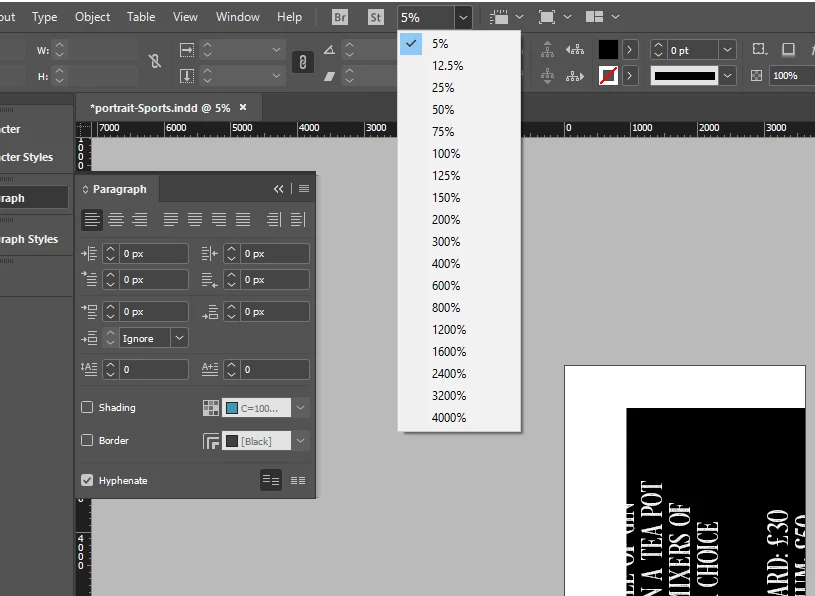

    Correct answer rob day

    It can be done via scripting:

    app.activeWindow.zoomPercentage=10;

    Open the ExtendScript Toolkit app and paste the above line into a new script and save it to your Scripts folder /Applications/Adobe InDesign CC 20XX/Scripts/Scripts Panel

    It will show in your Scripts panel where you can double click to run, or you can assign it a key command.

    2 replies

    rob day
    Community Expert
    rob dayCommunity ExpertCorrect answer
    Community Expert
    March 18, 2019

    It can be done via scripting:

    app.activeWindow.zoomPercentage=10;

    Open the ExtendScript Toolkit app and paste the above line into a new script and save it to your Scripts folder /Applications/Adobe InDesign CC 20XX/Scripts/Scripts Panel

    It will show in your Scripts panel where you can double click to run, or you can assign it a key command.

    Jongware
    Community Expert
    Community Expert
    March 18, 2019

    At this point that would be hardly any faster than typing in "10" in the field and pressing "Enter". (Which IMO already is faster than moving with the mouse to the dropdown field and hunting down your desired value.)

    It may be easier to just remember "Ctrl+Minus" = "smaller", "Ctrl+Plus" = "larger", and, of course, "Ctrl+Zero" = "zoom to fit". The actual display percentage almost never matters to me as it isn't really linked to the real world anyway.

    Known Participant
    March 18, 2019

    Hi,

    I know the short cuts - CTRL +/- doesnt zoom to 10%.Robs solutions IS way faster especially after adding a custom keyboard shortcut - and he provided a solution - display percentage is very important - when creating artwork on a 6508 px x 3622pm document.

    Steve Werner
    Community Expert
    Community Expert
    March 18, 2019

    No, you can't. You could make a feature request that would be seen by the product managers and others could vote to support here:

    Feature Requests/Bugs