This topic is closed to new replies. Start a new post to keep the conversation going.
m1b
m1bCorrect answer
Community Expert
July 29, 2024

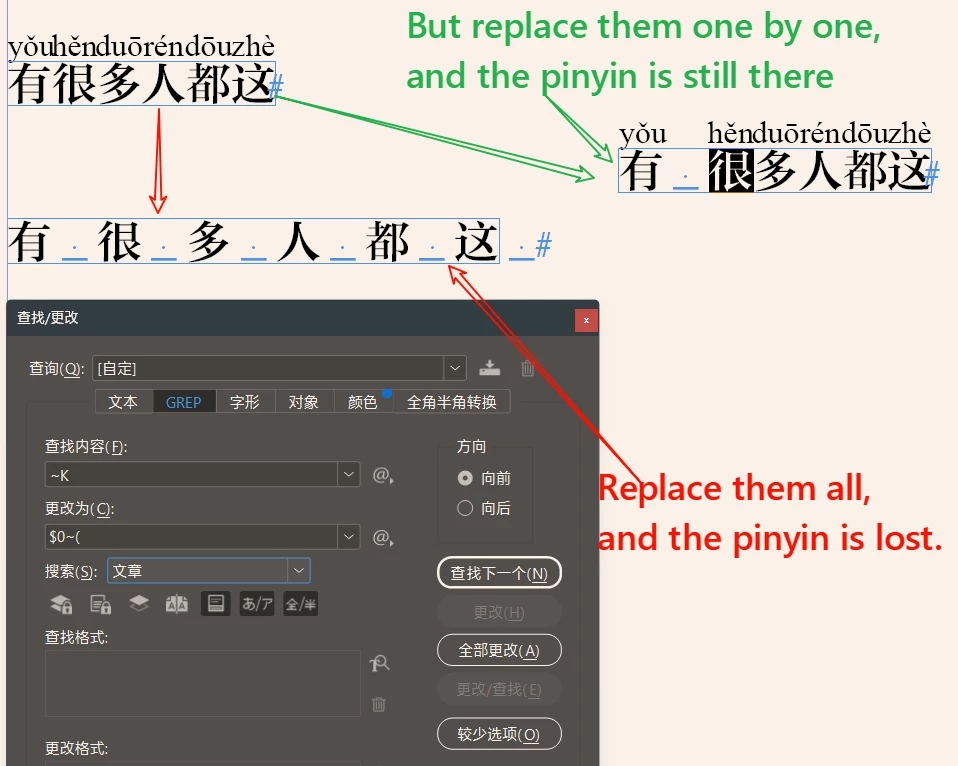
Hi @dublove, I couldn't solve this in the normal way (someone else might do better!). But I wrote this script that seems to work. - Mark

/**
 * Adds "Ideographic Space" between selected characters.
 * @author m1b
 * @discussion https://community.adobe.com/t5/indesign-discussions/add-a-space-after-the-chinese-character-if-you-replace-it-all-once-the-pinyin-is-lost-how-to-solve/m-p/14765771
 */
function main() {

    app.findGrepPreferences = NothingEnum.NOTHING;
    app.changeGrepPreferences = NothingEnum.NOTHING;
    app.findGrepPreferences.findWhat = '~K(?!~()';

    var doc = app.activeDocument,
        textFrames = getTextFrames(doc.selection);

    for (var i = textFrames.length - 1, found; i >= 0; i--) {

        found = textFrames[i].findGrep();

        for (var j = found.length - 1; j >= 0; j--)
            found[j].insertionPoints[-1].contents = '\u3000';

    }

};
app.doScript(main, ScriptLanguage.JAVASCRIPT, undefined, UndoModes.ENTIRE_SCRIPT, 'Add Ideographic Spaces');

/**
 * Returns any text frames found in given `items`.
 * @author m1b
 * @version 2022-02-02
 * @param {DOM item} items - a DOM item or items to search in, eg. doc.selection.
 * @returns {Array<TextFrame>}
 */
function getTextFrames(items) {

    if (undefined == items)
        return [];

    var found = [];

    if (!items.hasOwnProperty('0'))
        items = [items];

    for (var i = 0, item; i < items.length; i++) {

        item = items[i];

        if (
            // item is a table
            'TextFrame' === item.constructor.name
        )
            found.push(item);

        else if (
            // item contains textFrames
            item.hasOwnProperty('textFrames')
            && item.textFrames.length > 0
        )
            found = found.concat(getTextFrames(item.textFrames));


        else if (
            // is contained by textFrame(s)
            item.hasOwnProperty('parentTextFrames')
            && item.parentTextFrames.length > 0
        )
            found = found.concat(getTextFrames(item.parentTextFrames));


        else if (
            // is in a story, which may contain textFrames
            item.hasOwnProperty('parentStory')
        )
            found = found.concat(getTextFrames([item.parentStory]));


        else if (
            // contains page items, which may be textFrames
            item.hasOwnProperty('pageItems')
            && item.pageItems.length > 0
        )
            found = found.concat(getTextFrames(item.pageItems));


        else if (
            // has a parent which might be a textFrame
            item.hasOwnProperty('parent')
            && item.parent.constructor.name != 'Document'
        )
            found = found.concat(getTextFrames([item.parent]));

    }

    return found;

};


3 replies

m1b
Community Expert
m1bCommunity ExpertCorrect answer
Community Expert
July 29, 2024

Hi @dublove, I couldn't solve this in the normal way (someone else might do better!). But I wrote this script that seems to work. - Mark

/**
 * Adds "Ideographic Space" between selected characters.
 * @author m1b
 * @discussion https://community.adobe.com/t5/indesign-discussions/add-a-space-after-the-chinese-character-if-you-replace-it-all-once-the-pinyin-is-lost-how-to-solve/m-p/14765771
 */
function main() {

    app.findGrepPreferences = NothingEnum.NOTHING;
    app.changeGrepPreferences = NothingEnum.NOTHING;
    app.findGrepPreferences.findWhat = '~K(?!~()';

    var doc = app.activeDocument,
        textFrames = getTextFrames(doc.selection);

    for (var i = textFrames.length - 1, found; i >= 0; i--) {

        found = textFrames[i].findGrep();

        for (var j = found.length - 1; j >= 0; j--)
            found[j].insertionPoints[-1].contents = '\u3000';

    }

};
app.doScript(main, ScriptLanguage.JAVASCRIPT, undefined, UndoModes.ENTIRE_SCRIPT, 'Add Ideographic Spaces');

/**
 * Returns any text frames found in given `items`.
 * @author m1b
 * @version 2022-02-02
 * @param {DOM item} items - a DOM item or items to search in, eg. doc.selection.
 * @returns {Array<TextFrame>}
 */
function getTextFrames(items) {

    if (undefined == items)
        return [];

    var found = [];

    if (!items.hasOwnProperty('0'))
        items = [items];

    for (var i = 0, item; i < items.length; i++) {

        item = items[i];

        if (
            // item is a table
            'TextFrame' === item.constructor.name
        )
            found.push(item);

        else if (
            // item contains textFrames
            item.hasOwnProperty('textFrames')
            && item.textFrames.length > 0
        )
            found = found.concat(getTextFrames(item.textFrames));


        else if (
            // is contained by textFrame(s)
            item.hasOwnProperty('parentTextFrames')
            && item.parentTextFrames.length > 0
        )
            found = found.concat(getTextFrames(item.parentTextFrames));


        else if (
            // is in a story, which may contain textFrames
            item.hasOwnProperty('parentStory')
        )
            found = found.concat(getTextFrames([item.parentStory]));


        else if (
            // contains page items, which may be textFrames
            item.hasOwnProperty('pageItems')
            && item.pageItems.length > 0
        )
            found = found.concat(getTextFrames(item.pageItems));


        else if (
            // has a parent which might be a textFrame
            item.hasOwnProperty('parent')
            && item.parent.constructor.name != 'Document'
        )
            found = found.concat(getTextFrames([item.parent]));

    }

    return found;

};

Translate
dublove
dubloveAuthor
Legend
July 29, 2024

This could also be ......
Shocker.
Just a question, I want to change to smaller half spaces, where do I change?
Thanks.

I seem to have found it.


 found[j].insertionPoints[-1].contents = '\u0020';


Translate
m1b
Community Expert
Community Expert
July 29, 2024

Yes that's it. You can put any text in that string. '\u0020' (normal space) is the same as ' '.

Translate