Inspiring
July 7, 2020
Answered

Add multi-word name or phrase to dictionary?

  • July 7, 2020
  • 2 replies
  • 510 views

I'd like to add non-hyphenated, multi-word items to the dictionary, eg
"Blu Karrot"

or
"Wi11em O#mert"
but when typing in more than one word, it takes away the option to add.

Is there a way around this?


thanks

This topic has been closed for replies.
Correct answer Barb Binder

Unfortunately that isn't an option in InDesign, as you have discovered. You can create custom list of word in a .txt file and import that word list into your user dictionary, but InDesign recognizes the individual words because they are separated by a space, a tab, or a paragraph return. That's the dealbreaker.


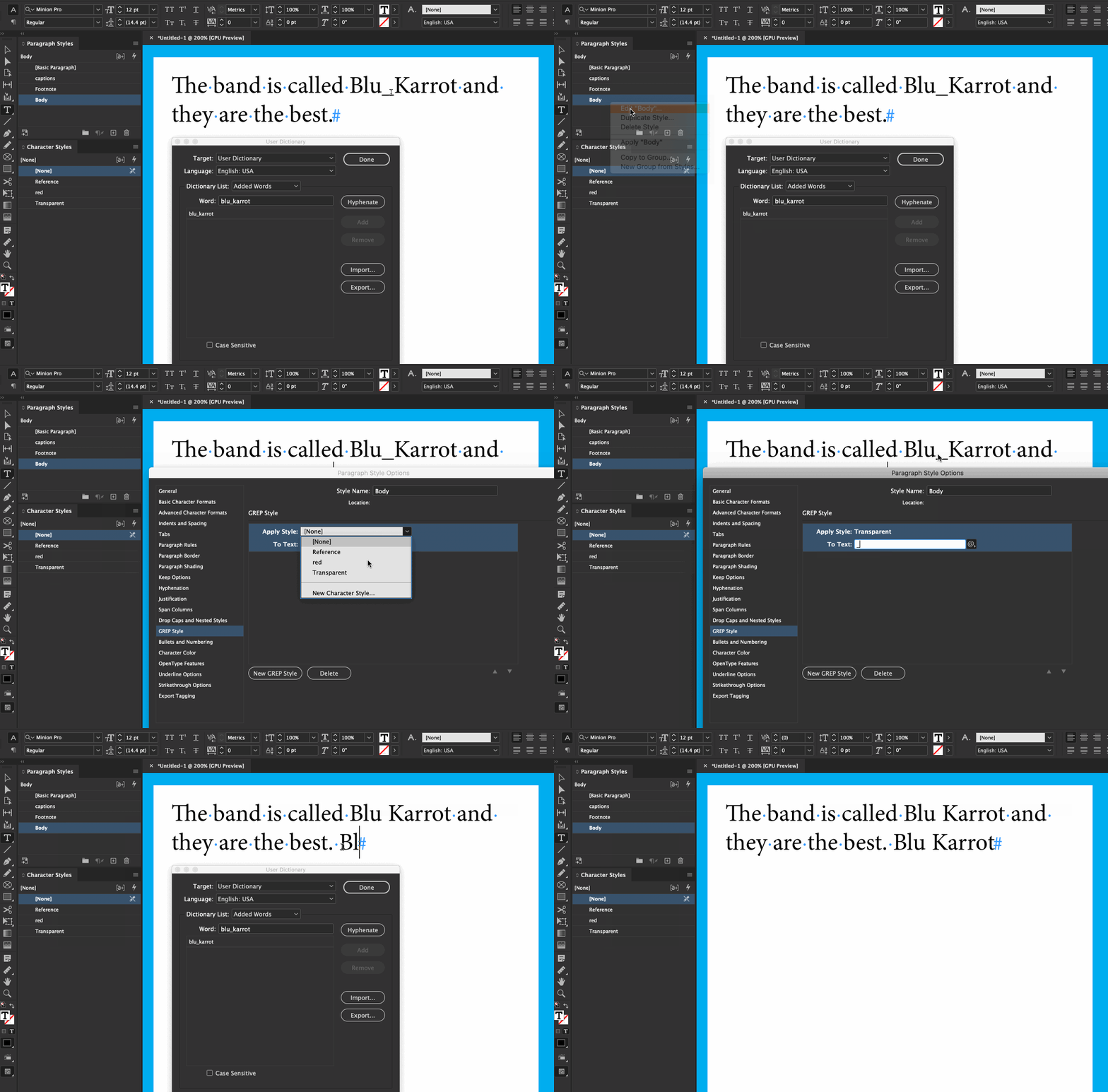
The only "outside the box" solution I can think of is to add the words with an underline in place of a space, i.e., blu_karrot, and use a GREP style to make the underline transparent with a character style (and I reduced the typesize by half because it was too wide). 


~Barb
 

2 replies

Barb Binder
Community Expert
Barb BinderCommunity ExpertCorrect answer
Community Expert
July 7, 2020

Unfortunately that isn't an option in InDesign, as you have discovered. You can create custom list of word in a .txt file and import that word list into your user dictionary, but InDesign recognizes the individual words because they are separated by a space, a tab, or a paragraph return. That's the dealbreaker.


The only "outside the box" solution I can think of is to add the words with an underline in place of a space, i.e., blu_karrot, and use a GREP style to make the underline transparent with a character style (and I reduced the typesize by half because it was too wide). 


~Barb

 

~Barb at Rocky Mountain Training
Barb Binder
Community Expert
Community Expert
July 7, 2020

You can add them as single words.


~Barb


~Barb at Rocky Mountain Training
turner111Author
Inspiring
July 7, 2020

Hi Barb - thanks -

Yes - I'm aware of that... however, I wouldn't want ID to skip "karrot", thinking it was correct, if it was supposed to be "carrot".