Participant
December 14, 2017
Answered

Add page-specific margins

  • December 14, 2017
  • 3 replies
  • 706 views

I am working on a technical manual that will be bound with a coil bind. I'd like to add a wider margin to the right edge of left pages and the left edge of right pages. Is that possible through either editing the master or the document setup?

This topic has been closed for replies.
Correct answer manal shanableh

Yes, you can edit the margins on the master pages.

go to master page, select the spread (left and right page), go to Layout> Margins and Columns

do not make all the sittings the same by clicking on so you can make the inside and outside margin to be different.
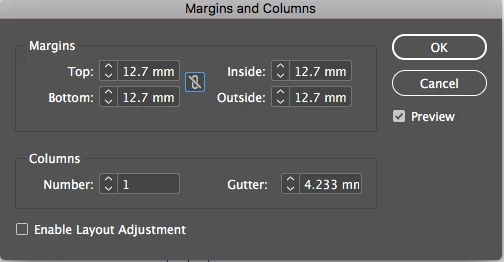
add a wider margin to the right edge of left pages and the left edge of right pages as you wish.

3 replies

manal shanableh
Legend
December 14, 2017

don't forget to select the spread in the master.

manal shanableh
manal shanablehCorrect answer
Legend
December 14, 2017

Yes, you can edit the margins on the master pages.

go to master page, select the spread (left and right page), go to Layout> Margins and Columns

do not make all the sittings the same by clicking on so you can make the inside and outside margin to be different.

add a wider margin to the right edge of left pages and the left edge of right pages as you wish.

Legend
December 14, 2017

Set it up as facing pages with inside and outside margin settings.  You can separate the pages to allow for inside bleed just before sending it to press. 

https://indesignsecrets.com/breaking-pages-apart-to-bleed-off-a-spine.php