
Participating Frequently
February 26, 2024
Answered

Adding a multi state object into another multi state object

  • February 26, 2024
  • 1 reply
  • 631 views

Hello Community,


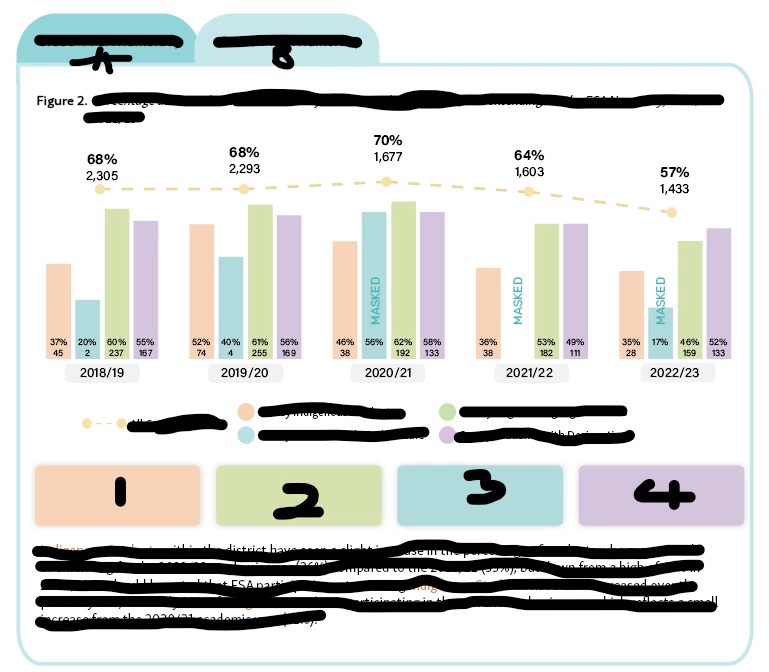
I am trying to make an interactive table where users can view two categories. I had to erase the information for privacy purposes, but there are two tabs at the top that will change the entire body information. However, I am having issues with adding a MSO within another one. I want the commentary at the bottom to change when you click the squares at the bottom (Orange, blue, purple and green). 


So the first MSO is the graphs at the top and then the second MSO will be the buttons with the commentary at the bottom (There are 4 different comments depending on the color button selected).


I hope this is not confusing, but I will like a trick to at it all in one. 
This topic has been closed for replies.
Correct answer BobLevine

You can add an MSO to an MSO but there is indeed a trick. You need to anchor the second MSO to a small empty text frame and then add that text frame to the original MSO.


BTW, if you're doing a lot of MSO work I highly recommend this free plugin: Object States Assistant for Adobe InDesign – Automatication; it removes all kinds of pain points of multi state objects.

1 reply

BobLevine
Community Expert
BobLevineCommunity ExpertCorrect answer
Community Expert
February 27, 2024

You can add an MSO to an MSO but there is indeed a trick. You need to anchor the second MSO to a small empty text frame and then add that text frame to the original MSO.


BTW, if you're doing a lot of MSO work I highly recommend this free plugin: Object States Assistant for Adobe InDesign – Automatication; it removes all kinds of pain points of multi state objects.

Participating Frequently
February 27, 2024

Bob you are the best! Honestly thank you, this really helped me! It works great