
Known Participant
October 8, 2018
Answered

Adding folio to comic book panels

  • October 8, 2018
  • 1 reply
  • 1423 views

Hello,

I have a 200-page comic book already laid out in In Design CS3. I added the folio manually, which was very time consuming.

Now I upgraded to the current version of In Design.

My first question is basic: how do I add an automated folio to each page in a document that has already been created ? (folios that will adjust automatically if I remove or add a page)

My second question is more complicated. I would also like to have a folio on each panel within the page (it's a comic book and I need each panel to have a reference). Is there a way to add a folio on each panel that will adjust automatically if I remove or add panels ?

Thank you very much for your expertise !

L
This topic has been closed for replies.
Correct answer hammer0909

Not sure if this is the best way, but this certainly popped into my mind when i'd read your post;

https://webdev-il.blogspot.com/2016/09/how-to-add-automatic-numbering-in.html

I had to add numbers to 400 different labels for clothing and this saved me hours.


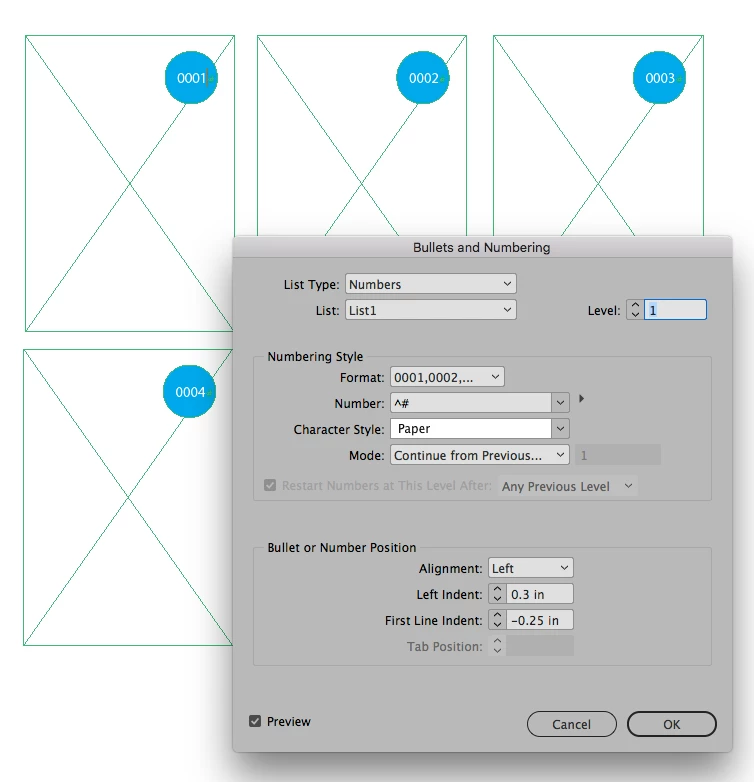
Not sure if data merge is going to work since the panels already exist. You could do it with a numbered list however. Create a style with Automatic numbering and define the formatting for the list. In the Bullets and numbering formats, change the format to 0001, 0002, delete the period in the number field and define a list to tell the list to continue numbering across stories. See screen shot below.

1 reply

Derek Cross
Community Expert
Community Expert
October 9, 2018

On the Master Pages create a text frame – one for the left hand and one for the right hand page – where you want the folio to appear (normally at the bottom, outside the existing text frame). With the curser in the newly created frame (in turn for each page) select: Type > Insert Special Character > Markers > Current Page Number – a capital A will be inserted to represent the page number. You can format on the Master Pages, the size, font and alignment of the page number. If you don't want a folio to appear on a particular page, such as the cover, you can delete it on the text page by selecting it with command/control + shift and then delete. If you add your delete pages the number will update automatically.

Laurent29Author
Known Participant
October 9, 2018

Thank you Derek for the answer. I now understand how it works !

However, concerning the second part of my question, do you know if there is a way to automatically number a number of panels within a page, like comic book panels.

This is what I would like to have (each panel automatically numbered, not just the page) :

Is that possible ?

Thanks !

Legend
October 9, 2018

Not sure if this is the best way, but this certainly popped into my mind when i'd read your post;

https://webdev-il.blogspot.com/2016/09/how-to-add-automatic-numbering-in.html

I had to add numbers to 400 different labels for clothing and this saved me hours.