

Adding keyboard shortcuts to menu items created by script. Is that possible?
Dear all,
I wanted to create a custom menu by script and assign (on the numeric keyboard) shortcuts to the menu items so that I could run one script with small variations instead of modifying a few (currently seven) separate scripts and assigning a shortcut to each of them. But now I realized that custom menus aren’t visible from the “Keyboard Shortcuts” dialog box. (What a disappointment!)
Am I missing something here? Or, is there a workaround?
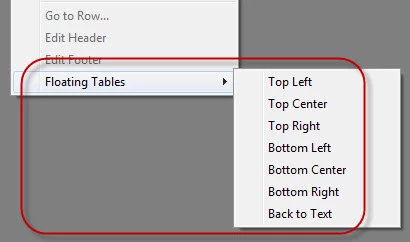
My idea was to trigger the main script -- Floating Tables.jsx – from the menu item handler passing the menu title as argument.
var tableMenu = app.menus.item("$ID/Main").submenus.item("Table");

// "Floating Tables" sub-menu
try {
    var subMenu = tableMenu.submenus.item("Floating Tables");
    subMenu.title;
}
catch(err) {
    var subMenu = tableMenu.submenus.add("Floating Tables", LocationOptions.AT_END);
}

var topLeftAction = app.scriptMenuActions.add("Top Left");
var topLeftListener = topLeftAction.eventListeners.add("onInvoke", FloatingTablesHandler);
var topLeftMenuItem = subMenu.menuItems.add(topLeftAction);

var topCenterAction = app.scriptMenuActions.add("Top Center");
var topCenterListener = topCenterAction.eventListeners.add("onInvoke", FloatingTablesHandler);
var topCenterMenuItem = subMenu.menuItems.add(topCenterAction);

var topRightAction = app.scriptMenuActions.add("Top Right");
var topRightListener = topRightAction.eventListeners.add("onInvoke", FloatingTablesHandler);
var topRightMenuItem = subMenu.menuItems.add(topRightAction);

var bottomLeftAction = app.scriptMenuActions.add("Bottom Left");
var bottomLeftListener = bottomLeftAction.eventListeners.add("onInvoke", FloatingTablesHandler);
var bottomLeftMenuItem = subMenu.menuItems.add(bottomLeftAction);

var bottomCenterAction = app.scriptMenuActions.add("Bottom Center");
var bottomCenterListener = bottomCenterAction.eventListeners.add("onInvoke", FloatingTablesHandler);
var bottomCenterMenuItem = subMenu.menuItems.add(bottomCenterAction);

var bottomRightAction = app.scriptMenuActions.add("Bottom Right");
var bottomRightListener = bottomRightAction.eventListeners.add("onInvoke", FloatingTablesHandler);
var bottomRightMenuItem = subMenu.menuItems.add(bottomRightAction);

var backToTextAction = app.scriptMenuActions.add("Back to Text");
var backToTextListener = backToTextAction.eventListeners.add("onInvoke", FloatingTablesHandler);
var backToTextMenuItem = subMenu.menuItems.add(backToTextAction);

function FloatingTablesHandler(event) {
    var args = [event.parent.title];
    app.doScript(mainScriptFile, ScriptLanguage.JAVASCRIPT, args, UndoModes.ENTIRE_SCRIPT, "\"" + scriptName + "\" Script");
}
The main script reads the argument like so:
alert("The argument -- " + args[0]);
If memory serves me right, Rorohiko’s APID ToolKit can create “Shortcut-assignable” menus. I don't remember this for sure at the moment because made such menus long ago.
BTW the question was asked here, but it wasn’t answered.
Regards,
Kasyan
 AdChoices