
1721media
Inspiring
July 27, 2017
Answered

Adding month/day to each page

  • July 27, 2017
  • 13 replies
  • 9778 views

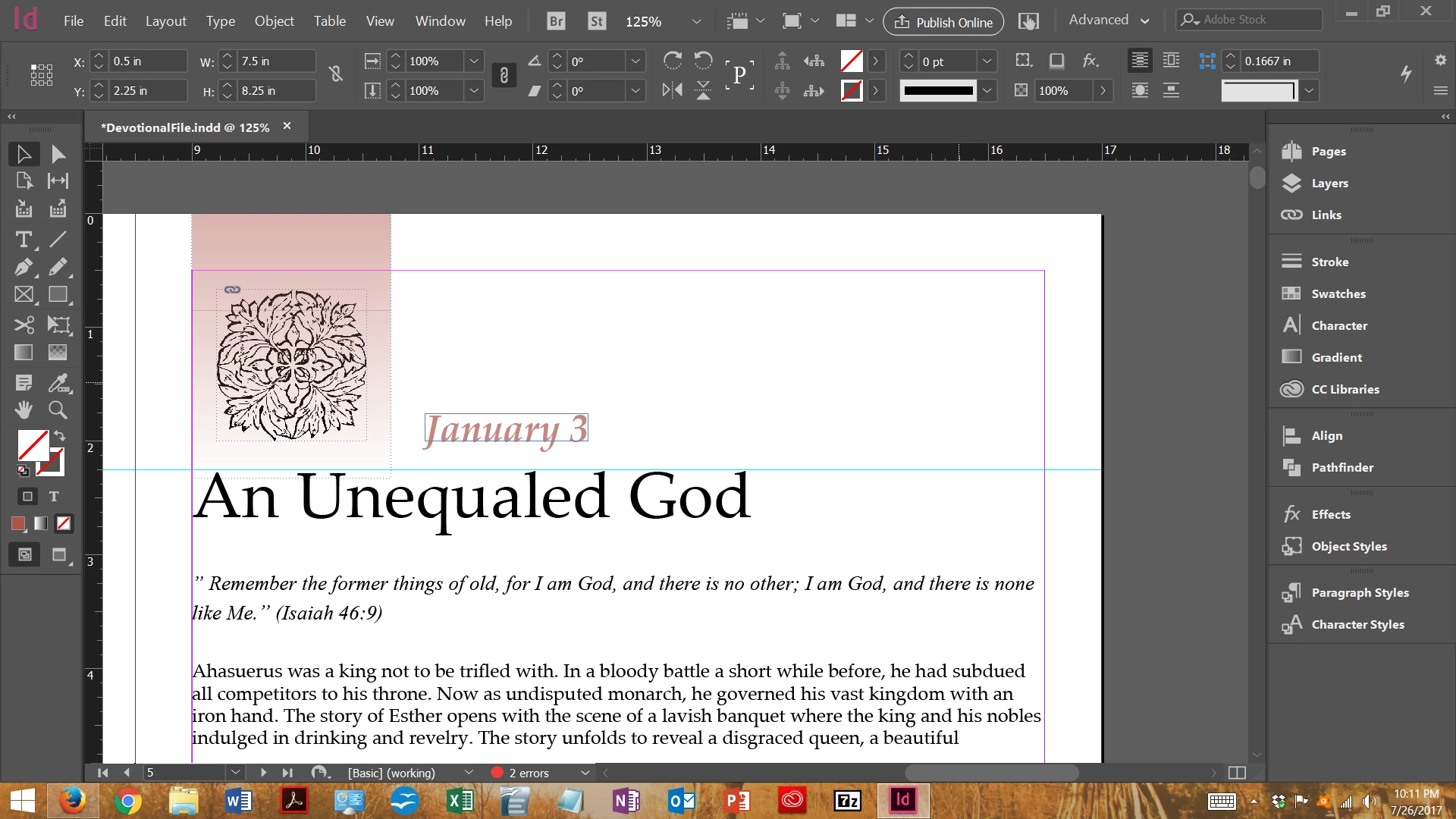
I'm working on a freelance project. There are 366 pages. The client wants each page to have the month and day, using the Gregorian calendar.

I've tried data merge but I'm not sure I'm doing it correctly. I've also found a calendar script on Sourceforge but I don't want a full calendar on the page, I only want a month and day on the page. See my screenshot. The month/day shown was placed manually. I want to avoid having to manually place all of them.
    This topic has been closed for replies.
    Correct answer 1721media

    Success!!! Many thanks to all who helped (or attempted to help) me along the way, especially to vinny38​. I followed vinny38's instructions, except I did NOT put placeholder text into the text frame in the master and I held down the Shift+Alt keys when I clicked to place the RTF data. It flowed into the text frames perfectly with no additional blank pages at the end like before.

    I love ID and the ID community. This took a while to figure out but I hope it helps someone else. This might be a good feature to have in future releases, particularly for people needing similar dated headers like in diaries and such. Just a thought.

    13 replies

    1721media
    1721mediaAuthorCorrect answer
    Inspiring
    July 30, 2017

    Success!!! Many thanks to all who helped (or attempted to help) me along the way, especially to vinny38​. I followed vinny38's instructions, except I did NOT put placeholder text into the text frame in the master and I held down the Shift+Alt keys when I clicked to place the RTF data. It flowed into the text frames perfectly with no additional blank pages at the end like before.

    I love ID and the ID community. This took a while to figure out but I hope it helps someone else. This might be a good feature to have in future releases, particularly for people needing similar dated headers like in diaries and such. Just a thought.

    JonathanArias
    Legend
    July 29, 2017

    I will read it over and follow your steps In order to learn the way you say to do it. Thank you. It is important to give the correct advise.

    happy hollydas, enjoy

    JonathanArias
    Legend
    July 29, 2017

    I did do 100,000 certificates for a data merge the way I talked about and it works.

    there is nothing wrong with the method I showed for a data merge and cleaning the file you would load to indesign file

    the file you had was full of stuff that did belong with the file, I took a screenshot to show you. Data merges require a clean files that are comma separate Value, your file was full of junk text.

    just exporting from excell is obviously not working for you. So I pointed out the issued I found with the file you are trying to use to load in your data merge.

    i did say the variable suggestion would not work and I offer to look at your file.

    Did you finished cleaning the file and load it? I understand there is a language barrier with you and I am happy to help you but I don't know if you are in fact following the steps I suggested for cleaning your file.

    i don't know what you are doing from your end, we can only go with what you describe to us.

    vinny38
    Legend
    July 29, 2017

    Hi Jonathan.

    I suggest you read the question carefully again, as well as given answers. Since you have made hundreds of thousands documents, I'm sure you'll understand why data merging is irrelevant here.

    Tip: there are 365 pages with different text.

    And please stop asking to clean the RTF. This is nonsense. There is a good reason for what you call junk. Please read the solution I suggested.

    This discussion isn't going anywhere.

    But I know where I'm going! On holidays :-))

    So... Experienced users... Please help OP finishing his document...

    Cya all

    JonathanArias
    Legend
    July 28, 2017

    ok, i cleaned up the first 60 entries for you, there needs to be comma separated values on a nice cleaned .csv file the data merge to work right. there was a ton of junk on that file. Use text wrangler and follow what i did, clean the file, remove the extra space before the month, and add the comma, like this ( your an change the first entry to whatever you alled your style in your layout):

    here is the link to the file i started for you:

    https://assets.adobe.com/link/e18c5206-2d95-4039-57a6-3dcf9a4a6fd0?section=activity_public&page=1https://adobe.ly/2vQM2pm

    vinny38
    Legend
    July 28, 2017

    Jonathan.

    It's great you are trying to help!

    However, may I suggest you test your method at first? Then please share it if you think it will help the OP.

    Excuse me for being honest but I think neither variables, nor data merge, nor cleaning up a RTF file (when you can just save the excel file in csv) does make sense to me in this case.

    Of course, I can be wrong, and maybe you can tweak data merging feature in order to merge data into 365 different pages. I don't see how, but maybe... I ain't an Indd guru ^^. In this case, please share your method for the benefits of all.

    But as long as you haven't tested it, excuse me again for speaking frankly, you should not share what seems to be just thoughts or ideas.

    I kinda feel sorry for the Op who was 2 clicks away to achieve what he wanted and who is probably now very confused and hoping for your data merging based solution...

    Here we go, I hope you won't get upset and understand what I mean (not easy to try to be diplomatical in a foreign language :-))

    Vinny

    JonathanArias
    Legend
    July 28, 2017

    you need to clean the file. it has a too much code the data merge will never pull correclty, see attached

    cleaning it now. i will give you a new file and you load that

    JonathanArias
    Legend
    July 28, 2017

    great. i will help you see whats happening. yes, the variable suggestion i made would not work for your request. Let me open teh files and set up the same data merge. i will help you figure out whats happening.

    JonathanArias
    Legend
    July 28, 2017

    where is your excell sheet with the dates? do you have that?

    1721media
    1721mediaAuthor
    Inspiring
    July 28, 2017

    Hi, Jonathan. Below is the link to the RTF sheet. I created it using instructions from vinny38​.

    calendar.rtf - Google Drive

    JonathanArias
    Legend
    July 28, 2017

    You can make a text variable like this:

    Text Variables - YouTube

    1. give a unique paraphaph or character style to the copy/ text you want the variable to pull from

    2. make/define your text variable and link it to that style 

    3. insert the variable in the master page(s) you want it in and location (the running header can be linked to a paragraph or character style).

    done.

    Hope this helps you with what you want to accomplish.

    vinny38
    Legend
    July 28, 2017

    Unless I'm missing something obvious, I really don't see what's the point of using variables here...

    Are you sure you answered the right question?

    1721media
    1721mediaAuthor
    Inspiring
    July 28, 2017

    JonathanArias​, so does this mean I'm adding a unique variable on each page? Or defining a variable for Month/Day (for instance) and applying that on the master? If the latter, I'm not that familiar with defining new variables. Where can I learn more?

    JonathanArias
    Legend
    July 27, 2017

    Make a variable that is linked to the style of the copy that is unique on each page?