
b1gjust
Participating Frequently
August 10, 2023
Answered

Adding padding to character or paragraph styles without a table

  • August 10, 2023
  • 4 replies
  • 1701 views

Hello everyone. I could do with some help. I've been usinf InDesign for many years but this has failed me. I would like to use a table layout without a table. What I mean by that is to be able to control the padding between elements of a tabbed sentence so that I can use the underline character style to highlight parts.


Example text:
SKU >> Var >> Currency >> Price


In a table I can use padding and keep everything centered vertically then justification for the columns.I would like the same, or similar, control but using nestled character stylesand tab spaces but this means I cannot (or I don't seem to be able to) ass padding around any of the elements and the underline cuts short at the character start and/or finish.


You are probably thinking I should just use a table but this is to make a change to a 420 page mail order catalogue which must have in the reigion of 9000 product lines. Quite a task to convert and re-align tables!


Thanks in advance.
This topic has been closed for replies.
Correct answer pixxxelschubser

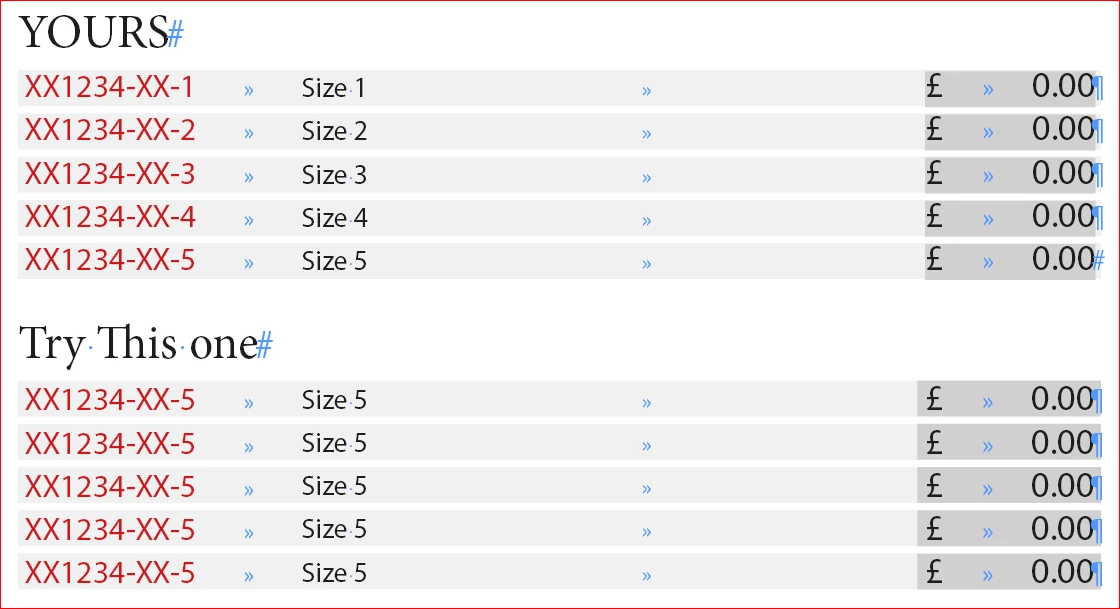
Thanks @pixxxelschubser but that's not quite what I'm after. I'll have to run a few of your words through a translator but you've applied the background to the whole line of text. I want to have the price highlighted with a different colour. I have reached as far as my example but just need to add padding either side of the text with dark grey (before the £ and after the .00)


Thanks for trying though. 


You can try this version:

https://shared-assets.adobe.com/link/877d84ed-de76-4d5e-53dd-3b82c4158f55


4 replies

Participant
August 10, 2023

will adding an extra tab before the $ sign and another tab after the dollar value, and using these 2 tabs in place of the left & right padding work? Add shading or underline to the tab character as needed?

b1gjust
b1gjustAuthor
Participating Frequently
August 11, 2023

Yes, it would. I've also tested adding a space character before and after the data but this adds more work too, although not quite as much as converting to tables. 

pixxxelschubser
Community Expert
Community Expert
August 10, 2023
quote

… I would like to use a table layout without a table. What I mean by that is to be able to control the padding between elements of a tabbed sentence so that I can use the underline character style to highlight parts …


By @b1gjust


Hi @Steve Werner 

I understood it like this. "I have a text with tabs. I want to create a table layout - but NOT use a table for it."

Am I wrong?

b1gjust
b1gjustAuthor
Participating Frequently
August 10, 2023

Yes @pixxxelschubser , you are correct.


Here is an example of what text I have (edited) which I am trying to re-format using just styles:

SKU >> Variant >> Currency >> Price

I nestle character styles in a paragraph style so each element can be formatted differently. I am able to use an underline style on the character style for price so it appears to be in a cell with a background without being in a table cell but there is no padding to the background cuts short at the first and last characters.

Does that help to explain what I am trying to do?

b1gjust
b1gjustAuthor
Participating Frequently
August 10, 2023
pixxxelschubser
Community Expert
Community Expert
August 10, 2023

Please show us a typical extract from an existing formatted table.

If possible, give us the text (without confidential data) as indd or plain text for testing.

Steve Werner
Community Expert
Community Expert
August 10, 2023

@pixxxelschubser, it sounds like the poster doesn't have a table now, but tabular text.


He might be able to convert to a real table if he selected sections of the tabular text and chose Table > Convert Text to Table:


It will still require a lot of reformatting, however.

Steve Werner
Community Expert
Community Expert
August 10, 2023

Frankly, I don't think that is possible.

If it were me, I would recreate the formatting with a table, taking whatever time it takes to do it correctly. In the meantime, make do with what you have now.